Three Kingdoms GO! – Idle RPG
Updated
Current Version
Offered By

With your passion for Three Kingdoms GO! – Idle RPG, you shouldn’t have to limit yourself to the small screen of a phone. Play like a pro and take full control of the game using a keyboard and mouse. MEmu gives you everything you’re looking for. Download and play Three Kingdoms GO! – Idle RPG on PC. Play as long as you want — no more worries about battery life, mobile data, or unexpected calls. The all-new MEmu 9 is the best way to play Three Kingdoms GO! – Idle RPG on PC. With our expertly designed keymapping system, Three Kingdoms GO! – Idle RPG feels just like a real PC game. The MEmu multi-instance manager lets you run two or more accounts on the same device at the same time. Most importantly, our exclusive emulation engine unlocks your PC’s full potential, delivering smooth and seamless performance.
Show more
Download Three Kingdoms GO! – Idle RPG on PC with MEmu Android Emulator. Enjoy playing on big screen. [Pre-Registration Rewards].

[Pre-Registration Rewards]
200 Hero Summon Tickets + 100 Pulse Gun Summon Tickets + 100 Jetpack Summon Tickets
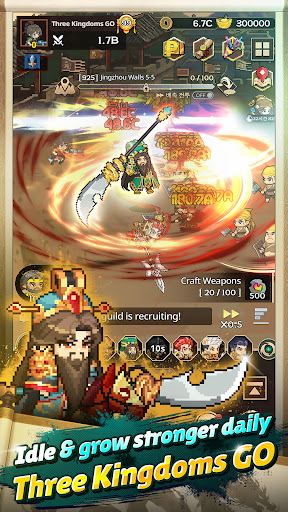
Merge, idle, and grow stronger!! A Three Kingdoms idle RPG powered by merging!
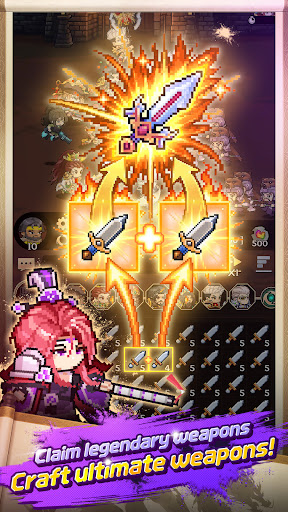
Merge weapons, merge again, and keep on merging — forever!
Get stronger in the blink of an eye!
Build your Three Kingdoms army in charming pixel art. Start now!
Auto battles that keep fighting even while you're away!
On your commute, at lunch, or before bed — just a few taps and unifying the Three Kingdoms is within reach!
Get stronger just by idling. Three Kingdoms GO!
■ FEATURES
Endless Weapon Merging – The Heart of Idle RPG Fun
Merge identical weapons to evolve them into stronger ones!
Keep merging to claim legendary weapons.
Craft → Merge → Equip — an addictive progression loop you won't be able to put down!
⏰ AFK Auto Battle – Level Up While You Sleep
Blast through stages with auto battle and speed-up!
Offline rewards pile up even when you're not playing, so you get stronger every day.
A Three Kingdoms idle game you can play with one hand!
Collect Heroes & Build the Ultimate Team
Recruit heroes from Wei, Shu, Wu, and the Warlords to build your own lineup.
Hero combos and synergies decide every battle — this is where strategy gets fun!
Your Own Oath of the Peach Garden
Sworn enemies in history fight side by side in your army!
Conquer the Three Kingdoms with dream teams history never saw.
Conquer the Land with Legendary Gear
Collect and upgrade legendary gear from the Treasury!
The higher its level, the more explosive your heroes' power.
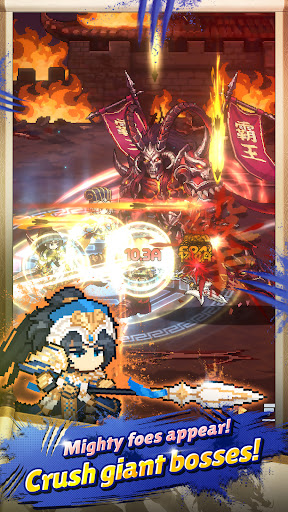
Giant Bosses & New Challenges Every Day
Take down giant bosses atop burning castle walls!
Dungeons, Raids, Ruins Exploration — new content and rewards await you every day.
Territory, Relics & Inner Arts – Endless Ways to Level Up
Sects, Training Grounds, Expeditions, War Academy... develop your territory and power up your heroes with Relics and Inner Arts!
The deep progression system of a true idle RPG.
Climb the Rankings and Become the Greatest Lord
Compete with lords worldwide in the Weapon and Stage Rankings!
Join a guild and conquer the land with your allies.
■ THIS GAME IS FOR YOU IF YOU...
Love anything Three Kingdoms
Enjoy casual games, idle games, and incremental games
Crave the satisfying feel of merging and rapid progression
Love cute pixel art and high-quality retro vibes
Want an idle RPG with auto battle and offline rewards
Need a one-handed mobile game for commutes and quick breaks
[Pre-register now and don't miss out on the rewards!]
Show more

1. Download MEmu installer and finish the setup

2. Start MEmu then open Google Play on the desktop

3. Search Three Kingdoms GO! – Idle RPG in Google Play
Install
4. Download and Install Three Kingdoms GO! – Idle RPG
5. On install completion click the icon to start

6. Enjoy playing Three Kingdoms GO! – Idle RPG on PC with MEmu
MEmu Play is the best Android emulator and 100 million people already enjoy its superb Android gaming experience. The MEmu virtualization technology empowers you to play thousands of Android games smoothly on your PC, even the most graphic-intensive ones.
Bigger screen with better graphics; Long duration, without limitation of battery or mobile data.
Full Keymapping support for precise control of keyboard and mouse or gamepad.
Multiple game accounts or tasks on single PC at one time with Multi-Instance manager.
Play Three Kingdoms GO! – Idle RPG on PC by following steps: