夢幻旅團-嘆氣的亡靈想隱退聯動
Updated
Current Version
Offered By

With your passion for 夢幻旅團-嘆氣的亡靈想隱退聯動, you shouldn’t have to limit yourself to the small screen of a phone. Play like a pro and take full control of the game using a keyboard and mouse. MEmu gives you everything you’re looking for. Download and play 夢幻旅團-嘆氣的亡靈想隱退聯動 on PC. Play as long as you want — no more worries about battery life, mobile data, or unexpected calls. The all-new MEmu 9 is the best way to play 夢幻旅團-嘆氣的亡靈想隱退聯動 on PC. With our expertly designed keymapping system, 夢幻旅團-嘆氣的亡靈想隱退聯動 feels just like a real PC game. The MEmu multi-instance manager lets you run two or more accounts on the same device at the same time. Most importantly, our exclusive emulation engine unlocks your PC’s full potential, delivering smooth and seamless performance.
Show more
Download 夢幻旅團-嘆氣的亡靈想隱退聯動 on PC with MEmu Android Emulator. Enjoy playing on big screen. 治癒系社交輕冒險MMO手遊《夢幻旅團》正式上市!

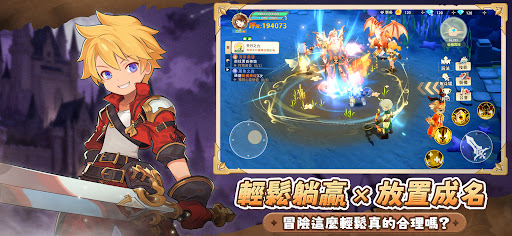
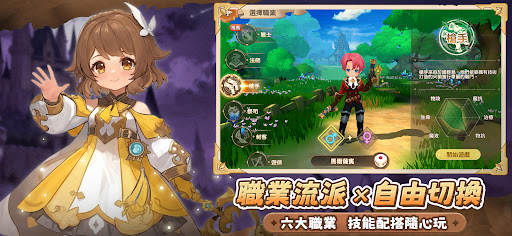

治癒系社交輕冒險MMO手遊《夢幻旅團》正式上市!當最強旅團遇上最想隱退的獵人,一場「誤打誤撞」的奇幻冒險就此展開!
《夢幻旅團》x《嘆氣的亡靈想隱退》 聯動盛大開啟,與克萊團長一起開啟最快樂的冒險之旅!
【《嘆氣的亡靈想隱退》聯動限定:傳說成員正式入團!】
限定寵物:**戰鬥力天花板,超萌幸運星**「莉茲·斯瑪特」重磅登場,伴你左右!
經典時裝:換上「克萊」與「蒂諾」的專屬造型,完美重現傳奇獵人榮耀。
聯動坐騎:將原作特色奇美拉化身坐騎「尹廖」收入麾下,隨心漫游新世界,帥翻全場。
BOSS挑戰:「空界」聯動專屬副本,挑戰原作強敵,贏取限時掉落的傳奇裝備!
【遊戲特色:解放雙手,快樂加倍!】
放置升級‧徹底解放雙手!拒絕爆肝‧拒絕壓力內耗!
創新自動戰鬥與資源找回系統,24小時資源不停產。上線找回、下線變強,享受「全自動」冒險爽感,把寶貴時間留給真正的快樂!
【戰寵協戰‧進化羈絆顛覆戰局】
進化蛻變:寵物多階進化系統,外觀實力雙重覺醒。
強力羈絆:獨家羈絆技能,在戰鬥中觸發華麗合體技,輕鬆逆轉勝負!
【福利天花板‧登入即領999抽】
誠意最足的旅團補給!現在登入,直接領取999抽大禮包。不論是稀有戰寵還是神極裝備,讓你抽到手軟,開局即擁有「夢幻陣容」!
【創意搭配‧打造百變造型】
拒絕撞衫!上百款精緻時裝自由定義,無論是高冷酷帥還是甜美可愛,都能隨心所欲展現你的時尚品味。
【組隊陪伴‧脫單冒險0壓力】
快樂是需要分享的!超輕鬆的社交系統,一鍵匹配夥伴。與隊友共同對抗強敵、在公會頻道吐槽聊天,更有浪漫社交玩法,讓你在旅途中遇見心動的另一半。
※本遊戲部分內容涉及暴力、戀愛交友,依遊戲軟體分級管理辦法分類為輔15級。
※本遊戲為免費遊戲,但遊戲內另提供購買虛擬遊戲幣、物品等付費服務。
※請注意遊戲時間,避免沉迷。
Show more

1. Download MEmu installer and finish the setup

2. Start MEmu then open Google Play on the desktop

3. Search 夢幻旅團-嘆氣的亡靈想隱退聯動 in Google Play
Install
4. Download and Install 夢幻旅團-嘆氣的亡靈想隱退聯動
5. On install completion click the icon to start

6. Enjoy playing 夢幻旅團-嘆氣的亡靈想隱退聯動 on PC with MEmu
MEmu Play is the best Android emulator and 100 million people already enjoy its superb Android gaming experience. The MEmu virtualization technology empowers you to play thousands of Android games smoothly on your PC, even the most graphic-intensive ones.
Bigger screen with better graphics; Long duration, without limitation of battery or mobile data.
Full Keymapping support for precise control of keyboard and mouse or gamepad.
Multiple game accounts or tasks on single PC at one time with Multi-Instance manager.
Play 夢幻旅團-嘆氣的亡靈想隱退聯動 on PC by following steps: