ルミナサーガ:夢と冒険のMMORPG
Updated
Current Version
0.11.4
Offered By

With your passion for ルミナサーガ:夢と冒険のMMORPG, you shouldn’t have to limit yourself to the small screen of a phone. Play like a pro and take full control of the game using a keyboard and mouse. MEmu gives you everything you’re looking for. Download and play ルミナサーガ:夢と冒険のMMORPG on PC. Play as long as you want — no more worries about battery life, mobile data, or unexpected calls. The all-new MEmu 9 is the best way to play ルミナサーガ:夢と冒険のMMORPG on PC. With our expertly designed keymapping system, ルミナサーガ:夢と冒険のMMORPG feels just like a real PC game. The MEmu multi-instance manager lets you run two or more accounts on the same device at the same time. Most importantly, our exclusive emulation engine unlocks your PC’s full potential, delivering smooth and seamless performance.
Show more
Download ルミナサーガ:夢と冒険のMMORPG on PC with MEmu Android Emulator. Enjoy playing on big screen. 『ルミナサーガ』は、幻想世界を自由に旅しながら、仲間との出会いや冒険を楽しめるMMORPGです。
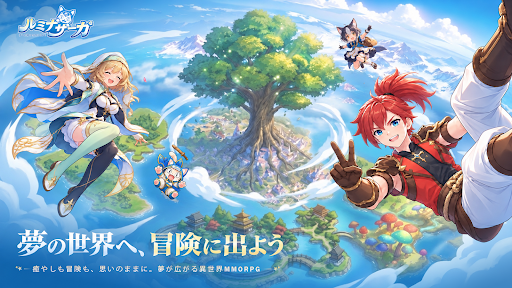
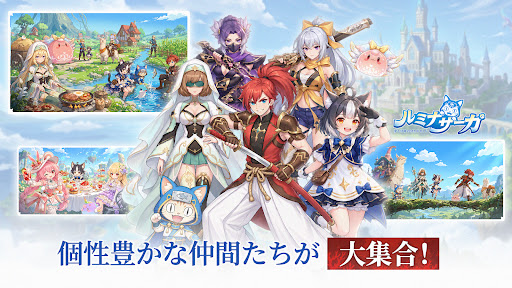
『ルミナサーガ』は、幻想世界を自由に旅しながら、仲間との出会いや冒険を楽しめるMMORPGです。
ジョブやスキルを自分らしく組み合わせて戦うもよし、仲間と力を合わせて強敵に挑むもよし。
時には足を止めて、美しい景色を眺めながらのんびり過ごすのも楽しみ方のひとつ。
夢の世界で、あなただけの冒険を始めよう。
◆夢の冒険は、小さな村から始まる――
山々に囲まれた、風の吹く小さな村。
ある夜、あなたは不思議な白ウサギを追い、
森の奥に現れた扉をくぐってしまう。
その先に広がっていたのは、空に浮かぶ島と古代遺跡、
そして夢の中にしか存在しない、不思議な世界だった――
白ウサギを追いかけた先で待っているのは、
まだ誰も知らない景色と、新たな仲間との出会い。
さあ、幻想世界への扉を開こう。
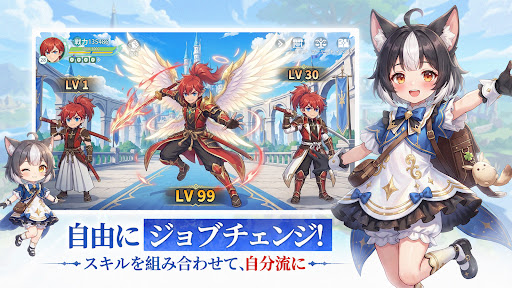
▼自由にジョブチェンジ!
冒険スタイルに合わせて、ジョブを自由にチェンジ。
気分やバトルに合わせて、自分にぴったりの戦い方を見つけよう。
ひとつの遊び方に縛られず、
いろいろなジョブで冒険を楽しめます。
▼スキルを組み合わせて、自分流に
さまざまなスキルを自由に組み合わせて、
自分だけのバトルスタイルを作ろう!
相手や状況に合わせてスキルを選ぶのも、
お気に入りの組み合わせをとことん楽しむのもあなた次第。
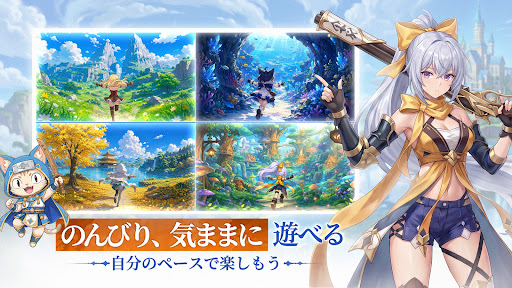
▼のんびり、気ままに遊べる
ずっと戦っているだけが冒険じゃない。
幻想世界を歩いて景色を眺めたり、
仲間との時間を楽しんだり。
疲れた時は少し寄り道しながら、
気ままな冒険を楽しもう。
▼自分のペースで楽しもう
今日はたっぷり冒険する。
明日は少しだけ世界を覗いてみる。
遊び方も過ごし方も、自分のペースでOK。
その日の気分に合わせて、自由に幻想世界を楽しめます。
▼仲間と挑む、熱い共闘!
強敵との戦いでは、仲間との連携が大きな力に。
ひとりでは難しい戦いも、
仲間と力を合わせれば乗り越えられる。
声を掛け合いながら、みんなで勝利をつかもう!
▼ギルドでボス戦&PvP
ギルドの仲間と一緒に、強大なボスへ挑戦!
さらにPvPでは、育てたキャラクターと自分だけの戦い方で、
ほかの冒険者とのバトルも楽しめます。
共闘も対戦も、仲間と一緒ならもっと熱くなる!
▼オシャレも遊び方も自由!
冒険だけじゃなく、オシャレだって自分らしく。
お気に入りのコーデを見つけて、
自分だけのスタイルで幻想世界を歩こう。
その日の気分に合わせて、自由に着せ替えを楽しめます。
▼お気に入りコーデで出発
お気に入りの衣装に着替えたら、冒険の準備は完了!
仲間と出かけたり、美しい景色を探したり、
自分らしい姿で、幻想世界の毎日を楽しもう。
さあ、夢の扉の向こうへ。
癒やしと冒険が待つ、幻想の世界へ。
Show more

1. Download MEmu installer and finish the setup

2. Start MEmu then open Google Play on the desktop

3. Search ルミナサーガ:夢と冒険のMMORPG in Google Play
Install
4. Download and Install ルミナサーガ:夢と冒険のMMORPG
5. On install completion click the icon to start

6. Enjoy playing ルミナサーガ:夢と冒険のMMORPG on PC with MEmu
MEmu Play is the best Android emulator and 100 million people already enjoy its superb Android gaming experience. The MEmu virtualization technology empowers you to play thousands of Android games smoothly on your PC, even the most graphic-intensive ones.
Bigger screen with better graphics; Long duration, without limitation of battery or mobile data.
Full Keymapping support for precise control of keyboard and mouse or gamepad.
Multiple game accounts or tasks on single PC at one time with Multi-Instance manager.
Play ルミナサーガ:夢と冒険のMMORPG on PC by following steps: