Dream Raiders 2: Wilds
Updated
Current Version
Offered By

With your passion for Dream Raiders 2: Wilds, you shouldn’t have to limit yourself to the small screen of a phone. Play like a pro and take full control of the game using a keyboard and mouse. MEmu gives you everything you’re looking for. Download and play Dream Raiders 2: Wilds on PC. Play as long as you want — no more worries about battery life, mobile data, or unexpected calls. The all-new MEmu 9 is the best way to play Dream Raiders 2: Wilds on PC. With our expertly designed keymapping system, Dream Raiders 2: Wilds feels just like a real PC game. The MEmu multi-instance manager lets you run two or more accounts on the same device at the same time. Most importantly, our exclusive emulation engine unlocks your PC’s full potential, delivering smooth and seamless performance.
Show more
Download Dream Raiders 2: Wilds on PC with MEmu Android Emulator. Enjoy playing on big screen. Ready to begin a relaxing idle adventure in another world?
Ready to begin a relaxing idle adventure in another world?
Wait—what?! You’ve been reincarnated as an adorable pet?! Become a mysterious (and irresistibly fluffy) hero in a whimsical fantasy realm, and start your cozy adventure across Dreamland. Set up camp, soak up the sunlight, share drinks, and enjoy a sizzling barbecue with friends—what could be better?
【Effortless Idling, Endless Rewards】
Wake up from a sweet dream—huh? Why is the warehouse overflowing?! Stay tucked under the covers and still earn tons of resources! Level up easily and enjoy shared experience growth across your team. Who says you can’t get stronger while lying down?
【A Laid-back Life in Another World】
Gather resources, craft items, and build your very own home in another world. Sip a little wine, unwind after a long day, and enjoy the slow rhythm of fantasy life!
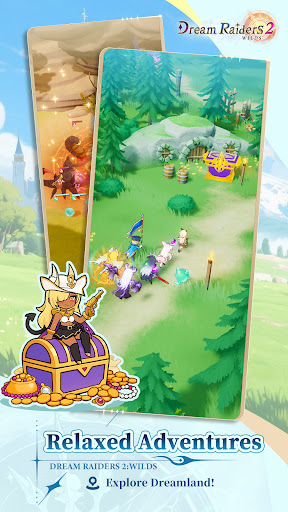
【Diverse Maps, Relaxed Adventures】
Do you love green meadows where the breeze gently brushes your face? Or would you rather wander along golden beaches, feeling the call of the waves? Maybe the unknown calls to you—mysterious caves, molten cores, or floating islands high above the clouds? Leave real-world worries behind and explore the breathtaking landscapes of Dreamland!
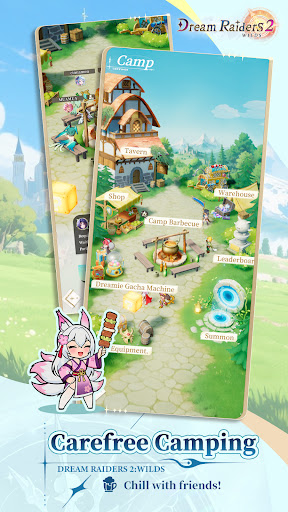
【Stress-free Social Fun at the Camp】
As the campfire crackles and the scent of grilled meat fills the air, lay out your picnic blanket and gather your friends! Try out some exotic delicacies from another world—ever wondered what dragon tail might taste like?
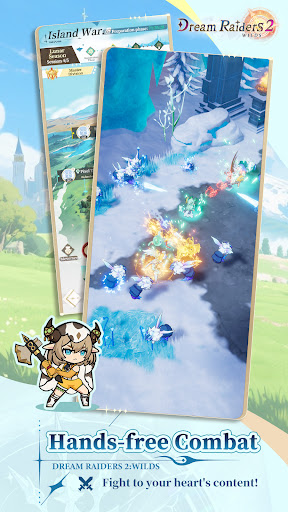
【Hands-Free Combat Anytime, Anywhere】
No complicated controls—just jump into battle with a single tap! Your team fights automatically with dazzling effects, letting you enjoy smooth and exciting combat wherever you are. Sit back, relax, and watch the show!
【Adorable Pets, Endless Variety】
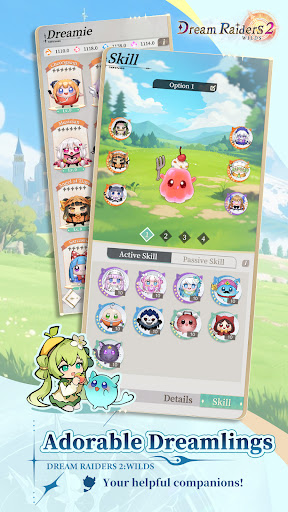
Meet the Dreamies—your cute, fluffy, and loyal friends of all shapes and sizes! Perfect for traveling, exploring, and collecting resources, each Dreamie has unique abilities that boost your power and productivity. Who could resist building a whole nest of adorable companions?
Show more

1. Download MEmu installer and finish the setup

2. Start MEmu then open Google Play on the desktop

3. Search Dream Raiders 2: Wilds in Google Play
Install
4. Download and Install Dream Raiders 2: Wilds
5. On install completion click the icon to start

6. Enjoy playing Dream Raiders 2: Wilds on PC with MEmu
MEmu Play is the best Android emulator and 100 million people already enjoy its superb Android gaming experience. The MEmu virtualization technology empowers you to play thousands of Android games smoothly on your PC, even the most graphic-intensive ones.
Bigger screen with better graphics; Long duration, without limitation of battery or mobile data.
Full Keymapping support for precise control of keyboard and mouse or gamepad.
Multiple game accounts or tasks on single PC at one time with Multi-Instance manager.
Play Dream Raiders 2: Wilds on PC by following steps: