
幻海神域-林心如傾情代言
Updated
Current Version
1.0.16
Offered By

With your passion for 幻海神域-林心如傾情代言, you shouldn’t have to limit yourself to the small screen of a phone. Play like a pro and take full control of the game using a keyboard and mouse. MEmu gives you everything you’re looking for. Download and play 幻海神域-林心如傾情代言 on PC. Play as long as you want — no more worries about battery life, mobile data, or unexpected calls. The all-new MEmu 9 is the best way to play 幻海神域-林心如傾情代言 on PC. With our expertly designed keymapping system, 幻海神域-林心如傾情代言 feels just like a real PC game. The MEmu multi-instance manager lets you run two or more accounts on the same device at the same time. Most importantly, our exclusive emulation engine unlocks your PC’s full potential, delivering smooth and seamless performance.
Show more
Download 幻海神域-林心如傾情代言 on PC with MEmu Android Emulator. Enjoy playing on big screen. 滄海龍族寶地「海淵」蘊含著重塑天地的磅礴神力。


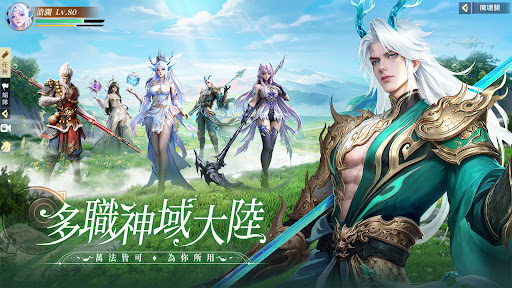
滄海龍族寶地「海淵」蘊含著重塑天地的磅礴神力。
司星覬覦「海淵」,不惜以禁術篡改天命軌跡,將禍水東引龍族。死神少女意外捲入這場命運的漩渦,於混沌處出窺得機緣,將「海淵」收入掌中。而亂局之中,還有妖族·悟空攪動風雲……
「海淵」被奪,幻海破滅,神域不再...滄溟後裔決心復仇,誓要奪回故土。
作为龍族最後的希望,你將撥開宿命的迷霧,重鑄滄溟龍族的榮光!
▶ 超派豪禮 || 龍族秘寶開局送
臺港澳專供福利!SSS龍族皮膚、極品坐騎「豹豹出擊」、珍稀侍靈「土肥坡使者」…助力開局覺醒海龍血脈,手握逆轉乾坤之力,開啟屬於你的復仇史詩!
▶ 萬法大陸 || 龍魂覺醒戰神域
無論你是揮舞潮汐之劍的滄瀾,還是引動星辰的司星,在幻海中隨心切換流派,龍甲附體,神龍降臨,創造自己的獨門絕技!六大核心職業,數十種成長分支,由你定義。
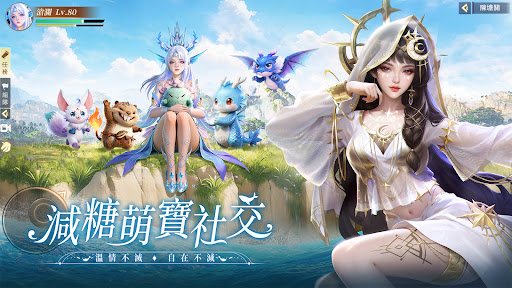
▶ 萌寵相伴 || 減糖社交情不減
土肥坡使者、石磯小仙女、軟萌海豹……超高顏值萌寶陪你上天入海!輕鬆無壓的社交氛圍,暖心陪伴的萌寵養成,為你在幻海世界中,找到獨屬的溫情港灣~
▶ 重塑神域 || 掌天命輕鬆升等
這是你的天命之戰!從海淵啟程,集結盟友,征戰盤踞故地的死神,對抗高懸的神域。在宏大敘事中,你的每一次選擇都將影響戰局!不肝也能封神,放置修煉,秘技全屏秒全場!重奪神域,爽戰到底!
▶ 龍宮海境 || 打造專屬幻家園
親手打造你獨一無二的懸浮海境。集珠寶奇珍,築夢中閣樓!更可邀請好友騎鯤兜風,共商跨服BOSS戰,或享片刻寧靜。是榮耀的起點,也是暖意的家園。
【溫馨提示】
更多的遊戲資訊可以到《幻海神域》粉絲專頁咨詢,也可到玩家討論社群參與討論哦~
官方粉絲頁:https://www.facebook.com/profile.php?id=61586773984687
官方討論組:https://www.facebook.com/groups/1548298363128427
*本軟體因涉及暴力、戀愛交友、性(遊戲角色穿著凸顯性特徵之服飾),依遊戲軟體分級管理辦法分類為輔12級。
*本遊戲為免費使用,遊戲內另提供購買虛擬遊戲幣、物品等付費服務。
*長時間進行遊戲,請注意使用時間,避免沉迷於遊戲。
喬葳數位行銷有限公司
臺北市信義區光復南路495號4樓
Show more

1. Download MEmu installer and finish the setup

2. Start MEmu then open Google Play on the desktop

3. Search 幻海神域-林心如傾情代言 in Google Play
Install
4. Download and Install 幻海神域-林心如傾情代言
5. On install completion click the icon to start

6. Enjoy playing 幻海神域-林心如傾情代言 on PC with MEmu
MEmu Play is the best Android emulator and 100 million people already enjoy its superb Android gaming experience. The MEmu virtualization technology empowers you to play thousands of Android games smoothly on your PC, even the most graphic-intensive ones.
Bigger screen with better graphics; Long duration, without limitation of battery or mobile data.
Full Keymapping support for precise control of keyboard and mouse or gamepad.
Multiple game accounts or tasks on single PC at one time with Multi-Instance manager.
Play 幻海神域-林心如傾情代言 on PC by following steps: