
Haunted Headlines:Don’t Scream
Updated
Current Version
12.2.2.2013
Offered By

With your passion for Haunted Headlines:Don’t Scream, you shouldn’t have to limit yourself to the small screen of a phone. Play like a pro and take full control of the game using a keyboard and mouse. MEmu gives you everything you’re looking for. Download and play Haunted Headlines:Don’t Scream on PC. Play as long as you want — no more worries about battery life, mobile data, or unexpected calls. The all-new MEmu 9 is the best way to play Haunted Headlines:Don’t Scream on PC. With our expertly designed keymapping system, Haunted Headlines:Don’t Scream feels just like a real PC game. The MEmu multi-instance manager lets you run two or more accounts on the same device at the same time. Most importantly, our exclusive emulation engine unlocks your PC’s full potential, delivering smooth and seamless performance.
Show more
Download Haunted Headlines:Don’t Scream on PC with MEmu Android Emulator. Enjoy playing on big screen. 【With fear ahead, can a coward survive?
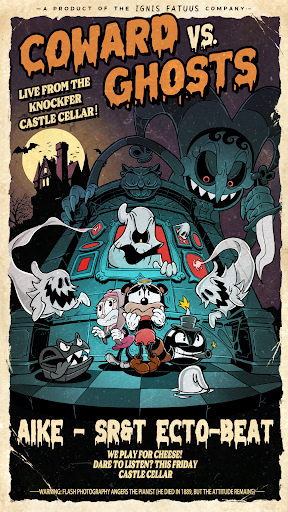

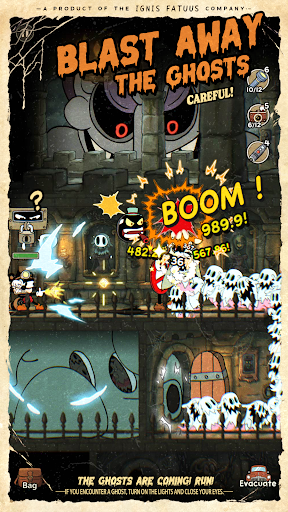

【With fear ahead, can a coward survive?】
When you step into a cursed mansion, are you a brave adventurer, or a trembling coward? This time, your courage and wisdom will be the ultimate test.
【Haunted Mansion Adventure—Cowards can still take the challenge!】
Feel the chilling air around you as the ghosts inch closer—can you keep your nerves steady, or will you succumb to the terror? The chandelier just swayed suspiciously; faint sobbing echoes from behind… what will you do?
【Forge weapons and become the ghost slayer!】
Don’t face ghosts empty-handed! Search every room for strange gear to power up your weapons or craft spells. Whether your weapon is just an old flashlight or something fancier, find the ghost’s weakness and strike that decisive blow! Keep your eyes open for those “invisible markers”—perhaps a kind clue is waiting to be uncovered.
【Strike gold in the haunted mansion: brave fear, claim riches!】
Treasures abound in this supernatural realm. Shimmering gold coins and rare items await to fuel your greed—do you grab the small gains and flee, or gamble it all and venture deeper into danger? Beware though: too much greed might lead to the gates of hell…
【Uncover the secrets within the depths】
Why are the ghosts haunting the mansion? What horrifying truths are buried in its halls? Every exploration, every cursed text, every bloody scar is a piece of the puzzle that builds the ultimate truth. Your choices shape the ending—freedom or falling into the abyss?
Fear not! The haunted mansion is calling you! NOW or NEVER! Prepare your gear, tie your shoelaces tight, and get ready to embark on this thrilling adventure of wit and courage! Will you become the lucky survivor who escapes the haunted mansion?
Show more

1. Download MEmu installer and finish the setup

2. Start MEmu then open Google Play on the desktop

3. Search Haunted Headlines:Don’t Scream in Google Play
Install
4. Download and Install Haunted Headlines:Don’t Scream
5. On install completion click the icon to start

6. Enjoy playing Haunted Headlines:Don’t Scream on PC with MEmu
MEmu Play is the best Android emulator and 100 million people already enjoy its superb Android gaming experience. The MEmu virtualization technology empowers you to play thousands of Android games smoothly on your PC, even the most graphic-intensive ones.
Bigger screen with better graphics; Long duration, without limitation of battery or mobile data.
Full Keymapping support for precise control of keyboard and mouse or gamepad.
Multiple game accounts or tasks on single PC at one time with Multi-Instance manager.
Play Haunted Headlines:Don’t Scream on PC by following steps: