
Couch x Crawler
Updated
Current Version
3.0.1
Offered By

With your passion for Couch x Crawler, you shouldn’t have to limit yourself to the small screen of a phone. Play like a pro and take full control of the game using a keyboard and mouse. MEmu gives you everything you’re looking for. Download and play Couch x Crawler on PC. Play as long as you want — no more worries about battery life, mobile data, or unexpected calls. The all-new MEmu 9 is the best way to play Couch x Crawler on PC. With our expertly designed keymapping system, Couch x Crawler feels just like a real PC game. The MEmu multi-instance manager lets you run two or more accounts on the same device at the same time. Most importantly, our exclusive emulation engine unlocks your PC’s full potential, delivering smooth and seamless performance.
Show more
Download Couch x Crawler on PC with MEmu Android Emulator. Enjoy playing on big screen. Couch x Crawler is a passive dungeon crawler mixed with virtual pet care.

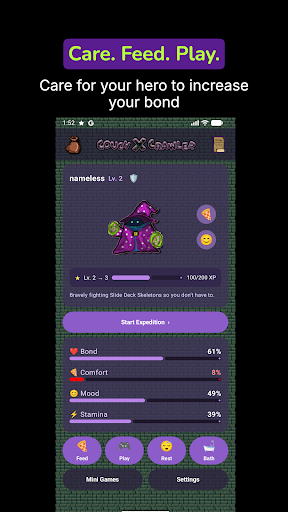
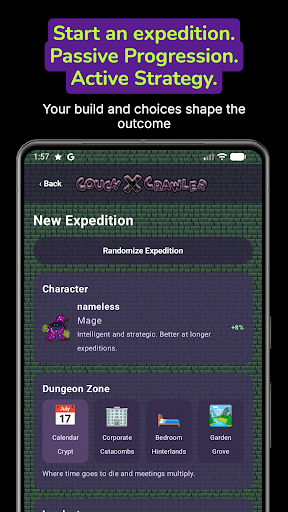
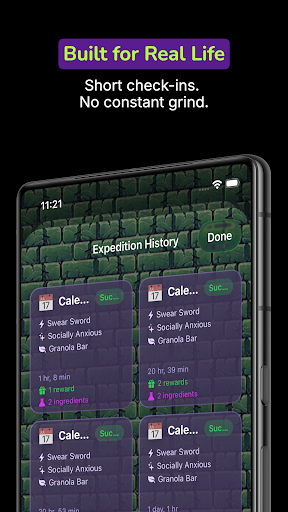
Couch x Crawler is a passive dungeon crawler mixed with virtual pet care.
Choose a character class, give your hero a name, and keep them healthy while they crawl through strange little dungeons in the background. Feed, play, rest, clean, and bathe your companion so they stay ready for their next run.
Send your hero on timed expeditions through themed zones like Calendar Crypt, Corporate Catacombs, Bedroom Hinterlands, and Garden Grove. Pick the route, duration, weapon, perk, and consumable, or randomize an available expedition when you just want to get moving. Expeditions continue while you are away, and local notifications can let you know when a run is complete or your character needs attention.
Progress through levels, earn XP, unlock zones and duration options, collect relics and traits, brew potions from ingredients, and keep a history of your completed adventures. Your hero can also get into trouble, from messy care states to getting stuck in a Mimic, so checking in still matters.
Features:
- Passive dungeon expeditions that progress over time
- Virtual pet care with feed, play, rest, clean, and bath actions
- Character classes and custom character names
- Strategic loadouts with weapons, perks, consumables, and durations
- Expedition results, rewards, history, inventory, and codex screens
- Badges, traits, relics, ingredients, and brewed potions
- Local notifications for expedition completion and attention states
- Premium one-time purchase with no subscription required
Couch x Crawler is built for quick check-ins, idle progress, and tiny dungeon drama from the comfort of your couch.
Show more

1. Download MEmu installer and finish the setup

2. Start MEmu then open Google Play on the desktop

3. Search Couch x Crawler in Google Play
Install
4. Download and Install Couch x Crawler
5. On install completion click the icon to start

6. Enjoy playing Couch x Crawler on PC with MEmu
MEmu Play is the best Android emulator and 100 million people already enjoy its superb Android gaming experience. The MEmu virtualization technology empowers you to play thousands of Android games smoothly on your PC, even the most graphic-intensive ones.
Bigger screen with better graphics; Long duration, without limitation of battery or mobile data.
Full Keymapping support for precise control of keyboard and mouse or gamepad.
Multiple game accounts or tasks on single PC at one time with Multi-Instance manager.
Play Couch x Crawler on PC by following steps:
















































