
RioRise-Life Simulation Game
Updated
Current Version
4.14.5
Offered By

With your passion for RioRise-Life Simulation Game, you shouldn’t have to limit yourself to the small screen of a phone. Play like a pro and take full control of the game using a keyboard and mouse. MEmu gives you everything you’re looking for. Download and play RioRise-Life Simulation Game on PC. Play as long as you want — no more worries about battery life, mobile data, or unexpected calls. The all-new MEmu 9 is the best way to play RioRise-Life Simulation Game on PC. With our expertly designed keymapping system, RioRise-Life Simulation Game feels just like a real PC game. The MEmu multi-instance manager lets you run two or more accounts on the same device at the same time. Most importantly, our exclusive emulation engine unlocks your PC’s full potential, delivering smooth and seamless performance.
Show more
Download RioRise-Life Simulation Game on PC with MEmu Android Emulator. Enjoy playing on big screen. Live the Street Life - Play Rio Rise, the ultimate open-world city simulator full of real action, police chases, mafia missions, and true urban adventure.


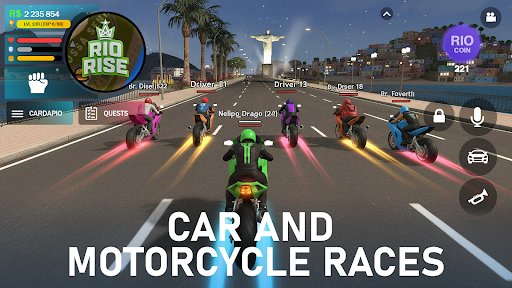

Live the Street Life - Play Rio Rise, the ultimate open-world city simulator full of real action, police chases, mafia missions, and true urban adventure. Explore a living favela city, build your own story, drive cars and bikes, and rise from the streets to the top.
Welcome to Rio Rise, a next-generation real-life simulation game where freedom, chaos, and choices define who you are. Walk through realistic city districts, talk to locals, join gangs or law enforcement, and experience what street life really feels like. It’s not just a game - it’s a dynamic life simulator that puts you right in the middle of a living, breathing world.
Drive, Race, Explore
Choose from different vehicles - from old-school cars to fast bikes. Take part in street races, test your driving skills, and escape the police in thrilling high-speed chases.
Police vs Mafia - Choose Your Side
Become a cop and keep the city safe, or join the mafia and rule the streets. Every mission brings new challenges, danger, and rewards. Will you be the hero or the criminal?
Open-World Freedom
Walk anywhere, interact with everything, and create your own rules. Rio Rise offers an open-world city full of surprises, side quests, and random encounters. Every corner hides a new story waiting to be discovered.
Action and Realism Combined
Fight, run, drive, and survive. With realistic physics, dynamic AI, and lifelike environments, every move feels authentic. Experience the intensity of real street action and the atmosphere of a living simulation.
Build Your Street Legacy
Earn respect, grow your influence, and create your personal empire. Customize your character, vehicles, and lifestyle. Whether you prefer crime, adventure, or honest living - Rio Rise lets you live your own urban dream.
Main Features:
Real-life city simulation with open-world freedom
Multiple roles: mafia, police, or civilian
Exciting missions, street chases, and criminal action
Realistic vehicles and driving mechanics
Stunning city graphics inspired by Brazilian favelas
Dynamic day-night cycle and real ambient life
Play offline - your story never stops
Are you ready to rise from the streets?
Join Rio Rise - the city simulator that brings real life, crime, and freedom together.
Download now and start your story today!
Show more

1. Download MEmu installer and finish the setup

2. Start MEmu then open Google Play on the desktop

3. Search RioRise-Life Simulation Game in Google Play
Install
4. Download and Install RioRise-Life Simulation Game
5. On install completion click the icon to start

6. Enjoy playing RioRise-Life Simulation Game on PC with MEmu
MEmu Play is the best Android emulator and 100 million people already enjoy its superb Android gaming experience. The MEmu virtualization technology empowers you to play thousands of Android games smoothly on your PC, even the most graphic-intensive ones.
Bigger screen with better graphics; Long duration, without limitation of battery or mobile data.
Full Keymapping support for precise control of keyboard and mouse or gamepad.
Multiple game accounts or tasks on single PC at one time with Multi-Instance manager.
Play RioRise-Life Simulation Game on PC by following steps:














































