
Cozy Builder
Updated
Current Version
Offered By

With your passion for Cozy Builder, you shouldn’t have to limit yourself to the small screen of a phone. Play like a pro and take full control of the game using a keyboard and mouse. MEmu gives you everything you’re looking for. Download and play Cozy Builder on PC. Play as long as you want — no more worries about battery life, mobile data, or unexpected calls. The all-new MEmu 9 is the best way to play Cozy Builder on PC. With our expertly designed keymapping system, Cozy Builder feels just like a real PC game. The MEmu multi-instance manager lets you run two or more accounts on the same device at the same time. Most importantly, our exclusive emulation engine unlocks your PC’s full potential, delivering smooth and seamless performance.
Show more
Download Cozy Builder on PC with MEmu Android Emulator. Enjoy playing on big screen. Cozy Builder suits players who prefer creating and restoring places at their own pace instead of completing competitive challenges.

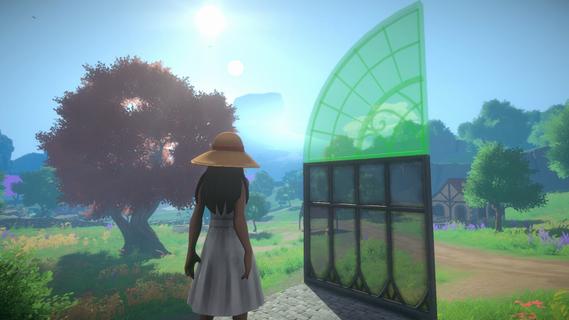

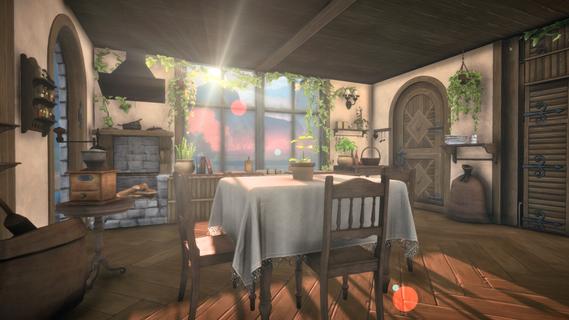
Cozy Builder suits players who prefer creating and restoring places at their own pace instead of completing competitive challenges. The game takes place in Vineyard Valley after an earthquake has left homes and familiar locations in need of care. As you explore the countryside, the focus stays on shaping a personal space and helping the valley feel lived in again. Before deciding to download Cozy Builder, consider whether a calm building game with countryside activities matches what you want to play.Build and restore Vineyard ValleyCreate a personal châteauCozy Builder lets you construct a château from modular architectural parts. You can combine arches, gabled roofs, and ivy-covered walls to shape the outside of your home. This approach allows you to change the layout and appearance as your ideas develop.Decorate indoor and outdoor spacesYou can furnish rooms and add details to the land around your château. Cozy Builder includes furniture, art, gardens, terraces, and handcrafted decorations for different parts of the property. As a result, players can work on a single room, a courtyard, or the full exterior without following a fixed design.Design greenhouse gardensGreenhouses provide spaces for indoor garden designs. You can collect rare plants, care for flowers, and arrange them within these glass-covered areas. This gives you another way to work with plants beyond the open countryside.Repair homes across the valleyCozy Builder places restoration at the center of its vineyard valley setting. You rebuild damaged homes after the earthquake and gradually bring activity back to forgotten places. Rather than managing a busy city, you spend time improving smaller countryside locations.Gather crops and make rustic goodsAs you move through the valley, you can harvest grapes, olives, herbs, wildflowers, and heirloom produce. These materials can be used to ferment, blend, and bottle wine. You can also prepare preserves and other rustic goods to share or sell.What to know about Cozy BuilderCozy Builder is a sandbox builder centered on a rural vineyard rather than a city or combat setting. There are no competitive challenges described in the game information, so progress is tied to your own building, decoration, restoration, and countryside routines. Players looking for structured battles or score-based competition may want a different type of game.The château building game theme combines home design with a post-earthquake recovery setting. The valley’s damaged homes give the creative work a clear purpose, while the vineyard setting keeps the focus on gardens, crops, and local goods. Cozy Builder APK may therefore appeal to players who want a building game with a countryside setting.How to play Cozy BuilderCozy Builder starts with a valley that needs attention after an earthquake. Before beginning, make sure you have opened the Cozy Builder latest version available on your Android device. Then use the valley’s locations and materials to decide what you want to restore or create first.Start by exploring Vineyard Valley and looking at the homes and locations that need restoration.Choose a château area, then place modular parts such as walls, arches, and roofs to form its structure.Continue by arranging furniture, art, terraces, gardens, and other details inside and outside your building.Visit greenhouse spaces to collect plants, nurture flowers, and set up indoor garden layouts.Harvest available crops in the countryside, then use grapes and other produce for wine, preserves, and rustic goods.Get started with Vineyard ValleyCozy Builder combines château construction, home decoration, countryside restoration, gardening, and winemaking in one vineyard setting. Download Cozy Builder APK from APKPure if you want to spend time shaping homes and restoring a quiet valley on Android.
Show more

1. Download MEmu installer and finish the setup

2. Start MEmu then open Google Play on the desktop

3. Search Cozy Builder in Google Play
Install
4. Download and Install Cozy Builder
5. On install completion click the icon to start

6. Enjoy playing Cozy Builder on PC with MEmu
MEmu Play is the best Android emulator and 100 million people already enjoy its superb Android gaming experience. The MEmu virtualization technology empowers you to play thousands of Android games smoothly on your PC, even the most graphic-intensive ones.
Bigger screen with better graphics; Long duration, without limitation of battery or mobile data.
Full Keymapping support for precise control of keyboard and mouse or gamepad.
Multiple game accounts or tasks on single PC at one time with Multi-Instance manager.
Play Cozy Builder on PC by following steps: