Destiny: Rising
Updated
Current Version
1.0.56850830
Offered By

With your passion for Destiny: Rising, you shouldn’t have to limit yourself to the small screen of a phone. Play like a pro and take full control of the game using a keyboard and mouse. MEmu gives you everything you’re looking for. Download and play Destiny: Rising on PC. Play as long as you want — no more worries about battery life, mobile data, or unexpected calls. The all-new MEmu 9 is the best way to play Destiny: Rising on PC. With our expertly designed keymapping system, Destiny: Rising feels just like a real PC game. The MEmu multi-instance manager lets you run two or more accounts on the same device at the same time. Most importantly, our exclusive emulation engine unlocks your PC’s full potential, delivering smooth and seamless performance.
Show more
Download Destiny: Rising on PC with MEmu Android Emulator. Enjoy playing on big screen. Experience top-tier sci-fi shooting action in first-person or third-person.



Experience top-tier sci-fi shooting action in first-person or third-person. Play as unique characters with formidable skills and embark on a new adventure to defend the future Earth!
FIRST MOBILE GAME IN THE DESTINY FRANCHISE
Experience iconic best-in-class sci-fi shooting action at your fingertips! Choose between the highly immersive first-person view or a new fully third-person action view and play with touchscreen or compatible controller precision.
CLASSIC AND BRAND-NEW GAME MODES
Choose from a wide array of game modes, such as campaign missions and 6-player co-op strikes that are iconic to the Destiny franchise, along with all-new and replayable PVE and PVP modes.
POWERFUL AND DISTINCTIVE WEAPONS
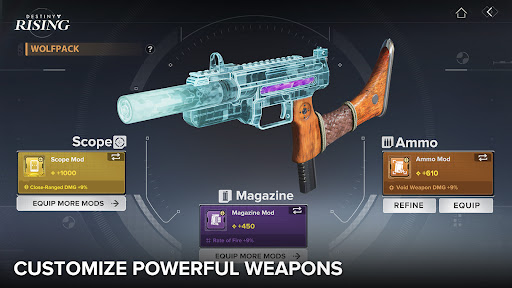
Countless powerful and unique weapons are available to choose according to your combat style. Explore different weapon and traits combinations, defeat enemies with different gameplay mechanics, and become the next master of arms.
LEGENDARY HEROES WITH EPIC SKILLS
Enter an era of heroes and legends, where familiar faces from Destiny are joined by a host of new, intriguing characters. Each character comes with a rich personal story, a unique personality, and formidable skills. Choosing the right character and mastering their combat style will be your key to overcoming the challenging foes that stand in your way.
JOIN THE ACTION WITH YOUR TEAMMATES
Embark on thrilling online multiplayer action along with your fellow players. Build strong clans, experience fun and casual party game modes, customize shared spaces, and more. Join in with your friends to fight off invading enemies or challenge them to test your skill.
Show more

1. Download MEmu installer and finish the setup

2. Start MEmu then open Google Play on the desktop

3. Search Destiny: Rising in Google Play
Install
4. Download and Install Destiny: Rising
5. On install completion click the icon to start

6. Enjoy playing Destiny: Rising on PC with MEmu
MEmu Play is the best Android emulator and 100 million people already enjoy its superb Android gaming experience. The MEmu virtualization technology empowers you to play thousands of Android games smoothly on your PC, even the most graphic-intensive ones.
Bigger screen with better graphics; Long duration, without limitation of battery or mobile data.
Full Keymapping support for precise control of keyboard and mouse or gamepad.
Multiple game accounts or tasks on single PC at one time with Multi-Instance manager.
Play Destiny: Rising on PC by following steps: