Frozen War: Endless Frost
Updated
Current Version
1.9.1
Offered By

With your passion for Frozen War: Endless Frost, you shouldn’t have to limit yourself to the small screen of a phone. Play like a pro and take full control of the game using a keyboard and mouse. MEmu gives you everything you’re looking for. Download and play Frozen War: Endless Frost on PC. Play as long as you want — no more worries about battery life, mobile data, or unexpected calls. The all-new MEmu 9 is the best way to play Frozen War: Endless Frost on PC. With our expertly designed keymapping system, Frozen War: Endless Frost feels just like a real PC game. The MEmu multi-instance manager lets you run two or more accounts on the same device at the same time. Most importantly, our exclusive emulation engine unlocks your PC’s full potential, delivering smooth and seamless performance.
Show more
Download Frozen War: Endless Frost on PC with MEmu Android Emulator. Enjoy playing on big screen. Frozen War: Endless Frost is an exhilarating survival strategy game set against the backdrop of a frigid zombie apocalypse.
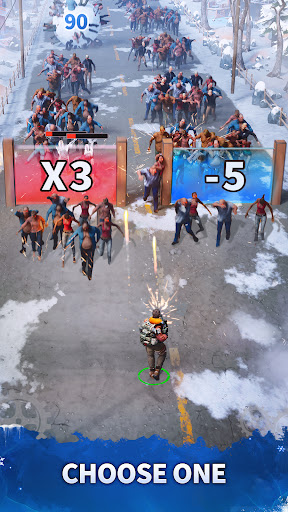
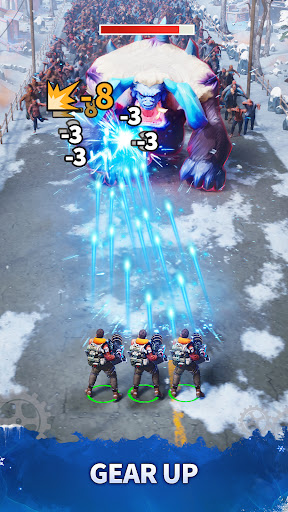
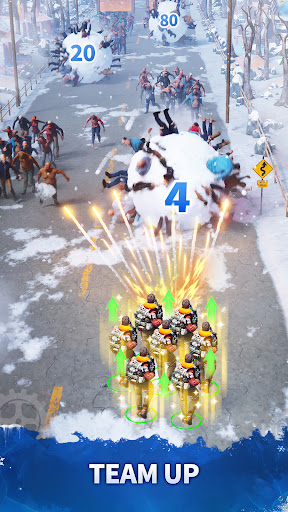
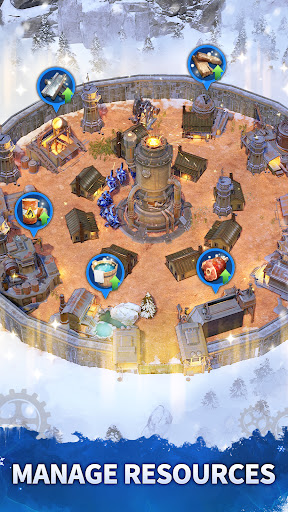
Frozen War: Endless Frost is an exhilarating survival strategy game set against the backdrop of a frigid zombie apocalypse. Prepare yourself for unique adventure settings that will test your skills and resolve!
As global temperatures plummet, a catastrophic disaster has obliterated human civilization. The few survivors who escaped their crumbling homes now confront a host of new challenges: relentless zombie hordes, fierce snowstorms, mutated beasts, and ruthless bandits.
In this icy wasteland, you are humanity's last hope. Can you lead the survivors in rebuilding civilization amidst the chaos of a zombie-infested world? The time has come for you to rise and save humanity!
Gather Resources and Rebuild Shelters
Mobilize your survivors to scavenge the tundra for essential resources to construct safe shelters! Assign tasks such as hunting, cooking, and logging to ensure the continuous development of your shelters, all while keeping a close eye on their health and well-being.
Survive the Apocalypse
In this post-apocalyptic tundra, resources may be plentiful, but competition is fierce. Other survivor clans are lurking, ready to clash for survival. You must confront these challenges head-on, competing for resources to endure the harsh realities of this frozen apocalypse.
Form Alliances and Fight Together
Strength in unity is unbeatable! Create or join alliances with like-minded allies, fight side by side, dominate the battlefield, and establish your rule over the tundra!
Recruit Survivors and Defend Against Zombies
Bring together individuals with unique skills and strategically deploy them to bolster your defenses against terrifying zombie invasions!
Triumph Over Adversity and Earn Glory
Harness your hero's skills and bravely advance against the dual threats of freezing temperatures and relentless zombies. Compete with other leaders to earn rare items and endless glory! In this perilous time, showcase your strength to the world!
Show more

1. Download MEmu installer and finish the setup

2. Start MEmu then open Google Play on the desktop

3. Search Frozen War: Endless Frost in Google Play
Install
4. Download and Install Frozen War: Endless Frost
5. On install completion click the icon to start

6. Enjoy playing Frozen War: Endless Frost on PC with MEmu
MEmu Play is the best Android emulator and 100 million people already enjoy its superb Android gaming experience. The MEmu virtualization technology empowers you to play thousands of Android games smoothly on your PC, even the most graphic-intensive ones.
Bigger screen with better graphics; Long duration, without limitation of battery or mobile data.
Full Keymapping support for precise control of keyboard and mouse or gamepad.
Multiple game accounts or tasks on single PC at one time with Multi-Instance manager.
Play Frozen War: Endless Frost on PC by following steps: