Hollywood Merge
Updated
Current Version
0.1.47
Offered By

With your passion for Hollywood Merge, you shouldn’t have to limit yourself to the small screen of a phone. Play like a pro and take full control of the game using a keyboard and mouse. MEmu gives you everything you’re looking for. Download and play Hollywood Merge on PC. Play as long as you want — no more worries about battery life, mobile data, or unexpected calls. The all-new MEmu 9 is the best way to play Hollywood Merge on PC. With our expertly designed keymapping system, Hollywood Merge feels just like a real PC game. The MEmu multi-instance manager lets you run two or more accounts on the same device at the same time. Most importantly, our exclusive emulation engine unlocks your PC’s full potential, delivering smooth and seamless performance.
Show more
Download Hollywood Merge on PC with MEmu Android Emulator. Enjoy playing on big screen. Merge!



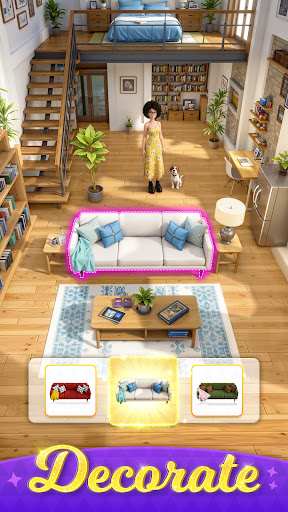
Merge! Fashion! Drama!
From girl next door to Hollywood sensation, experience the celebrity life now!
Life in LA is tough and running back and forth from your part-time job to acting auditions to be an extra isn't all that glamorous either. However, by some miracle, you find out you're actually the long-lost daughter of Hollywood actor Peter Dake.
When you learn about your family history, your whole world is turned upside down. Well, what you thought would be a life of ease, turns out to be anything but. It turns out your half-sister Rose detests you, your caring boyfriend is hiding something from you, and the media is relentless.
The challenges just keep coming. It's time to use your unique style and charisma to show the world what you're made of!
- Easy merge gameplay. Merge simple clothes to create elegant fashion items! Unlock rare designs and create one-of-a-kind outfits.
- Over 1,000 style options to dress for the red carpet, parties, auditions, and other events.
- A plot full of twists and turns. How will your story end?
- Develop friendships and romantic relationships with different characters in the storyline!
Are you ready to start your journey from unnamed extra to Hollywood icon?
Show more

1. Download MEmu installer and finish the setup

2. Start MEmu then open Google Play on the desktop

3. Search Hollywood Merge in Google Play
Install
4. Download and Install Hollywood Merge
5. On install completion click the icon to start

6. Enjoy playing Hollywood Merge on PC with MEmu
MEmu Play is the best Android emulator and 100 million people already enjoy its superb Android gaming experience. The MEmu virtualization technology empowers you to play thousands of Android games smoothly on your PC, even the most graphic-intensive ones.
Bigger screen with better graphics; Long duration, without limitation of battery or mobile data.
Full Keymapping support for precise control of keyboard and mouse or gamepad.
Multiple game accounts or tasks on single PC at one time with Multi-Instance manager.
Play Hollywood Merge on PC by following steps: