
Hoop Life:Idle Game
Updated
Current Version
1.1.9
Offered By

With your passion for Hoop Life:Idle Game, you shouldn’t have to limit yourself to the small screen of a phone. Play like a pro and take full control of the game using a keyboard and mouse. MEmu gives you everything you’re looking for. Download and play Hoop Life:Idle Game on PC. Play as long as you want — no more worries about battery life, mobile data, or unexpected calls. The all-new MEmu 9 is the best way to play Hoop Life:Idle Game on PC. With our expertly designed keymapping system, Hoop Life:Idle Game feels just like a real PC game. The MEmu multi-instance manager lets you run two or more accounts on the same device at the same time. Most importantly, our exclusive emulation engine unlocks your PC’s full potential, delivering smooth and seamless performance.
Show more
Download Hoop Life:Idle Game on PC with MEmu Android Emulator. Enjoy playing on big screen. WELCOME TO HOOP STAR: IDLE CLICKER – THE ULTIMATE BASKETBALL RISE!
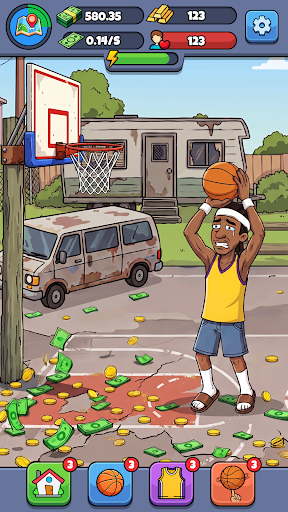



WELCOME TO HOOP STAR: IDLE CLICKER – THE ULTIMATE BASKETBALL RISE!
Step into the world of JORDEN, an unknown street baller with nothing but a worn-out court, a ball, and a dream to become a legend. In this addictive idle clicker and life simulator, you’ll grind your way from street games to the pro stage—rising from “the kid nobody passes to” into a global basketball icon and business tycoon.
FROM STREET COURTS TO THE SPOTLIGHT
JORDEN starts with nothing but grit and determination. Watch his journey from zero to hero as he battles through intense games and relentless training. Every tap brings you closer to turning doubt into dominance and becoming the center of attention on the court.
SHOW YOUR MOVES, OWN THE GAME
Dominate the court with your skills! Hold to dribble, shoot, and dunk your way to highlight plays that fire up the crowd. In intense 1v1 shooting battles, face off against your opponents. Time your shots and score more baskets within the limit to win. Each victory boosts your leaderboard rank, taking you from unknown to the top.
BUILD YOUR BASKETBALL EMPIRE
As your fame grows, so does your income. Upgrade elite training facilities, unlock stylish gear and signature sneakers, and refine your skills to perfection. Balance training and competition to turn JORDEN into not just a star player—but a true business powerhouse.
LIVE THE PRO PLAYER LIFE
This is more than just basketball—it’s a full life simulation. Meet teammates, face rivals, handle pressure, and make key decisions that shape your career. Will you rise to MVP greatness or fade as a one-hit wonder? The choice is yours.
KEY FEATURES:
● Highlight Plays: Perform flashy moves and dominate the crowd
● Idle Progression: Train and earn rewards even while offline
● Tycoon System: Upgrade facilities, gear, and performance
● Life Simulator: Experience the highs and lows of a pro career
● Rise to Glory: Go from street baller to global legend
● Star Journey: Build your fame, skills, and legacy
Show more

1. Download MEmu installer and finish the setup

2. Start MEmu then open Google Play on the desktop

3. Search Hoop Life:Idle Game in Google Play
Install
4. Download and Install Hoop Life:Idle Game
5. On install completion click the icon to start

6. Enjoy playing Hoop Life:Idle Game on PC with MEmu
MEmu Play is the best Android emulator and 100 million people already enjoy its superb Android gaming experience. The MEmu virtualization technology empowers you to play thousands of Android games smoothly on your PC, even the most graphic-intensive ones.
Bigger screen with better graphics; Long duration, without limitation of battery or mobile data.
Full Keymapping support for precise control of keyboard and mouse or gamepad.
Multiple game accounts or tasks on single PC at one time with Multi-Instance manager.
Play Hoop Life:Idle Game on PC by following steps: