Hunting Simulator
Updated
Current Version
1.7.7
Offered By

With your passion for Hunting Simulator, you shouldn’t have to limit yourself to the small screen of a phone. Play like a pro and take full control of the game using a keyboard and mouse. MEmu gives you everything you’re looking for. Download and play Hunting Simulator on PC. Play as long as you want — no more worries about battery life, mobile data, or unexpected calls. The all-new MEmu 9 is the best way to play Hunting Simulator on PC. With our expertly designed keymapping system, Hunting Simulator feels just like a real PC game. The MEmu multi-instance manager lets you run two or more accounts on the same device at the same time. Most importantly, our exclusive emulation engine unlocks your PC’s full potential, delivering smooth and seamless performance.
Show more
Download Hunting Simulator on PC with MEmu Android Emulator. Enjoy playing on big screen. Accurate and realistic hunting simulator made for hunters.
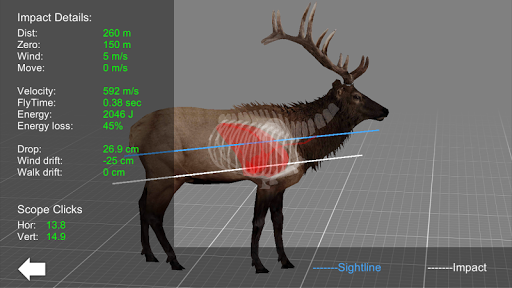
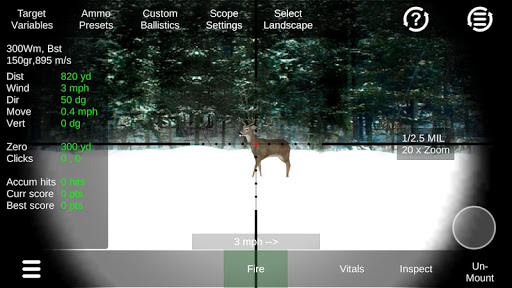
Accurate and realistic hunting simulator made for hunters.
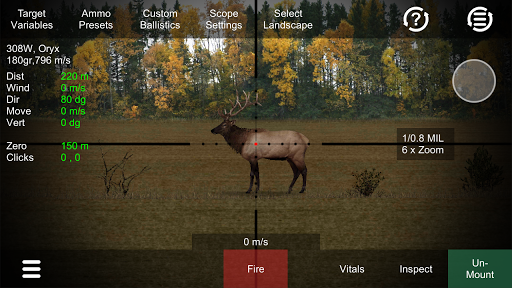
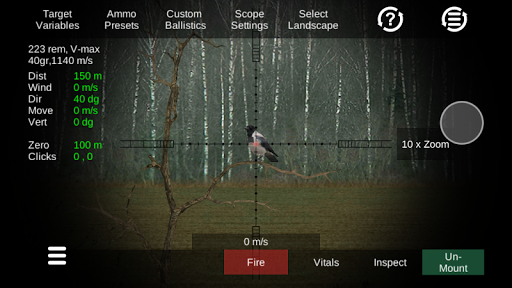
This is an easy to use visual 3D ballistic tool for practicing very realistic hunting situations up to 1000m.
Practice deer hunting or other game types using realistic adjustable scope, accurate ballistics and lots of environment variables such as distance, wind, movement, direction, vertical angle and amount of daylight.
After an impact you can inspect and analyse your hit.
Practice hunting whitetail deer, elk, roe deer, moose, wild boar, red deer and fox.
Features:
-Imperial and metric units.
-Adjustable accurate reticle (Combined german no4 and mildot using most common MOA and mDot clicks).
-Scope zoom with first/second focal plane.
-Up to 1000m range in realistic enviroment.
-View detailed vitals on animals.
-Vertical shooting
-Select between various calibers 22-250, 223Rem, 6.5-55, 270W, 308Win, 30-06 and 300win mag.
-Load / save your own custom ballistic.
-Variable Wind, Distance, Animal heading and walk speed.
-Hunt mode using random wind, distance and animal movement.
-Hunt mode score accumulates points of your last shots.
-Simulate Low light hunting mode
-Simulate trigger delay.
-3D impact data on various animals.
-Slow-motion visible bullet trajectory (tracer)
-Realistic kill when hit in vital zone
Impact calculations:
-energy
-energy loss
-Impact velocity
-wind drag
-animal movement result on impact
-bullet drop
-bullet flight time
-click adjustment for scope
Does the above feature looks interesting but you dont feel like paying, ask for a promocode by email.
App is under constant development, It will be updated with more features later.
Please see the demo video how it works before installing and rating the app.
Please send me a mail if you have feature requests or questions.
Show more

1. Download MEmu installer and finish the setup

2. Start MEmu then open Google Play on the desktop

3. Search Hunting Simulator in Google Play
Install
4. Download and Install Hunting Simulator
5. On install completion click the icon to start

6. Enjoy playing Hunting Simulator on PC with MEmu
MEmu Play is the best Android emulator and 100 million people already enjoy its superb Android gaming experience. The MEmu virtualization technology empowers you to play thousands of Android games smoothly on your PC, even the most graphic-intensive ones.
Bigger screen with better graphics; Long duration, without limitation of battery or mobile data.
Full Keymapping support for precise control of keyboard and mouse or gamepad.
Multiple game accounts or tasks on single PC at one time with Multi-Instance manager.
Play Hunting Simulator on PC by following steps: