Immortals Revenge
Updated
Current Version
Offered By

With your passion for Immortals Revenge, you shouldn’t have to limit yourself to the small screen of a phone. Play like a pro and take full control of the game using a keyboard and mouse. MEmu gives you everything you’re looking for. Download and play Immortals Revenge on PC. Play as long as you want — no more worries about battery life, mobile data, or unexpected calls. The all-new MEmu 9 is the best way to play Immortals Revenge on PC. With our expertly designed keymapping system, Immortals Revenge feels just like a real PC game. The MEmu multi-instance manager lets you run two or more accounts on the same device at the same time. Most importantly, our exclusive emulation engine unlocks your PC’s full potential, delivering smooth and seamless performance.
Show more
Download Immortals Revenge on PC with MEmu Android Emulator. Enjoy playing on big screen. Step into the immersive MMORPG world of Immortals Revenge, blending adventure, role-playing, and hack-and-slash gameplay.

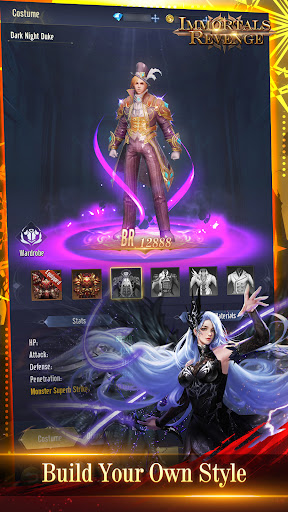
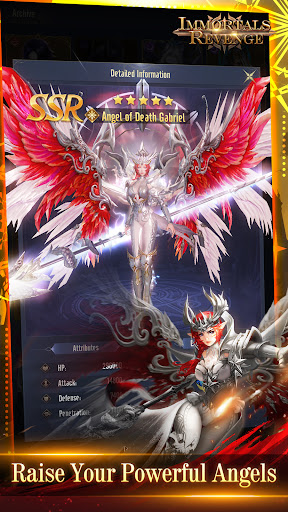
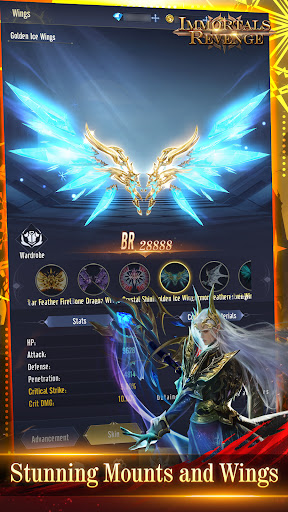
Step into the immersive MMORPG world of Immortals Revenge, blending adventure, role-playing, and hack-and-slash gameplay. Inspired by Greek mythology, embark on an epic quest as a mortal infused with divine power, seeking vengeance against those who threaten the gods' order. Summon superpowers from iconic figures like Athena and engage in thrilling hack-and-slash combat against formidable adversaries, including the enigmatic Hades. With rich storytelling and expansive landscapes to explore, master divine abilities to restore balance to Olympus. Are you prepared for the ultimate adventure in Immortals Revenge?
Game Features:
[Get Equipment, Skin and Diamonds]
• Join the battle to get Equipment: Defeat Bosses to drop Superb Equipment. All equipment can be traded in the Auction House, and equipment can be obtained by defeating Bosses Equipment can be exchanged with other players.
• Get Wings and Artifacts at the Boss: Defeat Bosses to randomly obtain various Wings and Artifacts. Equip Wings and Artifacts to get cool skins and increase BR and special attributes significantly.
• Get Lots of Diamonds: Kill monsters to get diamonds and use them in the systems. You can also be strong when you are in the AFK mode.
[Get Free Angels]
• Full-screen Archangel Expertise: Immersive 3D gaming experience. Gorgeous Angels descend from the sky and release powerful skills. Kill the monsters and get lots of EXP. A cool, hearty and exciting battle experience!
[Get Free VIP]
• Get for free! Complete the quest to upgrade your VIP level for free.
• Upgrade VIP level to claim: Exclusive Skin (Title, Avatar, Frame, Background, Artifact Skin, Exclusive Mount, Exclusive Wings), Superb Equipment, Promotion Material, Enhancement Material, EXP Orb and Lots of Diamonds.
• Upgrade VIP level to claim privilege: Boss DMG Bonus and higher ultimate drop rates.
[Countless Bonus]
• 14 Days Login Bonus
• Get Peerage Free
• Time-Limited Special Events and Exclusive Rewards
Facebook: https://www.facebook.com/ImmortalsRevengeMobile/
Discord: https://discord.gg/MwXMFCaXxa
YouTube: https://www.youtube.com/@ImmortalsRevenge
Show more

1. Download MEmu installer and finish the setup

2. Start MEmu then open Google Play on the desktop

3. Search Immortals Revenge in Google Play
Install
4. Download and Install Immortals Revenge
5. On install completion click the icon to start

6. Enjoy playing Immortals Revenge on PC with MEmu
MEmu Play is the best Android emulator and 100 million people already enjoy its superb Android gaming experience. The MEmu virtualization technology empowers you to play thousands of Android games smoothly on your PC, even the most graphic-intensive ones.
Bigger screen with better graphics; Long duration, without limitation of battery or mobile data.
Full Keymapping support for precise control of keyboard and mouse or gamepad.
Multiple game accounts or tasks on single PC at one time with Multi-Instance manager.
Play Immortals Revenge on PC by following steps: