
ITsMagic Engine 2.0 - 2026
Updated
Current Version
P2.2026.08f5
Offered By

With your passion for ITsMagic Engine 2.0 - 2026, you shouldn’t have to limit yourself to the small screen of a phone. Play like a pro and take full control of the game using a keyboard and mouse. MEmu gives you everything you’re looking for. Download and play ITsMagic Engine 2.0 - 2026 on PC. Play as long as you want — no more worries about battery life, mobile data, or unexpected calls. The all-new MEmu 9 is the best way to play ITsMagic Engine 2.0 - 2026 on PC. With our expertly designed keymapping system, ITsMagic Engine 2.0 - 2026 feels just like a real PC game. The MEmu multi-instance manager lets you run two or more accounts on the same device at the same time. Most importantly, our exclusive emulation engine unlocks your PC’s full potential, delivering smooth and seamless performance.
Show more
Download ITsMagic Engine 2.0 - 2026 on PC with MEmu Android Emulator. Enjoy playing on big screen. Create Console-Quality 3D Games — Directly on Your Android.
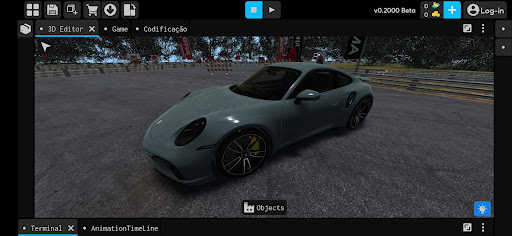
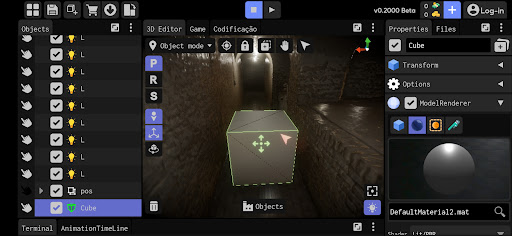
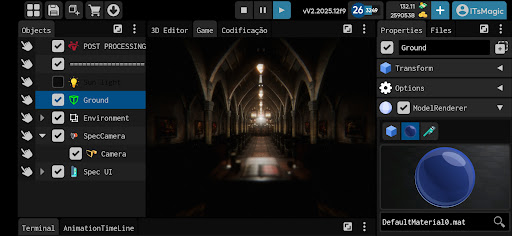
Create Console-Quality 3D Games — Directly on Your Android
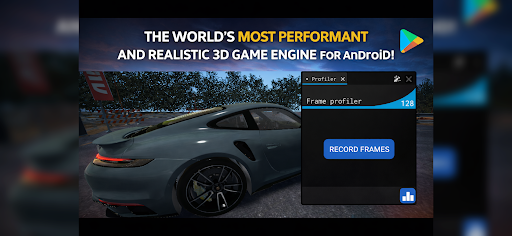
ITsMagic Engine 2.0 is the most powerful and realistic 3D game engine ever released for Android.
Build professional 3D games anywhere — with performance, visuals, and tools usually found only on PC game engines.
No compromises. No “mobile-only” limits.
PC-Level Game Development — On Your Phone
Create complete games directly on your Android device:
Build complex 3D scenes
Add animations, physics, and AI
Program using Java or Lua
Export your game as an APK and share it with the world
From prototype to full game — all on mobile.
What’s New in Version 2.0
Brand-new Vulkan graphics engine
Modern, clean, and intuitive interface
Massive performance improvements
Stable workflow for large-scale projects
V2.0 isn’t an update — it’s a new generation.
Powerful Features Built for Real Games
• High-end 3D graphics & physics
• Real-time cascaded shadows
• Advanced animation system
• Ultra-fast object renderer (Object Pool)
• Custom Vulkan shaders in real time
• Full terrain editor (sculpt & texture)
• 3D spatial audio
• Unlimited worlds, assets, and projects
Advanced Post-Processing Effects (Real-Time)
• SSAO & Contact Shadows
• Atmospheric Scattering
• Bloom & Color Grading
• Depth of Field
• Volumetric Fog
• Temporal Motion Blur
• VHS / CRT / Night Vision
• Chromatic Aberration
• Grain, Sharpen, Gaussian Blur
Create any visual style you want — or write your own shader.
Import Almost Anything
3D Models:
.obj | .fbx | .gltf | .glb | .dae | .blend | .3ds | .stl | .ply | .3mf
Animations:
.fbx | .gltf | .glb | .dae | .blend
Textures:
.png | .jpg | .webp | .tga | .tif | .bmp | .heif
Audio:
.mp3 | .wav | .ogg | .flac | .aac | .m4a | and more
Community & Marketplace
• Join a growing global community
• Share and download community assets
• Publish your games and ideas
Download Now
Start creating real 3D games today — anytime, anywhere.
Discord (Global):
https://discord.gg/cjN7uUTUEr
YouTube (Global):
https://www.youtube.com/c/ITsMagicWeMadeTheImpossible
YouTube (Brazil):
https://www.youtube.com/c/TheFuzeITsMagic
Documentation:
https://itsmagic.com.br/
Show more

1. Download MEmu installer and finish the setup

2. Start MEmu then open Google Play on the desktop

3. Search ITsMagic Engine 2.0 - 2026 in Google Play
Install
4. Download and Install ITsMagic Engine 2.0 - 2026
5. On install completion click the icon to start

6. Enjoy playing ITsMagic Engine 2.0 - 2026 on PC with MEmu
MEmu Play is the best Android emulator and 100 million people already enjoy its superb Android gaming experience. The MEmu virtualization technology empowers you to play thousands of Android games smoothly on your PC, even the most graphic-intensive ones.
Bigger screen with better graphics; Long duration, without limitation of battery or mobile data.
Full Keymapping support for precise control of keyboard and mouse or gamepad.
Multiple game accounts or tasks on single PC at one time with Multi-Instance manager.
Play ITsMagic Engine 2.0 - 2026 on PC by following steps:















































