Joshi ji - Open World Car Game
Updated
Current Version
6
Offered By

With your passion for Joshi ji - Open World Car Game, you shouldn’t have to limit yourself to the small screen of a phone. Play like a pro and take full control of the game using a keyboard and mouse. MEmu gives you everything you’re looking for. Download and play Joshi ji - Open World Car Game on PC. Play as long as you want — no more worries about battery life, mobile data, or unexpected calls. The all-new MEmu 9 is the best way to play Joshi ji - Open World Car Game on PC. With our expertly designed keymapping system, Joshi ji - Open World Car Game feels just like a real PC game. The MEmu multi-instance manager lets you run two or more accounts on the same device at the same time. Most importantly, our exclusive emulation engine unlocks your PC’s full potential, delivering smooth and seamless performance.
Show more
Download Joshi ji - Open World Car Game on PC with MEmu Android Emulator. Enjoy playing on big screen. Explore a town where a drive, a challenge and a day at home are all part of the same game.
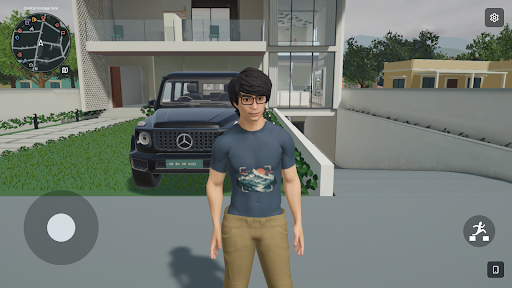
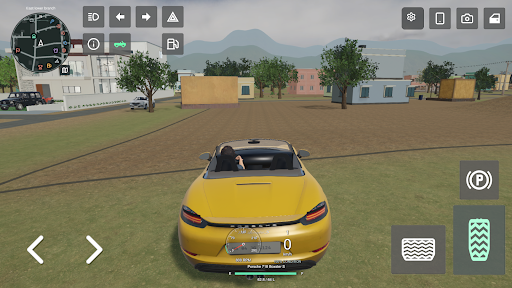
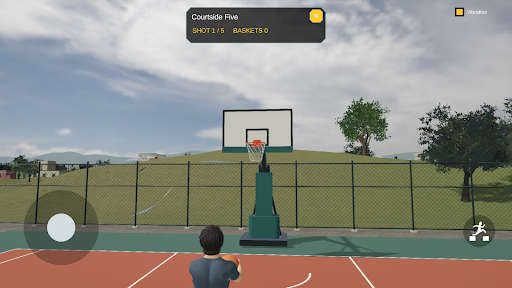
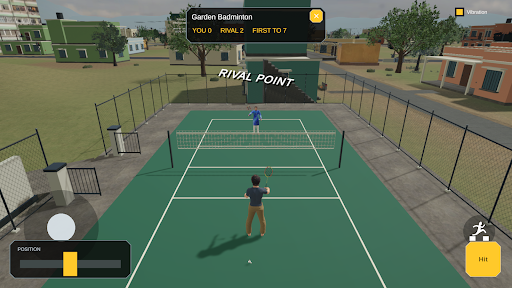
Explore a town where a drive, a challenge and a day at home are all part of the same game.
Joshi ji - open world Car game brings car driving and everyday activities into one connected 3D world. Leave the house on foot, get behind the wheel, visit activity areas and return home when you want a change of pace.
DRIVE AND EXPLORE
Travel through neighbourhood streets, take different vehicles for a drive and find your way around the town. Use the in-game map to plan where to go next. Refuel when needed, visit the garage and arrange vehicle recovery when a car needs help.
PLAY CHALLENGES
Head to the circuit for a race or take a break from driving with badminton and basketball. Complete activities to earn in-game coins, then decide which part of the town to explore next. Challenges give you a reason to revisit locations beyond a simple drive around the block.
A HOME BETWEEN JOURNEYS
Spend time inside the house, move between rooms and interact with the family characters. Change your character's outfit at the wardrobe before heading back outside. The home, roads and activity areas belong to the same playable world.
RECORD YOUR DAY
Use the in-game phone and camera to record moments from your adventures. Review your clips and publish them to the simulated in-game video channel. Recording and publishing are gameplay features, not a connection to a real social media account.
TOUCH CONTROLS AND DISPLAY OPTIONS
Move your character with touch controls and switch to vehicle controls when driving. Adjust camera sensitivity, brightness, graphics quality and frame rate to suit your device. Available quality and frame-rate options depend on device capability.
ABOUT ADS AND REWARDS
The game includes rewarded video ads. Some activities, video publishing and temporary vehicle access involve watching an ad. Completed challenges can offer an ad to double the coin reward. Ads require an internet connection and availability can vary. Coins, rewards and vehicle access are for use inside this game only and have no real-world cash value.
Choose your next destination: a drive across town, a match on the court or another moment to record at home.
Show more

1. Download MEmu installer and finish the setup

2. Start MEmu then open Google Play on the desktop

3. Search Joshi ji - Open World Car Game in Google Play
Install
4. Download and Install Joshi ji - Open World Car Game
5. On install completion click the icon to start

6. Enjoy playing Joshi ji - Open World Car Game on PC with MEmu
MEmu Play is the best Android emulator and 100 million people already enjoy its superb Android gaming experience. The MEmu virtualization technology empowers you to play thousands of Android games smoothly on your PC, even the most graphic-intensive ones.
Bigger screen with better graphics; Long duration, without limitation of battery or mobile data.
Full Keymapping support for precise control of keyboard and mouse or gamepad.
Multiple game accounts or tasks on single PC at one time with Multi-Instance manager.
Play Joshi ji - Open World Car Game on PC by following steps: