
Juicy Realm
Updated
Current Version
3.6.3
Offered By

With your passion for Juicy Realm, you shouldn’t have to limit yourself to the small screen of a phone. Play like a pro and take full control of the game using a keyboard and mouse. MEmu gives you everything you’re looking for. Download and play Juicy Realm on PC. Play as long as you want — no more worries about battery life, mobile data, or unexpected calls. The all-new MEmu 9 is the best way to play Juicy Realm on PC. With our expertly designed keymapping system, Juicy Realm feels just like a real PC game. The MEmu multi-instance manager lets you run two or more accounts on the same device at the same time. Most importantly, our exclusive emulation engine unlocks your PC’s full potential, delivering smooth and seamless performance.
Show more
Download Juicy Realm on PC with MEmu Android Emulator. Enjoy playing on big screen. *Google Play Best Indie Game of 2020.
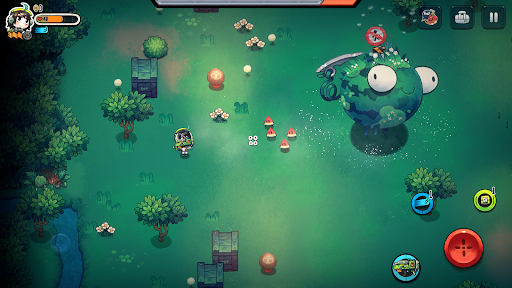
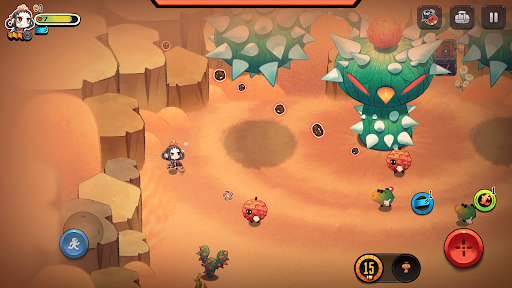


*Google Play Best Indie Game of 2020
Juicy Realm is an action game where you fight against bizarre fruit enemies all around the world. In this world, the boundaries between animals and plants have been blurred, marking the beginning of an upheaval in the food chain. Humanity was forced to establish outposts and begin investigations in the region where the mutated plants were first discovered. The military prepared numerous powerful weapons, and under your leadership, a vanguard force began a prolonged tug-of-war battle.
The Order of Things... Disrupted
"Many years in the future, humanity looks upward in despair at plants, now standing atop the food chain. How could they have been so arrogant..."
Only when plants began sprouting arms and legs and developing self-awareness did humanity truly begin to understand the menace that these once photosynthesis-dependent creatures posed. No one could understand how the plants took this large evolutionary leap in such a short time, something that took their animal counterparts millions of years to accomplish. One thing is certain, now is the time for humanity to make their stand in order to stay at the top of the food chain.
Gameplay
As one of the first explorers of the newly discovered plant empire, you must continuously drive deeper and deeper into the enemy's lair. Defeat bizarre and colorful fruits while retrieving new gear, weapons, and resources to defend yourself and expand your base camp.
Game Features
*Roguelike elements with random zones, treasures, and monsters
*Loads of special weapons and items
*Unique and incredibly detailed art style
Press contact: contact@spacecan.net
©2024 SpaceCan Technology Co.,Ltd. All rights reserved.
Show more

1. Download MEmu installer and finish the setup

2. Start MEmu then open Google Play on the desktop

3. Search Juicy Realm in Google Play
Install
4. Download and Install Juicy Realm
5. On install completion click the icon to start

6. Enjoy playing Juicy Realm on PC with MEmu
MEmu Play is the best Android emulator and 100 million people already enjoy its superb Android gaming experience. The MEmu virtualization technology empowers you to play thousands of Android games smoothly on your PC, even the most graphic-intensive ones.
Bigger screen with better graphics; Long duration, without limitation of battery or mobile data.
Full Keymapping support for precise control of keyboard and mouse or gamepad.
Multiple game accounts or tasks on single PC at one time with Multi-Instance manager.
Play Juicy Realm on PC by following steps:
















































