Lawn Mowing Simulator 2
Updated
Current Version
Offered By

With your passion for Lawn Mowing Simulator 2, you shouldn’t have to limit yourself to the small screen of a phone. Play like a pro and take full control of the game using a keyboard and mouse. MEmu gives you everything you’re looking for. Download and play Lawn Mowing Simulator 2 on PC. Play as long as you want — no more worries about battery life, mobile data, or unexpected calls. The all-new MEmu 9 is the best way to play Lawn Mowing Simulator 2 on PC. With our expertly designed keymapping system, Lawn Mowing Simulator 2 feels just like a real PC game. The MEmu multi-instance manager lets you run two or more accounts on the same device at the same time. Most importantly, our exclusive emulation engine unlocks your PC’s full potential, delivering smooth and seamless performance.
Show more
Download Lawn Mowing Simulator 2 on PC with MEmu Android Emulator. Enjoy playing on big screen. Lawn Mowing Simulator 2 suits players who enjoy steady task based simulation games with visible progress across each job.
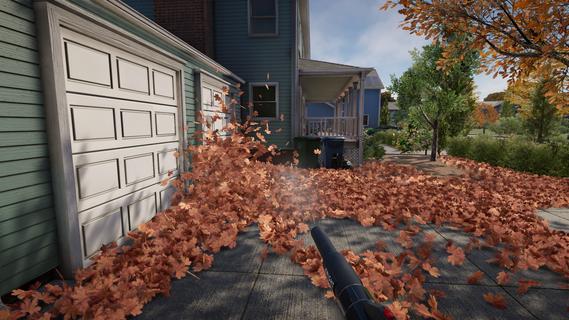
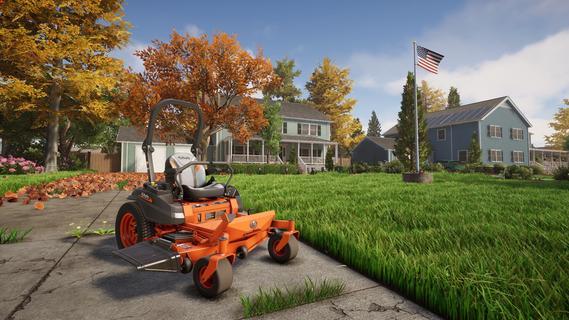
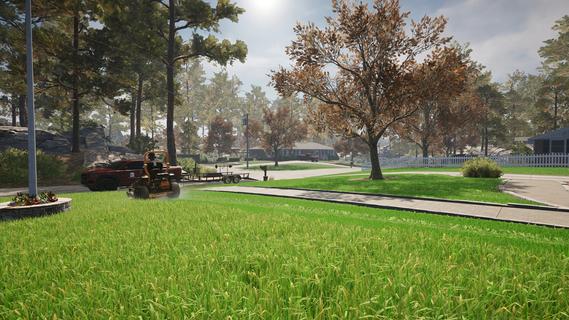

Lawn Mowing Simulator 2 suits players who enjoy steady task based simulation games with visible progress across each job. Set in a fictional town in the USA, the game follows the work of a professional lawn care operator taking on outdoor contracts. Players begin with smaller work and gradually handle broader responsibilities as their company develops. For those looking for the Lawn Mowing Simulator 2 latest version, this sequel adds more ways to approach everyday property maintenance and business growth.Lawn Mowing Simulator 2 featuresMow and trim outdoor spacesLawn Mowing Simulator 2 asks you to restore overgrown gardens and outdoor areas by cutting grass at a measured pace. You can use mowers for larger sections, then switch to a string trimmer for weeds and edges that need closer work. This creates a job flow where the main lawn and its difficult borders both need attention before the property looks finished.See changes in the grassThe grass system shows a clear contrast between areas that have been cut and areas still waiting for work. Different grass heights, weeds, and flowers affect how each location looks before you begin. As a result, players can check their progress visually while turning an untidy space into a maintained landscape.Clear leaves and clippingsWork does not end when the mowing is complete. Lawn Mowing Simulator 2 includes leaf blowing, grass clipping collection, and raking for areas that are harder to reach. You blow debris onto a tarp, place the collected material into bags, and use the rake where a blower cannot easily clear the ground.Use named lawn care equipmentYou can operate recreated equipment from Kubota, STIGA, and SCAG®, including mowers, trimmers, and blowers. Patterson and Knight equipment is also available during lawn care work. The available tools match different parts of the job, so players need to choose equipment that fits the size and condition of each property.Manage contracts and company growthAs jobs become more demanding, you can move toward larger equipment, take on additional contracts, and hire staff. The business is managed through a fully explorable 3D headquarters, which serves as the base for operations. Returning customer gardens may also change with additions such as flower beds, pools, or flagpoles, so repeat work can require a different approach.Playing Lawn Mowing Simulator 2 on AndroidLawn Mowing Simulator 2 follows a work cycle that moves from accepting a property job to leaving the area tidy. The Lawn Mowing Simulator 2 APK is intended for players who want to handle both outdoor maintenance tasks and the longer term running of a lawn care company. Take time to inspect each site, since grass, weeds, and debris can need different tools.Start by choosing an available contract and looking over the property before beginning work. Notice the larger grassy areas, the edges, and any leaves or clippings that may need clearing afterward.Use a suitable mower to cut the main lawn area, working across the space until the uncut grass has been covered. Check the visible grass pattern as you move so that sections are not left unfinished.After mowing, use a string trimmer on weeds and narrow edges that the mower cannot reach easily. This helps complete the detailed areas around the property.Clear leaves and grass clippings by blowing them onto a tarp, then collect the debris into bags. Use a rake when debris remains in tight or difficult areas.Finish the contract, then use the income and new opportunities to develop the business. As equipment and staff options expand, take on larger jobs while preparing for returning properties that may have changed.Get started with Lawn Mowing Simulator 2Lawn Mowing Simulator 2 combines realistic mowing, trimming, leaf clearing, and business management across suburban, commercial, and municipal locations. Players who download Lawn Mowing Simulator 2 can focus on completing each lawn carefully while building a company through new contracts and equipment.
Show more

1. Download MEmu installer and finish the setup

2. Start MEmu then open Google Play on the desktop

3. Search Lawn Mowing Simulator 2 in Google Play
Install
4. Download and Install Lawn Mowing Simulator 2
5. On install completion click the icon to start

6. Enjoy playing Lawn Mowing Simulator 2 on PC with MEmu
MEmu Play is the best Android emulator and 100 million people already enjoy its superb Android gaming experience. The MEmu virtualization technology empowers you to play thousands of Android games smoothly on your PC, even the most graphic-intensive ones.
Bigger screen with better graphics; Long duration, without limitation of battery or mobile data.
Full Keymapping support for precise control of keyboard and mouse or gamepad.
Multiple game accounts or tasks on single PC at one time with Multi-Instance manager.
Play Lawn Mowing Simulator 2 on PC by following steps:

















































