Lone Chronicle
Updated
Current Version
1.0.0
Offered By

With your passion for Lone Chronicle, you shouldn’t have to limit yourself to the small screen of a phone. Play like a pro and take full control of the game using a keyboard and mouse. MEmu gives you everything you’re looking for. Download and play Lone Chronicle on PC. Play as long as you want — no more worries about battery life, mobile data, or unexpected calls. The all-new MEmu 9 is the best way to play Lone Chronicle on PC. With our expertly designed keymapping system, Lone Chronicle feels just like a real PC game. The MEmu multi-instance manager lets you run two or more accounts on the same device at the same time. Most importantly, our exclusive emulation engine unlocks your PC’s full potential, delivering smooth and seamless performance.
Show more
Download Lone Chronicle on PC with MEmu Android Emulator. Enjoy playing on big screen. Lone Chronicle is a classic, MMORPG-style fantasy RPG made for one player.
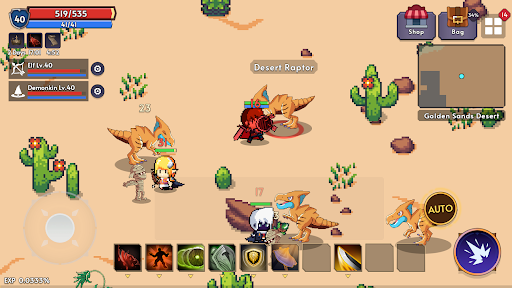
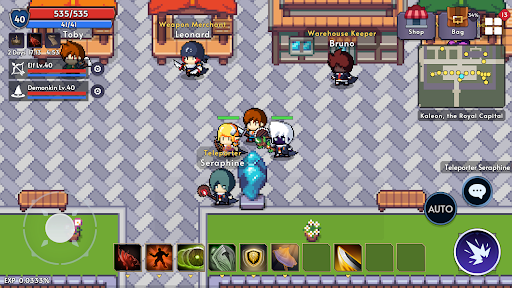
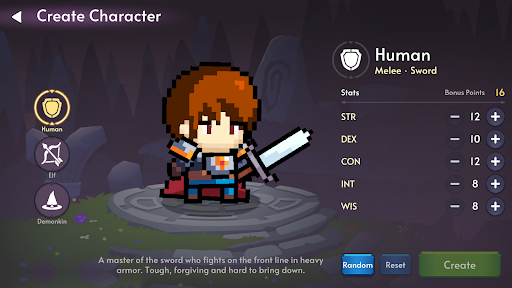
Lone Chronicle is a classic, MMORPG-style fantasy RPG made for one player. You start on Sage Isle with empty hands. No quest markers, no level labels in the field: just a sword, a bow or a staff, and a world that will not hold your hand.
A CHRONICLE WRITTEN FROM EMPTY HANDS
• Begin on Sage Isle, where an old sage once lived in seclusion, then sail to the continent of Ersia.
• Find your own hunting grounds. Fields and monsters carry no level tags; you learn where you belong by feel.
• The Chronicle records what you have truly lived through: every boss you met and slew, how fast, how often it beat you, and the Lessons you learned the hard way.
THREE RACES, YOUR STATS
• Human: a front-line swordsman in heavy armor, tough and hard to bring down.
• Elf: a forest sharpshooter with a bow who borrows the power of the spirits.
• Demonkin: born with mana in the blood. Frail in body, but wields dark magic and healing.
• Spend bonus points on STR, DEX, CON, INT and WIS when you create a hero, and earn more on the road to level 70.
• Over 40 race-only spells in six tiers, learned from spellbooks you buy or find.
HUNT ON AUTO, OR BY HAND
• Tap AUTO and your hero hunts on its own, striking back at whatever attacks first.
• Set potions to drink themselves at the HP you choose, and let Auto Return pull you out before it is too late.
• Take over at any moment with the joystick, the attack button and ten quick slots.
YOUR OTHER CHARACTERS ARE YOUR PARTY
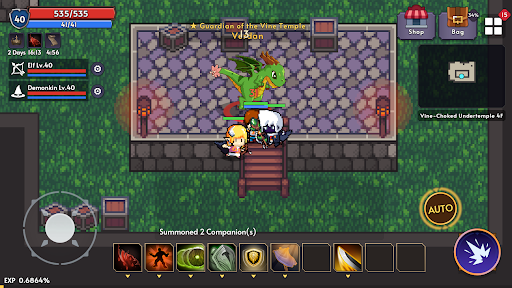
• Link your other characters on the select screen and summon them with a Companion Summoning Scroll.
• Up to three Companions fight beside you with their own level, gear and spells, and earn EXP of their own.
• Two character slots are free from the start, and the 3rd and 4th can also be unlocked with in-game gold.
GEAR UP THE OLD WAY
• Enchant weapons and armor up to +10. High enchants awaken bonus options, and past the safe zone a failure costs a level.
• Reroll options, imbue spells into your gear, polish accessories and complete armor sets.
• Over 70 crafting recipes from town artisans, made from the materials monsters drop.
• Carry weight is real. When the potions and arrows run out, it is back to town.
DUNGEONS, BOSSES AND A KEEP TO TAKE
• Eight multi-floor dungeons, from the Abandoned Laboratory and the Sand-Buried Tomb to the Temple Beneath the Lake and the Ember Lava Cave.
• Over 100 monsters and 20+ bosses that return on their own clocks. Learn their timers and come back for them.
• Break the gate of Kaleon Keep under archer fire, fight floor by floor, and face the Regent at the top.
DEATH HAS WEIGHT
• Fall in battle and you lose experience. From level 10 you may also drop an item where you fell. It stays there until you go back for it.
• Until level 10, the Sprout Ward keeps you safe while you learn.
FAIR TO PLAY
• No gacha, no energy timers, no premium currency.
• The shop sells convenience: character slots, warehouse space, the 30-day Adventurer's Blessing, starter packs and supply bundles. Enchant stones are never sold.
• Optional rewarded videos for free supplies.
ALWAYS WITH YOU
• Plays offline. You only need a connection for purchases, rewarded videos and cloud backup.
• Your progress is backed up to the cloud automatically, and a restore code brings it to a new phone.
• Available in English, Korean, Traditional Chinese, Simplified Chinese, Japanese, Vietnamese, Thai, Portuguese (Brazil), Spanish (Latin America), French and German.
Write your own chronicle.
Show more

1. Download MEmu installer and finish the setup

2. Start MEmu then open Google Play on the desktop

3. Search Lone Chronicle in Google Play
Install
4. Download and Install Lone Chronicle
5. On install completion click the icon to start

6. Enjoy playing Lone Chronicle on PC with MEmu
MEmu Play is the best Android emulator and 100 million people already enjoy its superb Android gaming experience. The MEmu virtualization technology empowers you to play thousands of Android games smoothly on your PC, even the most graphic-intensive ones.
Bigger screen with better graphics; Long duration, without limitation of battery or mobile data.
Full Keymapping support for precise control of keyboard and mouse or gamepad.
Multiple game accounts or tasks on single PC at one time with Multi-Instance manager.
Play Lone Chronicle on PC by following steps: