Meow Marble : Cute puzzle
Updated
Current Version
Offered By

With your passion for Meow Marble : Cute puzzle, you shouldn’t have to limit yourself to the small screen of a phone. Play like a pro and take full control of the game using a keyboard and mouse. MEmu gives you everything you’re looking for. Download and play Meow Marble : Cute puzzle on PC. Play as long as you want — no more worries about battery life, mobile data, or unexpected calls. The all-new MEmu 9 is the best way to play Meow Marble : Cute puzzle on PC. With our expertly designed keymapping system, Meow Marble : Cute puzzle feels just like a real PC game. The MEmu multi-instance manager lets you run two or more accounts on the same device at the same time. Most importantly, our exclusive emulation engine unlocks your PC’s full potential, delivering smooth and seamless performance.
Show more
Download Meow Marble : Cute puzzle on PC with MEmu Android Emulator. Enjoy playing on big screen. Aim at the colorful rolling marbles and pop!
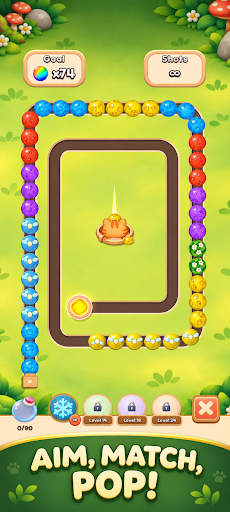
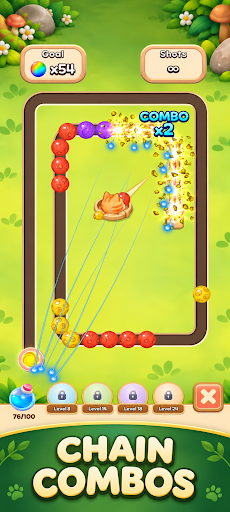
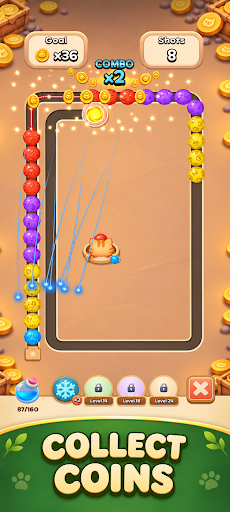

Aim at the colorful rolling marbles and pop!
A relaxing marble shooter puzzle adventure begins to blow away your stress with a cute cat friend.
Experience the simple controls that anyone can easily enjoy and the satisfying sensation right now.
[Simple Yet Thrilling Marble Shooting Action]
- Aim and Shoot: Aim your angle with your finger toward the line of rolling marbles and shoot a marble.
- Match 3 or More: Match 3 or more marbles of the same color to make them pop with a cheerful sound.
- Thrilling Chain Combos: Trigger continuous explosions with a single shot to achieve combos and aim for high scores.
[Charge the Gauge for a Powerful Blow]
- Charge the special gauge that fills up every time you pop marbles.
- When the gauge is full, a powerful effect is unleashed to pop marbles all at once in critical moments.
- Feel the thrill of a satisfying turnaround before the marbles reach the hole.
[Colorful Events Unfolding Every Day]
- Win Streak Event: Clear stages consecutively and earn richer, special rewards.
- Various In-Game Events: Diverse challenges and events with never a dull moment are waiting for you.
[Recommended for People Who]
- Love cute and charming cat graphics
- Are looking for a puzzle game with easy, intuitive rules and satisfying feedback
- Need a relaxing game to casually enjoy on the bus, subway, or during break times
- Enjoy the combos and strategic play unique to the marble shooter genre
Embark on an exciting marble-popping adventure with a lovely cat right now!
--------------------------------------------------
[Optional] Notifications: Receive informational and promotional notifications
※ Granting optional permissions is not mandatory to use the service. After giving permission, you can modify or revoke it in your smartphone's settings.
[How to withdraw access]
* Android 6.0 and above:
- Withdraw by access: Device Settings > Apps > More (Settings and Controls) > App Settings > App Permissions > Select that access > Allow or Withdraw Access
- Withdraw by app: Device Settings > Apps > Selected app > Permissions > Allow or Withdraw Access
* Android 6.0 or less:
Due to the nature of the operating system, access rights cannot be withdrawn, so it can only withdrawn if the app is deleted. We recommend that you upgrade the Android version to 6.0 or higher.
Show more

1. Download MEmu installer and finish the setup

2. Start MEmu then open Google Play on the desktop

3. Search Meow Marble : Cute puzzle in Google Play
Install
4. Download and Install Meow Marble : Cute puzzle
5. On install completion click the icon to start

6. Enjoy playing Meow Marble : Cute puzzle on PC with MEmu
MEmu Play is the best Android emulator and 100 million people already enjoy its superb Android gaming experience. The MEmu virtualization technology empowers you to play thousands of Android games smoothly on your PC, even the most graphic-intensive ones.
Bigger screen with better graphics; Long duration, without limitation of battery or mobile data.
Full Keymapping support for precise control of keyboard and mouse or gamepad.
Multiple game accounts or tasks on single PC at one time with Multi-Instance manager.
Play Meow Marble : Cute puzzle on PC by following steps: