MusorDrop: Case Simulator
Updated
Current Version
1.7.0
Offered By

With your passion for MusorDrop: Case Simulator, you shouldn’t have to limit yourself to the small screen of a phone. Play like a pro and take full control of the game using a keyboard and mouse. MEmu gives you everything you’re looking for. Download and play MusorDrop: Case Simulator on PC. Play as long as you want — no more worries about battery life, mobile data, or unexpected calls. The all-new MEmu 9 is the best way to play MusorDrop: Case Simulator on PC. With our expertly designed keymapping system, MusorDrop: Case Simulator feels just like a real PC game. The MEmu multi-instance manager lets you run two or more accounts on the same device at the same time. Most importantly, our exclusive emulation engine unlocks your PC’s full potential, delivering smooth and seamless performance.
Show more
Download MusorDrop: Case Simulator on PC with MEmu Android Emulator. Enjoy playing on big screen. MusorDrop is a case opening simulator played with in-game currency.
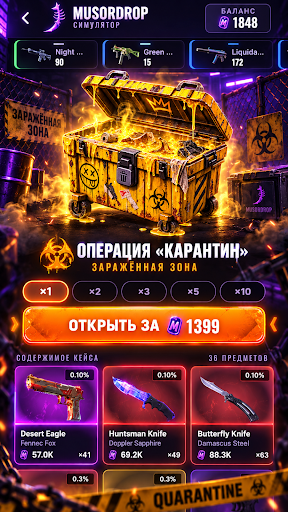
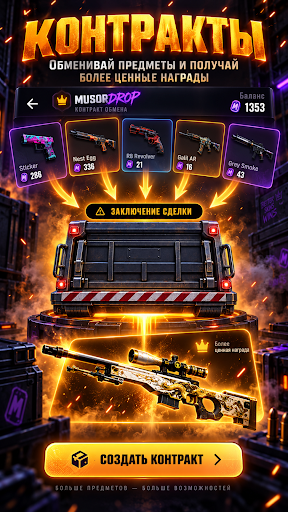
MusorDrop is a case opening simulator played with in-game currency. 80 cases from 99 coins up to quintillions, skin upgrades, trade-up contracts, case battles and an online leaderboard. No in-app purchases and no withdrawals: all money and items in the game are fictional.
CASE OPENING
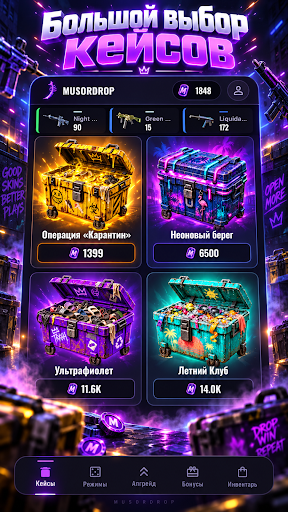
• 80 cases: from the Starter Box for 99 coins to The End of Everything for 1.8 quintillion. Themed cases too: pistols only, snipers only, rifles only, gloves.
• The pricier, the crazier: Garbage Truck, Raccoon Mafia, Black Hole, Trash Dragon, Multiverse — meme cases with their own items.
• Five secret cases — 67, Aura, Sigma, Brainrot and Cringe: more generous than regular ones, opened for an ad plus coins, each with its own cooldown.
• Open one at a time or up to 10 cases at once.
• You can see what's inside a case before opening it.
UPGRADES AND CONTRACTS
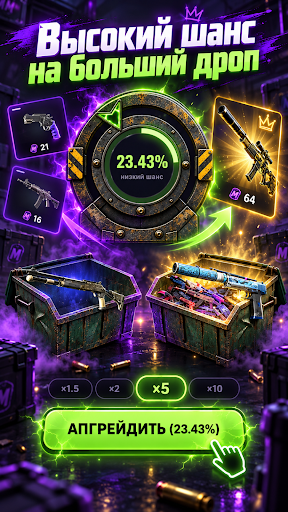
• Skin upgrade: pick an item and a multiplier — ×1.5, ×2, ×5 or ×10. The chance is shown on the wheel before you spin.
• Trade-up contracts: five items in, one item out — worth more or less than what you put in.
• A catalog of 4,000+ CS2 skins: knives, gloves, stickers, agents. Upgrades and contracts use all of it.
MODES
• Magnet crane: catch loot from the junkyard conveyor with an electromagnet — from scrap to a safe.
• Guess the Drop: three items, only one is real.
• Higher or Lower: will the next item from the case be pricier or cheaper?
• Rats: 25 trash bins, some hide rats. Every empty bin multiplies your reward — know when to stop.
• Wheel of fortune and a daily bonus that grows with your streak.
ONLINE
• 1v1 case battles: both players open the same cases, the better drop takes everything.
• Upgrade duels: challenge a friend by nickname or join an open lobby.
• Leaderboard: who is the richest by balance and inventory.
• Friends, invites, promo codes for in-game currency and avatar frames.
• A live feed of big drops and a counter of who's playing right now.
• Online has its own progress from zero and uses Google sign-in. Your offline balance stays on your phone: leave online and it's right where you left it.
ALSO
• Offline mode works without internet.
• Ads stay out of the way: no more than two interstitials per session, rewarded videos only if you choose.
• Inventory, item selling, operation history and stats.
• 10 interface languages.
IMPORTANT
This is a simulator. The balance and items are fictional. Real money is not accepted, paid out or won. Items cannot be bought for money, sold, traded or withdrawn from the app.
This app was created independently and is not affiliated with, endorsed or sponsored by Valve Corporation. Counter-Strike, CS2, item names and images are trademarks and property of Valve Corporation and are used solely to describe items inside the simulator. Skin prices are for reference only, taken from public Steam Community Market data, and are not an offer.
The app is not affiliated with any case opening websites and is not their client: there are no deposits and no item withdrawals.
The app is intended for users aged 16 and over.
Show more

1. Download MEmu installer and finish the setup

2. Start MEmu then open Google Play on the desktop

3. Search MusorDrop: Case Simulator in Google Play
Install
4. Download and Install MusorDrop: Case Simulator
5. On install completion click the icon to start

6. Enjoy playing MusorDrop: Case Simulator on PC with MEmu
MEmu Play is the best Android emulator and 100 million people already enjoy its superb Android gaming experience. The MEmu virtualization technology empowers you to play thousands of Android games smoothly on your PC, even the most graphic-intensive ones.
Bigger screen with better graphics; Long duration, without limitation of battery or mobile data.
Full Keymapping support for precise control of keyboard and mouse or gamepad.
Multiple game accounts or tasks on single PC at one time with Multi-Instance manager.
Play MusorDrop: Case Simulator on PC by following steps: