Order Daybreak
Updated
Current Version
1.0.2
Offered By

With your passion for Order Daybreak, you shouldn’t have to limit yourself to the small screen of a phone. Play like a pro and take full control of the game using a keyboard and mouse. MEmu gives you everything you’re looking for. Download and play Order Daybreak on PC. Play as long as you want — no more worries about battery life, mobile data, or unexpected calls. The all-new MEmu 9 is the best way to play Order Daybreak on PC. With our expertly designed keymapping system, Order Daybreak feels just like a real PC game. The MEmu multi-instance manager lets you run two or more accounts on the same device at the same time. Most importantly, our exclusive emulation engine unlocks your PC’s full potential, delivering smooth and seamless performance.
Show more
Download Order Daybreak on PC with MEmu Android Emulator. Enjoy playing on big screen. Follow us and get more informations and rewards:.

Follow us and get more informations and rewards:
https://discord.gg/F9GK5w36qh
https://www.facebook.com/OrderDaybreak
Email: developer_od@neocraftstudio.com
Step into the twilight of humanity, and embrace the dawn of a new legacy!
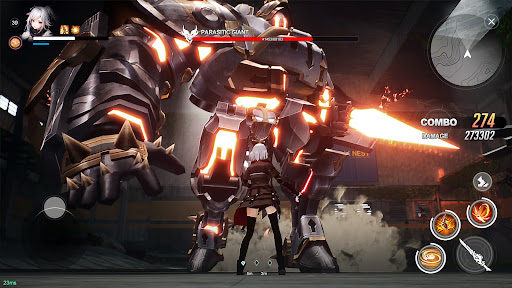
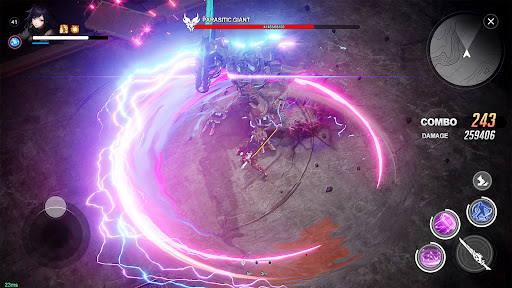
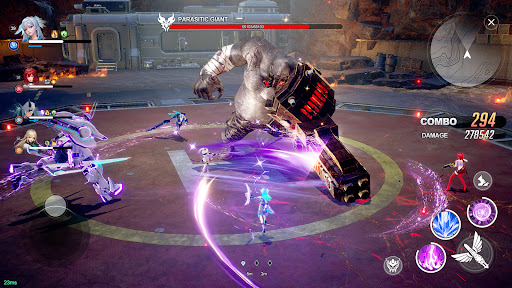
Order Daybreak, an ARPG that deftly weaves post-apocalyptic resilience with sci-fi marvels and anime-inspired grace. Experience combat in full swing from a dynamic 2.5D perspective, where strategic movement and skillful play reign supreme. As an Aegis Warrior in this sheltering sanctuary, gather unique allies and stand united against the corruption that sprawls before you, seeking salvation for a world on the edge.
Game Features:
[Allies in the Apocalypse]
Traverse treacherous landscapes to forge alliances with diverse allies. Develop their unique skills to build a synergistic force capable of turning despair into dominance.
[Strategic Combat Synergy]
Refine your reflexes and engage with precision—the essence of our real-time combat system. Each move is a step towards victory, each skill cast is your signature on the battlefield.
[Shape Your Legacy]
Choose from a multitude of classes, each offering distinctive paths of progression. Whether you yearn for the front lines or support from the shadows, redefine your warrior's journey again and again.
[Survival in Style]
Equip your survivor with gear that's both striking and sturdy, and ride into battle on mounts, each engineered for dominance in a world reclaimed from ruin.
[Global Alliances]
With cross-server play, witness ever-shifting alliances and rivalries. Join forces with players worldwide in this seamless integration of cooperation and competition.
As the first light of daybreak pierces through the darkness, the order of a new age awaits. Will you seize the twilight to bring about a radiant future, or will the nightfall claim your fate? In "Order Daybreak," every decision crafts the narrative of tomorrow.
Will you rise to illuminate a path for those who follow, or falter in the encroaching darkness? The choice—and the challenge—is yours.
Show more

1. Download MEmu installer and finish the setup

2. Start MEmu then open Google Play on the desktop

3. Search Order Daybreak in Google Play
Install
4. Download and Install Order Daybreak
5. On install completion click the icon to start

6. Enjoy playing Order Daybreak on PC with MEmu
MEmu Play is the best Android emulator and 100 million people already enjoy its superb Android gaming experience. The MEmu virtualization technology empowers you to play thousands of Android games smoothly on your PC, even the most graphic-intensive ones.
Bigger screen with better graphics; Long duration, without limitation of battery or mobile data.
Full Keymapping support for precise control of keyboard and mouse or gamepad.
Multiple game accounts or tasks on single PC at one time with Multi-Instance manager.
Play Order Daybreak on PC by following steps: