
Paralives
Updated
Current Version
Offered By

With your passion for Paralives, you shouldn’t have to limit yourself to the small screen of a phone. Play like a pro and take full control of the game using a keyboard and mouse. MEmu gives you everything you’re looking for. Download and play Paralives on PC. Play as long as you want — no more worries about battery life, mobile data, or unexpected calls. The all-new MEmu 9 is the best way to play Paralives on PC. With our expertly designed keymapping system, Paralives feels just like a real PC game. The MEmu multi-instance manager lets you run two or more accounts on the same device at the same time. Most importantly, our exclusive emulation engine unlocks your PC’s full potential, delivering smooth and seamless performance.
Show more
Download Paralives on PC with MEmu Android Emulator. Enjoy playing on big screen. Paralives is an upcoming life simulation game that offers players an expansive and highly customizable experience centered around building dream homes and managing the lives of unique characters.
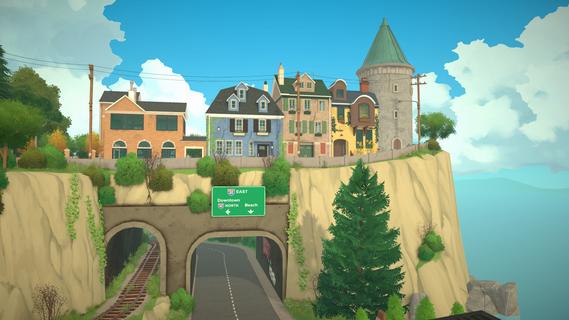

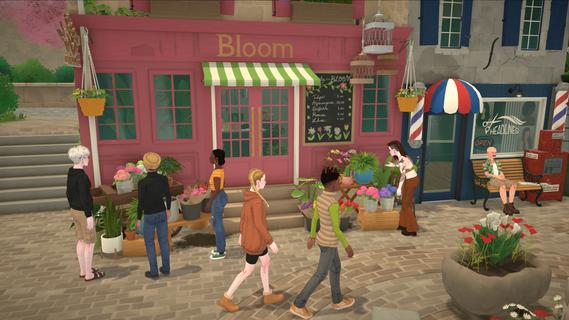

Paralives is an upcoming life simulation game that offers players an expansive and highly customizable experience centered around building dream homes and managing the lives of unique characters. Developed by Alex Massé, Paralives aims to blend the charm of classic life sims with modern design freedom, providing a vibrant and immersive sandbox where creativity and storytelling go hand in hand. At its core, Paralives invites players to design and construct houses with unprecedented flexibility. Unlike many other simulation games that limit architectural choices to preset templates or grids, Paralives features an intuitive and powerful building system. Players can create homes of any shape and size, customizing walls, windows, doors, roofs, and interior layouts with ease. The game’s building tools allow for curved walls, slanted roofs, and a wide variety of architectural elements, enabling truly unique and personalized designs. Whether you dream of a cozy cottage, a sprawling modern mansion, or an eclectic artist’s loft, Paralives gives you the freedom to bring that vision to life. Beyond architecture, Paralives shines in its character creation and life management aspects. Players can create diverse characters with detailed customization options, including appearance, clothing, hairstyles, and personality traits. Each character has their own needs, desires, and relationships, which players can nurture or challenge as they see fit. The game encourages players to craft rich narratives around their characters, from everyday routines to dramatic life events. The life simulation mechanics in Paralives are designed to be both accessible and deep. Characters have needs such as hunger, hygiene, social interaction, and fun, which players must balance to keep them happy and healthy. The game also features skills and careers, allowing characters to pursue jobs, hobbies, and personal growth. Players can guide their characters through various life stages, witnessing their growth and changes over time. Social interaction is another key element. Characters can form friendships, romantic relationships, rivalries, and family bonds, all of which influence their behavior and storylines. Players can organize social gatherings, parties, or quiet family dinners, creating dynamic and evolving social scenes within the game world. Paralives also places a strong emphasis on community and player creativity. The developers have expressed their commitment to supporting modding and custom content, enabling players to share their creations and expand the game’s possibilities. This openness fosters a vibrant community where ideas and inspiration flow freely. Visually, Paralives features charming, stylized graphics with a warm and inviting color palette. The art style strikes a balance between realism and cartoonish appeal, making characters and environments feel lively and relatable without overwhelming detail. The user interface is designed to be intuitive, helping players focus on creativity and storytelling rather than cumbersome controls. While still in development, Paralives has already garnered significant attention for its fresh approach to life simulation. It promises to offer a more flexible and player-driven experience compared to existing titles in the genre. By combining deep building mechanics, rich character customization, and engaging life management systems, Paralives aims to become a beloved sandbox where players can live out their dreams—literally building and shaping lives in a world of their own making. In summary, Paralives is more than just a life sim; it’s a platform for creativity, storytelling, and personal expression. Whether you’re passionate about architecture, character-driven narratives, or simply enjoying the everyday moments of simulated life, Paralives offers a welcoming and expansive playground. As the game continues to develop, it holds the promise of redefining what a life simulation game can be, inviting players to live fully and beautifully—one dream house at a time.
Show more

1. Download MEmu installer and finish the setup

2. Start MEmu then open Google Play on the desktop

3. Search Paralives in Google Play
Install
4. Download and Install Paralives
5. On install completion click the icon to start

6. Enjoy playing Paralives on PC with MEmu
MEmu Play is the best Android emulator and 100 million people already enjoy its superb Android gaming experience. The MEmu virtualization technology empowers you to play thousands of Android games smoothly on your PC, even the most graphic-intensive ones.
Bigger screen with better graphics; Long duration, without limitation of battery or mobile data.
Full Keymapping support for precise control of keyboard and mouse or gamepad.
Multiple game accounts or tasks on single PC at one time with Multi-Instance manager.
Play Paralives on PC by following steps:

















































