Ph Moba
Updated
Current Version
2.0
Offered By

With your passion for Ph Moba, you shouldn’t have to limit yourself to the small screen of a phone. Play like a pro and take full control of the game using a keyboard and mouse. MEmu gives you everything you’re looking for. Download and play Ph Moba on PC. Play as long as you want — no more worries about battery life, mobile data, or unexpected calls. The all-new MEmu 9 is the best way to play Ph Moba on PC. With our expertly designed keymapping system, Ph Moba feels just like a real PC game. The MEmu multi-instance manager lets you run two or more accounts on the same device at the same time. Most importantly, our exclusive emulation engine unlocks your PC’s full potential, delivering smooth and seamless performance.
Show more
Download Ph Moba on PC with MEmu Android Emulator. Enjoy playing on big screen. PH MOBA: Philippine Heroes Arena (Updated Full Description).
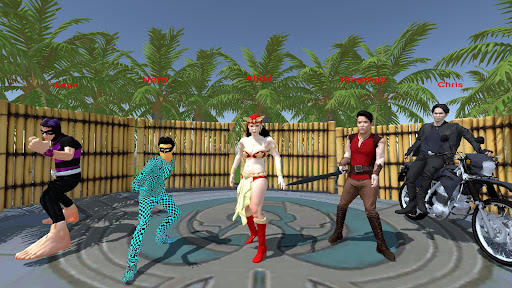
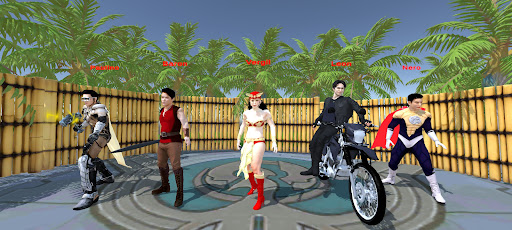
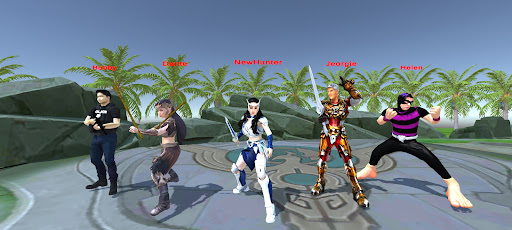
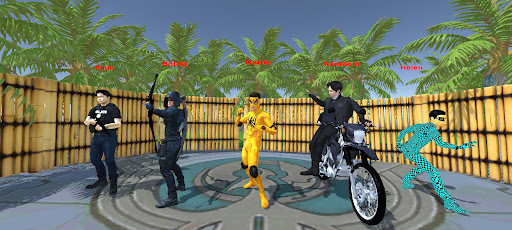
PH MOBA: Philippine Heroes Arena (Updated Full Description)
Handa ka na bang harapin ang mga lagim ng dilim at maging pinakamalakas na bayani?
Ang PH MOBA ay ang kauna-unahang pinagsamang 5v5 battle arena at 3D open-world adventure game na idinisenyo para sa mga mahilig sa aksyon, estratehiya, at mitolohiyang Pilipino. Gamitin ang iyong galing, talino, at lakas para protektahan ang iyong kampo at ganyakin ang iyong karakter sa mundo ng mga alamat!
MGA BAGONG TAMPOK AT MODA:
BAGONG ADVENTURE MODE (3D MMORPG Style)
Huwag lang makipag-battle, mag-explore din! Pumasok sa isang malawak na 3D world kung saan maaari kang mag-farm, magpakalakas, at makipagtagpo sa mga nakatatakot na nilalang mula sa mga kwentong bayan.
Labanan ang mga Alamat: Harapin ang mga mababangis na boss tulad ng Kapre, Tikbalang, Manananggal, Tiyanak, Chonlo/Tsukoy, White Lady, at marami pang iba!
Epic Loot System: May chance na mag-drop ng mga makapangyarihang equipments at items ang mga monster na matatalo mo para mas mapalakas ang iyong karakter!
CROSS-MODE REWARDS (MOBA to RPG Integration)
Ang bawat panalo mo sa battle arena ay may kabuluhan! Kapag nanalo ka sa 5v5 MOBA mode, makakakuha ka ng mga Random Item Drops na maaari mong dalhin at gamitin para sa iyong paglalakbay sa MMORPG Adventure Mode. Mas maraming panalo, mas maraming malalakas na kagamitan!
MGA PANGUNAHING TAMPOK:
Classic 5v5 3-Lane Arena: Gamitin ang iyong diskarte sa pag-atake at pagdepensa sa pamilyar na MOBA map. Pabagsakin ang mga tore ng kalaban habang iniiwasan ang mga bitag sa kagubatan.
Offline Training Mode: Hindi mo kailangan ng internet para maging master ng arena. Maaari kang mag-training at makipaglaban sa aming matatalinong AI bots kahit nasaan ka man.
Tunay na Pinoy Strategy: Binuo ang larong ito para sa bawat gamer na naghahanap ng mabilis, swabe, at kapana-panabik na gameplay sa mobile, na may temang hinding-hindi banyaga sa kulturang Pilipino.
Huwag hayaang sakupin ng mga maligno at pwersa ng kadiliman ang inyong lupain. Ipunin ang iyong lakas, maghanda ng diskarte, i-farm ang pinakamalakas na kagamitan, at ipakita ang tunay na tapang ng Lahing Pilipino!
I-download na ang PH MOBA at simulan ang isang walang katulad na pakikipagsapalaran!
Show more

1. Download MEmu installer and finish the setup

2. Start MEmu then open Google Play on the desktop

3. Search Ph Moba in Google Play
Install
4. Download and Install Ph Moba
5. On install completion click the icon to start

6. Enjoy playing Ph Moba on PC with MEmu
MEmu Play is the best Android emulator and 100 million people already enjoy its superb Android gaming experience. The MEmu virtualization technology empowers you to play thousands of Android games smoothly on your PC, even the most graphic-intensive ones.
Bigger screen with better graphics; Long duration, without limitation of battery or mobile data.
Full Keymapping support for precise control of keyboard and mouse or gamepad.
Multiple game accounts or tasks on single PC at one time with Multi-Instance manager.
Play Ph Moba on PC by following steps: