Pixel Starships 2
Updated
Current Version
0.7.9
Offered By

With your passion for Pixel Starships 2, you shouldn’t have to limit yourself to the small screen of a phone. Play like a pro and take full control of the game using a keyboard and mouse. MEmu gives you everything you’re looking for. Download and play Pixel Starships 2 on PC. Play as long as you want — no more worries about battery life, mobile data, or unexpected calls. The all-new MEmu 9 is the best way to play Pixel Starships 2 on PC. With our expertly designed keymapping system, Pixel Starships 2 feels just like a real PC game. The MEmu multi-instance manager lets you run two or more accounts on the same device at the same time. Most importantly, our exclusive emulation engine unlocks your PC’s full potential, delivering smooth and seamless performance.
Show more
Download Pixel Starships 2 on PC with MEmu Android Emulator. Enjoy playing on big screen. Welcome to Pixel Starships 2, the ultimate starship management and space strategy game!
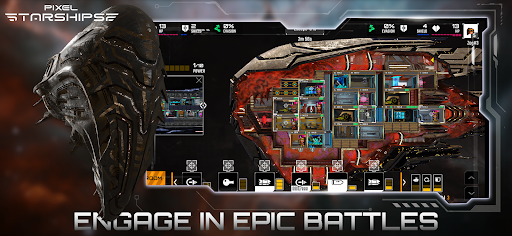
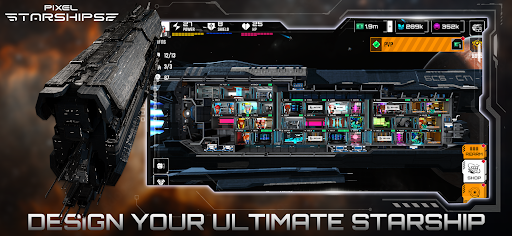
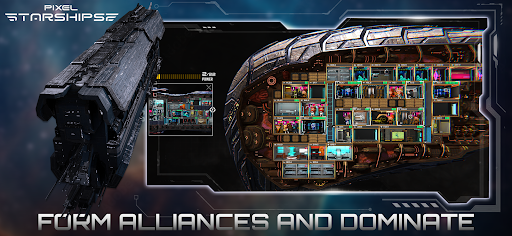
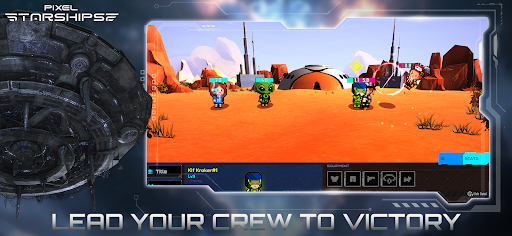
Welcome to Pixel Starships 2, the ultimate starship management and space strategy game! Dive into a vast universe where you can build, customize, and command your very own starship. With a blend of role-playing, real-time strategy, and spaceship management, Pixel Starships 2 offers an unparalleled gaming experience that will captivate both casual and hardcore gamers.
Key Features:
1. Build Your Starship:
Design and construct your starship from the ground up. Choose from a wide range of modules and components to create the perfect vessel. Whether you prefer a heavily armed battleship, a nimble explorer, or a versatile all-rounder, the choice is yours!
2. Train Your Crew:
Assemble a crew of skilled professionals to operate your starship. Train your crew members to enhance their abilities and improve your ship’s performance. Each crew member has unique skills and traits that can turn the tide of battle in your favor.
3. Epic Space Battles:
Engage in thrilling real-time battles against other players and AI opponents. Use strategy and tactics to outmaneuver your enemies, targeting specific ship systems to cripple their defenses. Victory in battle rewards you with valuable resources and prestigious rankings.
4. Explore the Galaxy:
Venture into the unknown as you explore a vast, procedurally generated galaxy. Discover new planets, encounter alien species, and uncover hidden treasures. Each expedition offers new challenges and opportunities for adventure.
5. Join Alliances:
Team up with other players to form alliances. Collaborate on missions, share resources, and support each other in battles. Alliance wars bring an additional layer of strategy and cooperation to the game, fostering a strong community spirit.
6. Regular Updates:
Pixel Starships 2 is constantly evolving, with regular updates introducing new content, features, and improvements. Stay tuned for exciting new events, challenges, and storylines that will keep you engaged for hours on end.
7. Stunning Pixel Art:
Immerse yourself in the beautifully crafted pixel art style of Pixel Starships 2. The game features intricate designs and animations that bring the universe to life, making every moment visually stunning.
Gameplay Highlights:
Starship Customization: Tailor your starship’s layout and appearance to your liking. Upgrade systems, add new weapons, and enhance your ship’s capabilities to dominate in space.
Strategic Combat: Plan your attacks carefully, considering your enemy’s weaknesses and strengths. Use a variety of tactics to gain the upper hand and secure victory.
Resource Management: Gather resources from missions, battles, and exploration. Use these resources to upgrade your ship, train your crew, and expand your fleet.
Dynamic Missions: Undertake a variety of missions that challenge your strategic thinking and problem-solving skills. From rescuing stranded ships to defending against pirate attacks, there’s always something exciting to do.
Player vs. Player (PvP) Battles: Test your skills against other players in intense PvP battles. Climb the leaderboards and earn rewards based on your performance.
Why Pixel Starships 2?
Pixel Starships 2 offers a unique blend of strategy, role-playing, and management that sets it apart from other space games. With its engaging gameplay, regular updates, and vibrant community, it provides endless hours of entertainment. Whether you’re a fan of space exploration, tactical combat, or starship customization, Pixel Starships 2 has something for everyone.
Download Pixel Starships 2 Today!
Join millions of players worldwide and embark on an epic journey through the stars. Build your starship, train your crew, and conquer the galaxy in Pixel Starships 2. The universe is waiting for you—download now and start your adventure!
Show more

1. Download MEmu installer and finish the setup

2. Start MEmu then open Google Play on the desktop

3. Search Pixel Starships 2 in Google Play
Install
4. Download and Install Pixel Starships 2
5. On install completion click the icon to start

6. Enjoy playing Pixel Starships 2 on PC with MEmu
MEmu Play is the best Android emulator and 100 million people already enjoy its superb Android gaming experience. The MEmu virtualization technology empowers you to play thousands of Android games smoothly on your PC, even the most graphic-intensive ones.
Bigger screen with better graphics; Long duration, without limitation of battery or mobile data.
Full Keymapping support for precise control of keyboard and mouse or gamepad.
Multiple game accounts or tasks on single PC at one time with Multi-Instance manager.
Play Pixel Starships 2 on PC by following steps: