QuackQuack Attack-PEGG Blaster
Updated
Current Version
Offered By

With your passion for QuackQuack Attack-PEGG Blaster, you shouldn’t have to limit yourself to the small screen of a phone. Play like a pro and take full control of the game using a keyboard and mouse. MEmu gives you everything you’re looking for. Download and play QuackQuack Attack-PEGG Blaster on PC. Play as long as you want — no more worries about battery life, mobile data, or unexpected calls. The all-new MEmu 9 is the best way to play QuackQuack Attack-PEGG Blaster on PC. With our expertly designed keymapping system, QuackQuack Attack-PEGG Blaster feels just like a real PC game. The MEmu multi-instance manager lets you run two or more accounts on the same device at the same time. Most importantly, our exclusive emulation engine unlocks your PC’s full potential, delivering smooth and seamless performance.
Show more
Download QuackQuack Attack-PEGG Blaster on PC with MEmu Android Emulator. Enjoy playing on big screen. On the endless azure seas, a duck slowly awakens on the deck of a mysterious ark.
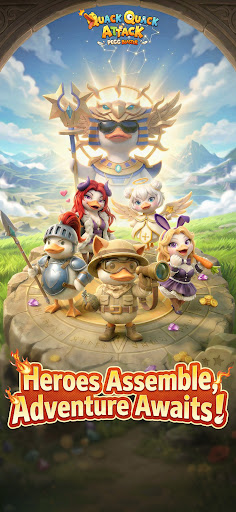
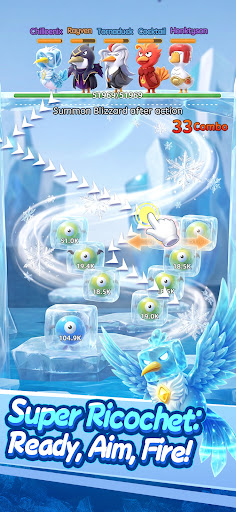
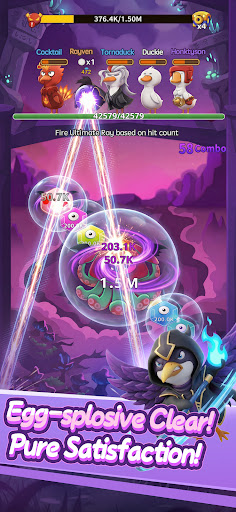
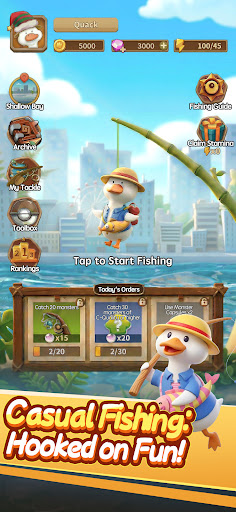
On the endless azure seas, a duck slowly awakens on the deck of a mysterious ark. Having lost your memories, you will transform into "Captain Duck", taking the helm of this ship of miracles and shuttling through perilous fantasy islands! During your adventure, you will constantly encounter and rescue super-powered avian partners like the lightning-wielding Chicken Mage and the martial arts master Goose Monk. Facing the surging monster waves and heavy traps, lead your adorable poultry army to smash monsters and difficulties using the most addictively satisfying "Egg-Laying Slingshot". Outside of combat, gather resources, open mysterious eggs, dress up your partners as you please, decorate your cozy ark, and uncover the ultimate secrets of these waters!
Core Game Features
Relaxing One-Handed Control, Infinite Slingshot for Satisfying Screen Clears
No matter when or where, start a game in various scenes anytime, easily controlled with just one hand! Swipe your finger to draw the aim line, and release to shoot! Utilizing physical ricochets, achieve "Infinite Slingshots" amidst the monster hordes, and enjoy the ultimate stress-relieving thrill of instant screen clears!
50+ Avian Heroes, Assemble Your Exclusive Squad
Recruit over 50 super-powered avian heroes with unique skills! Freely mix and match across hundreds of meticulously designed stages to build your ultimate exclusive squad. Use clever "Collision" and "Combo" mechanics to unleash flashy Combos, leaving your enemies defenseless!
Strategic Build Paths, Mix and Match Fire and Lightning Elements
Reject the cookie-cutter approach and freely construct diverse combat builds! Whether it's a "Fire" lineup that triggers furious explosions or a "Lightning" lineup that electrocutes the whole screen, the rich elemental synergies make every battle full of strategy. Unlock personalized skins that not only look badass but also instantly boost massive Combat Power and stat bonuses!
Massive Progression System, Phantom Beast Formations to Help You Dominate An all-around Combat Power upgrading path!
Gears, cards, and gems are all available to satisfy all your collecting and progression desires. Diverse dungeon gameplay awaits your challenge: continuously break your limits in the "Tower of Purgatory"; activate the powerful "Phantom Beast Formation" to summon phantom beasts to aid you in battle; challenge the "Endless Mode" where strategy is king, or enjoy a moment of leisure time at the "Fishing Ground"!
Casual and AFK-Friendly, Massive Perks and Egg-Opening Carnival
Easily acquire massive resources and enjoy the surprises and joy brought by the crazy "Egg-Opening" blind boxes! Enjoy plenty of premium perks upon logging in, with a chance to get hidden top-tier S-class heroes for free. Even when offline and AFK, the crew on the ark will automatically patrol and collect supplies for you, protecting your liver and keeping you from falling behind!
The world is about to sink, and the ark's engines are roaring! Captain, please board the ship immediately, download the game, and use the most addictive way to smash the apocalypse with your avian army!
Follow Us on Discord: https://discord.com/invite/quackquackattack
Facebook: https://www.facebook.com/profile.php?id=61577676575816
Twitter: https://x.com/QuackAttackEN
YouTube: https://www.youtube.com/@QuackQuackAttack-official
Show more

1. Download MEmu installer and finish the setup

2. Start MEmu then open Google Play on the desktop

3. Search QuackQuack Attack-PEGG Blaster in Google Play
Install
4. Download and Install QuackQuack Attack-PEGG Blaster
5. On install completion click the icon to start

6. Enjoy playing QuackQuack Attack-PEGG Blaster on PC with MEmu
MEmu Play is the best Android emulator and 100 million people already enjoy its superb Android gaming experience. The MEmu virtualization technology empowers you to play thousands of Android games smoothly on your PC, even the most graphic-intensive ones.
Bigger screen with better graphics; Long duration, without limitation of battery or mobile data.
Full Keymapping support for precise control of keyboard and mouse or gamepad.
Multiple game accounts or tasks on single PC at one time with Multi-Instance manager.
Play QuackQuack Attack-PEGG Blaster on PC by following steps: