RuneStory: Reveria
Updated
Current Version
0.11.4
Offered By

With your passion for RuneStory: Reveria, you shouldn’t have to limit yourself to the small screen of a phone. Play like a pro and take full control of the game using a keyboard and mouse. MEmu gives you everything you’re looking for. Download and play RuneStory: Reveria on PC. Play as long as you want — no more worries about battery life, mobile data, or unexpected calls. The all-new MEmu 9 is the best way to play RuneStory: Reveria on PC. With our expertly designed keymapping system, RuneStory: Reveria feels just like a real PC game. The MEmu multi-instance manager lets you run two or more accounts on the same device at the same time. Most importantly, our exclusive emulation engine unlocks your PC’s full potential, delivering smooth and seamless performance.
Show more
Download RuneStory: Reveria on PC with MEmu Android Emulator. Enjoy playing on big screen. Ready to live a double life?

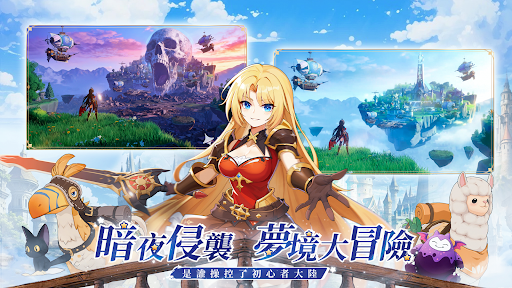
Ready to live a double life? RuneStory: Reveria is a classic-style fantasy MMO with a twist. By day, vibe out with chill farming and fishing. But when the sun sets, the game flips! Dive into the Dream Rift—a hardcore survival challenge where high risk means insane rewards.
========Features========
Nightfall in the Dreamland: Chill & Thrill
Chill by Day: Manage your manor, cast a line, and let the AFK gains roll in.
Thrill by Night: Dive into randomly generated Dream Rifts. Stealth past mobs, crack puzzles, and rush the exit! Every run is a unique roguelike challenge where one wrong move could cost you everything.
5 Classes, Zero Re-rolling
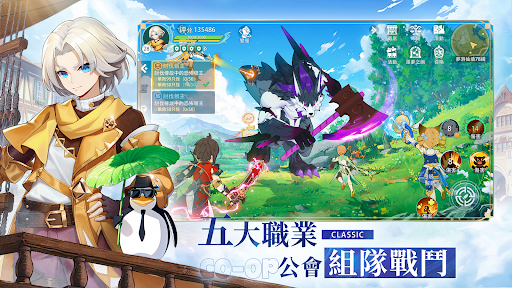
Warrior, Healer, Demon Hunter, and more—why pick a main when you can play them all? Swap between 5 classes. No starting over, no wasted EXP.
One character, shared gear, and infinite builds. Adapt to any raid or PvP meta and become the ultimate flex player your guild needs!
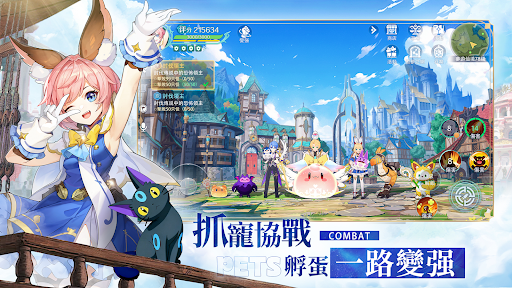
Pet Companions: Catch, Hatch, Evolve
Gotta catch 'em all! Capture mobs or hatch eggs to find your fated companion!
Every pet has unique Branching Evolution paths. Min-max your build and create your own pet squad to crush the Dream Rift!
Fishing & Farming & No Daily Burnout
We deleted the soulless "clock-in, clock-out" daily grind. Feel free to play at your own pace!
Whether you want to be a master angler, a farmer, or a world explorer, you can become a server tycoon without ever entering a dungeon.
Free Trading: Get Rich F2P
Awesome gear and rare cards drop from dungeons, not credit cards! Enjoy high drop rates and the thrill of the loot beam!
A true player-driven economy. We brought back the classic Stall System—you set the price. Buy low, sell high, and make bank. F2P players, this is your time to shine!
※ This game is classified as PG-12.
※ The game content involves violence.
※ Please manage your gaming time responsibly to avoid addiction.
※ INSANE.EM Co., Ltd. is the authorized agent in Taiwan.
※ Terms of Service: https://www.novicegame.com/terms.html
※ Privacy Policy: https://www.novicegame.com/privacy.html
Show more

1. Download MEmu installer and finish the setup

2. Start MEmu then open Google Play on the desktop

3. Search RuneStory: Reveria in Google Play
Install
4. Download and Install RuneStory: Reveria
5. On install completion click the icon to start

6. Enjoy playing RuneStory: Reveria on PC with MEmu
MEmu Play is the best Android emulator and 100 million people already enjoy its superb Android gaming experience. The MEmu virtualization technology empowers you to play thousands of Android games smoothly on your PC, even the most graphic-intensive ones.
Bigger screen with better graphics; Long duration, without limitation of battery or mobile data.
Full Keymapping support for precise control of keyboard and mouse or gamepad.
Multiple game accounts or tasks on single PC at one time with Multi-Instance manager.
Play RuneStory: Reveria on PC by following steps: