
Springs, Eternal
Updated
Current Version
Offered By

With your passion for Springs, Eternal, you shouldn’t have to limit yourself to the small screen of a phone. Play like a pro and take full control of the game using a keyboard and mouse. MEmu gives you everything you’re looking for. Download and play Springs, Eternal on PC. Play as long as you want — no more worries about battery life, mobile data, or unexpected calls. The all-new MEmu 9 is the best way to play Springs, Eternal on PC. With our expertly designed keymapping system, Springs, Eternal feels just like a real PC game. The MEmu multi-instance manager lets you run two or more accounts on the same device at the same time. Most importantly, our exclusive emulation engine unlocks your PC’s full potential, delivering smooth and seamless performance.
Show more
Download Springs, Eternal on PC with MEmu Android Emulator. Enjoy playing on big screen. Springs, Eternal suits players who prefer a short story led experience over combat or equipment collecting.



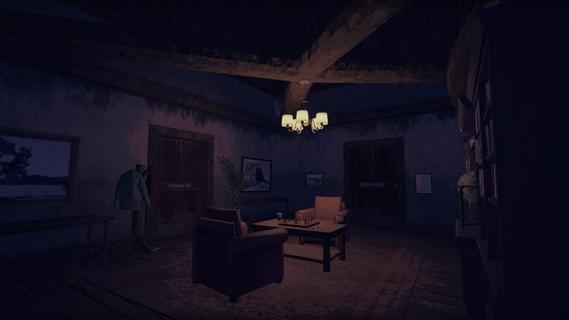
Springs, Eternal suits players who prefer a short story led experience over combat or equipment collecting. Set at the isolated Stillwater Springs retreat, it follows a protagonist confronting memories of a past relationship in a strange nighttime setting. For readers looking to download Springs, Eternal, it is important to note that the provided release information identifies it as a planned PC title for November 2026.Springs, Eternal FeaturesExplore Stillwater SpringsYou walk through fog covered pine forests, hot spring pools, caverns, and quiet paths using a flashlight. The retreat initially appears calm, but its dark surroundings and distant lights create uncertainty as you move between secluded areas.Talk with other visitorsSprings, Eternal introduces visitors with their own histories and unresolved feelings. You meet characters such as philosophers, a tattoo artist, older guests, a widow, and young lovers. Their conversations reveal different reasons for coming to Stillwater Springs.Choose dialogue responsesYou can respond to characters through branching dialogue. These choices can affect what people share, how their stories connect, and which details remain unknown. Careful listening matters more than fast action.Follow memories through a lo fi worldSprings, Eternal uses dithered, pixelated visuals inspired by late 1990s PC games and consoles. Fog, low resolution textures, lighting, and sound support a dreamlike setting while memories of the protagonist’s relationship emerge through places and conversations.Check Release Details Before InstallingSprings, Eternal is a compact narrative game expected to take about two to three hours to complete. No mobile release information or Springs, Eternal APK details are provided. Check Springs, Eternal latest version information and platform availability before installation.
Show more

1. Download MEmu installer and finish the setup

2. Start MEmu then open Google Play on the desktop

3. Search Springs, Eternal in Google Play
Install
4. Download and Install Springs, Eternal
5. On install completion click the icon to start

6. Enjoy playing Springs, Eternal on PC with MEmu
MEmu Play is the best Android emulator and 100 million people already enjoy its superb Android gaming experience. The MEmu virtualization technology empowers you to play thousands of Android games smoothly on your PC, even the most graphic-intensive ones.
Bigger screen with better graphics; Long duration, without limitation of battery or mobile data.
Full Keymapping support for precise control of keyboard and mouse or gamepad.
Multiple game accounts or tasks on single PC at one time with Multi-Instance manager.
Play Springs, Eternal on PC by following steps:

















































