Squid Game: Unleashed
Updated
Current Version
0.0.14334
Offered By

With your passion for Squid Game: Unleashed, you shouldn’t have to limit yourself to the small screen of a phone. Play like a pro and take full control of the game using a keyboard and mouse. MEmu gives you everything you’re looking for. Download and play Squid Game: Unleashed on PC. Play as long as you want — no more worries about battery life, mobile data, or unexpected calls. The all-new MEmu 9 is the best way to play Squid Game: Unleashed on PC. With our expertly designed keymapping system, Squid Game: Unleashed feels just like a real PC game. The MEmu multi-instance manager lets you run two or more accounts on the same device at the same time. Most importantly, our exclusive emulation engine unlocks your PC’s full potential, delivering smooth and seamless performance.
Show more
Download Squid Game: Unleashed on PC with MEmu Android Emulator. Enjoy playing on big screen. NO NETFLIX MEMBERSHIP REQUIRED.

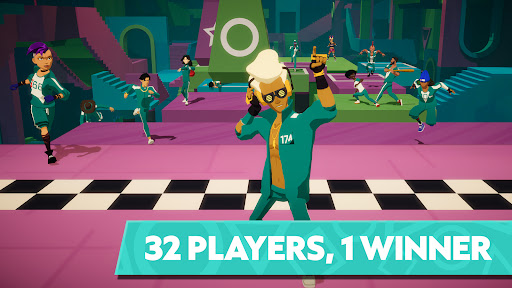
NO NETFLIX MEMBERSHIP REQUIRED.
Everyone is welcome to try Red Light, Green Light, Dalgona and more.
You win some, you die some. Use skill and killer instinct to survive twisted competitions in this multiplayer action game inspired by the hit series.
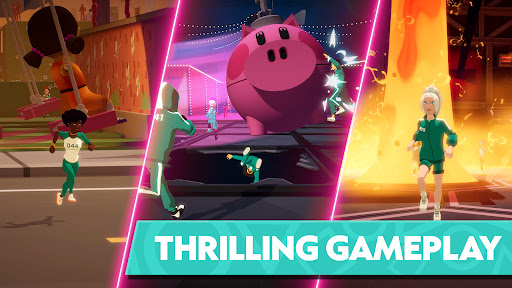
Prepare for fast, heart-pounding action and brutal competition in this multiplayer battle royale game. Play Red Light, Green Light or Glass Bridge — and more iconic games from the series — with friends (or enemies) online. See if you have what it takes to outlast and defeat all the other players in each twisted contest.
With deadly challenges you'll recognize from all three seasons of "Squid Game" and more new games inspired by classic childhood activities, each round is a dark trip down memory lane. Can you make it through playtime alive?
NEW UPDATES FOR SEASON 3:
• Try out three completely new game types, from a deadly Hide & Seek labyrinth to a sky-high version of Squid Game — plus new characters and weapons.
• Frenemies forever: Form a regular Crew of players to collaborate and compete together. Use new chat features to hang out and talk strategy with other players.
• Netflix members can unlock new content and earn unique Play-Along rewards in the game by watching episodes of "Squid Game" Season 3.
BRING "SQUID GAME" TO LIFE
• Find out how long you'd survive as a "Squid Game" contestant by playing Red Light, Green Light, Glass Bridge, Dalgona and more lethal games.
• Use special items to gain a competitive edge. Get a boost from dalgona candy or stun someone with a well-aimed dodgeball.
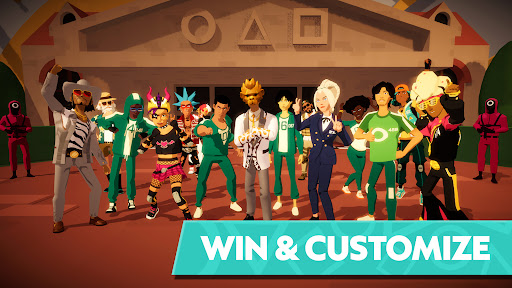
• Are you a natural Front Man, or more of a Geum-ja? Choose the perfect character and express yourself in this online battle royale with a huge range of outfits, animations and emoji reactions.
NO-MERCY MULTIPLAYER MAYHEM
• Play with up to 32 of your friends in Party mode and team up against online opponents in each multiplayer tournament — but always be prepared for betrayal.
• Fast online multiplayer matchmaking brings you into each round of the battle royale in seconds.
• Die early, but want to see who survives? Spectator mode lets your ghostly presence stay and watch the next round of Red Light, Green Light unfold.
THE ONLY WAY OUT IS UP
• Climb the Squid Ladder as you compete in multiplayer contests and complete challenges, unlocking new games and features as your rank rises.
• Spend hard-won (virtual) cash and tokens to collect new characters, outfits and more rewards that will let you strut your stuff in the arena.
• Keep your survival skills sharp with special events inspired by whatever's new in the "Squid Game" universe.
- Created by Boss Fight, a Netflix Game Studio.
Please note that the Data Safety information applies to information collected and used in this app. See the Netflix Privacy Statement to learn more about information we collect and use in this and other contexts, including at account registration.
Show more

1. Download MEmu installer and finish the setup

2. Start MEmu then open Google Play on the desktop

3. Search Squid Game: Unleashed in Google Play
Install
4. Download and Install Squid Game: Unleashed
5. On install completion click the icon to start

6. Enjoy playing Squid Game: Unleashed on PC with MEmu
MEmu Play is the best Android emulator and 100 million people already enjoy its superb Android gaming experience. The MEmu virtualization technology empowers you to play thousands of Android games smoothly on your PC, even the most graphic-intensive ones.
Bigger screen with better graphics; Long duration, without limitation of battery or mobile data.
Full Keymapping support for precise control of keyboard and mouse or gamepad.
Multiple game accounts or tasks on single PC at one time with Multi-Instance manager.
Play Squid Game: Unleashed on PC by following steps: