
The Immortal John Triptych
Updated
Current Version
Offered By

With your passion for The Immortal John Triptych, you shouldn’t have to limit yourself to the small screen of a phone. Play like a pro and take full control of the game using a keyboard and mouse. MEmu gives you everything you’re looking for. Download and play The Immortal John Triptych on PC. Play as long as you want — no more worries about battery life, mobile data, or unexpected calls. The all-new MEmu 9 is the best way to play The Immortal John Triptych on PC. With our expertly designed keymapping system, The Immortal John Triptych feels just like a real PC game. The MEmu multi-instance manager lets you run two or more accounts on the same device at the same time. Most importantly, our exclusive emulation engine unlocks your PC’s full potential, delivering smooth and seamless performance.
Show more
Download The Immortal John Triptych on PC with MEmu Android Emulator. Enjoy playing on big screen. Take a peek behind the curtain of rambling Renaissance ridiculousness with four never-before-seen deleted scenes plus exclusive time-lapse videos revealing the artistic process and absolute buffoonery of Joe Richardon’s painted world of Pythonesque absurdity.
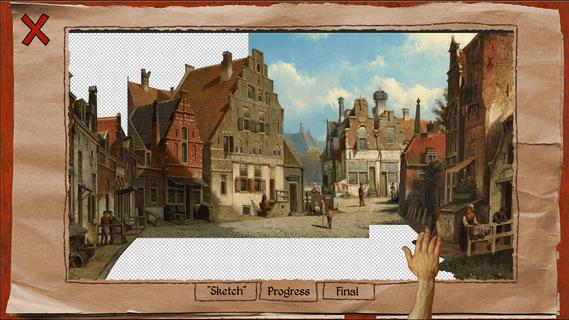
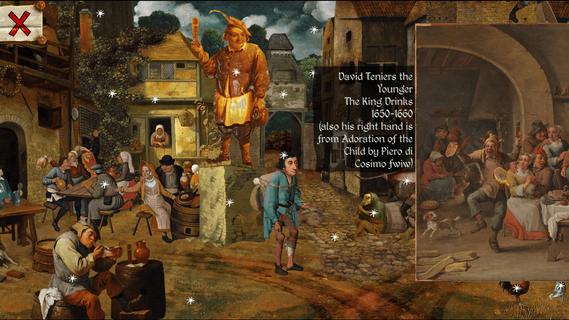


Take a peek behind the curtain of rambling Renaissance ridiculousness with four never-before-seen deleted scenes plus exclusive time-lapse videos revealing the artistic process and absolute buffoonery of Joe Richardon’s painted world of Pythonesque absurdity. The Immortal John DLC offers a rare glimpse into Joe Richardson's cluttered mind, where he inexplicably decided that Renaissance paintings needed more pointing, a bit more clicking, and SIGNIFICANTLY less dignity. Witness the creative process of a man who looked at centuries of artistic mastery and thought, "Yes, but what if I added a bit of flatulence and whimsy?" Experience content that was deemed too something-or-other for the original release whether they were lost to time, a result of poor note-taking, or just a fundamental disrespect for the archival process. Included Content: 4 Deleted Scenes - Lost to time, forgotten, or simply crafted out of nothingness, profound silliness is at the forefront. A scene behind bars where confinement breeds conversation.A mountain climbing expedition that reaches new heights.A preoccupied pack of “thespians” more interested in narcissistic toadyism than really anything else - WITH COMMENTARY! "Art-O-Vision" - Hover over artistic masterpieces and discover the exact Renaissance paintings they originated from and how Joe manipulated them into even GRANDER pieces of work.
Show more

1. Download MEmu installer and finish the setup

2. Start MEmu then open Google Play on the desktop

3. Search The Immortal John Triptych in Google Play
Install
4. Download and Install The Immortal John Triptych
5. On install completion click the icon to start

6. Enjoy playing The Immortal John Triptych on PC with MEmu
MEmu Play is the best Android emulator and 100 million people already enjoy its superb Android gaming experience. The MEmu virtualization technology empowers you to play thousands of Android games smoothly on your PC, even the most graphic-intensive ones.
Bigger screen with better graphics; Long duration, without limitation of battery or mobile data.
Full Keymapping support for precise control of keyboard and mouse or gamepad.
Multiple game accounts or tasks on single PC at one time with Multi-Instance manager.
Play The Immortal John Triptych on PC by following steps:

















































