Total Football VNG
Updated
Current Version
2.9.116
Offered By

With your passion for Total Football VNG, you shouldn’t have to limit yourself to the small screen of a phone. Play like a pro and take full control of the game using a keyboard and mouse. MEmu gives you everything you’re looking for. Download and play Total Football VNG on PC. Play as long as you want — no more worries about battery life, mobile data, or unexpected calls. The all-new MEmu 9 is the best way to play Total Football VNG on PC. With our expertly designed keymapping system, Total Football VNG feels just like a real PC game. The MEmu multi-instance manager lets you run two or more accounts on the same device at the same time. Most importantly, our exclusive emulation engine unlocks your PC’s full potential, delivering smooth and seamless performance.
Show more
Download Total Football VNG on PC with MEmu Android Emulator. Enjoy playing on big screen. SEA CUP 2026 OFFICIALLY KICKS OFF!
SEA CUP 2026 OFFICIALLY KICKS OFF!
The most thrilling football season in Southeast Asia has arrived in Total Football VNG! Standing alongside the SEA Cup - fueling the passion of the national team: predict the champion, recruit regional superstars, and upgrade your lineup to claim the throne. Live the full intensity of an entire football season right in Total Football VNG!
1. SEA Cup Prediction Event - Predict the outcomes of the hottest matches and earn great rewards for every correct guess!
2. Login Event - Receive SEA Regional Peak Season Card - Log in daily and receive top Southeast Asian superstars for free!
3. Football Cup Champion Squad Update - New champion players have officially arrived, ready to join your lineup.
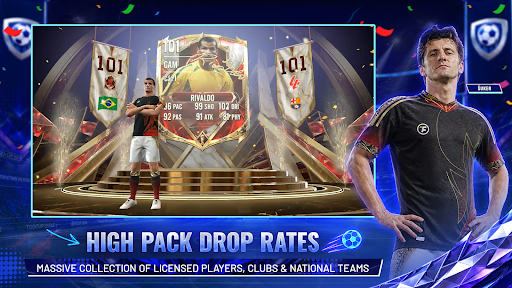
4. Improved Pack Opening Effects - Enjoy smoother, more explosive pack opening animations.
5. Enhanced Card Pull & Upgrade Effects - Card pulls and upgrades are now more impressive, realistic, and immersive than ever.
7 CORE FEATURES
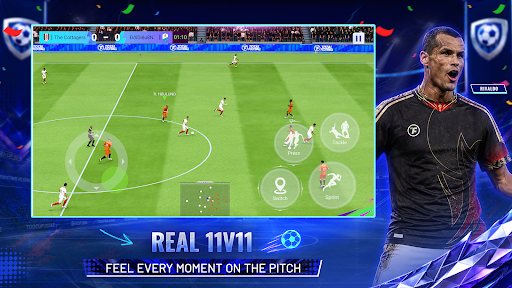
1. SKILL-BASED 11v11 GAMEPLAY
Every match is decided by your skill and decisions on the pitch. Smart AI, realistic physics, and a VAR system that mirrors real football all reward intelligent play. Crisp passes, sharp technique, and match-winning goals are yours to command.
2. CONTROLLER SUPPORT
Connect any Bluetooth controller and experience console-quality control on your phone. Prefer touchscreen? Choose from 3 fully customizable button layouts. Either way, you stay in complete control of every match.
3. BUILD YOUR DREAM SQUAD
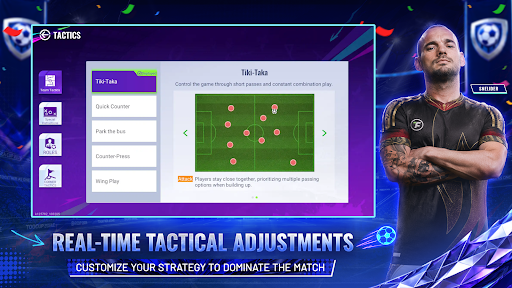
Sign officially FIFPro-licensed players from the world's top clubs. Customize your formation, develop your playstyle, and build a tactical system that reflects your own football philosophy.
4. REAL-TIME CONTENT UPDATES
Total Football VNG moves with real football. Content updates in hours, not weeks. Player cards reflect current form. Transfer news, standout moments, and live events keep the game fresh every single day.
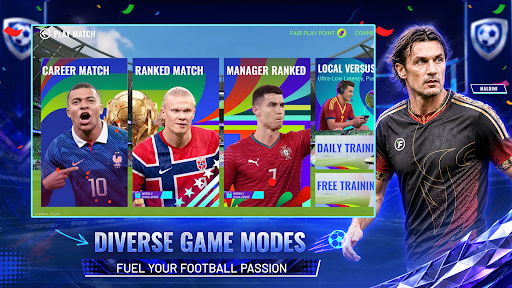
5. MULTIPLE GAME MODES
Climb the online ranked ladder, compete in seasonal tournaments, or challenge friends in zero-lag local matches. Host your own community tournament with custom rules and prizes. Full match quality available offline, anytime.
6. PERSONALIZE YOUR EXPERIENCE
Adjust camera angle, height, and zoom mid-match to suit your style. Customize your club with licensed kits, stadium atmosphere, TIFO banners, and crowd effects rooted in Southeast Asian football culture.
7. FAIR COMPETITION
Your squad retains full value when upgrading or switching players through the resource refund system. Progress through skill and smart decisions. Every Manager competes on a level playing field.
Download Total Football VNG now. This is the tournament you cannot afford to miss.
Show more

1. Download MEmu installer and finish the setup

2. Start MEmu then open Google Play on the desktop

3. Search Total Football VNG in Google Play
Install
4. Download and Install Total Football VNG
5. On install completion click the icon to start

6. Enjoy playing Total Football VNG on PC with MEmu
MEmu Play is the best Android emulator and 100 million people already enjoy its superb Android gaming experience. The MEmu virtualization technology empowers you to play thousands of Android games smoothly on your PC, even the most graphic-intensive ones.
Bigger screen with better graphics; Long duration, without limitation of battery or mobile data.
Full Keymapping support for precise control of keyboard and mouse or gamepad.
Multiple game accounts or tasks on single PC at one time with Multi-Instance manager.
Play Total Football VNG on PC by following steps: