Twilight Towers: Merge Defense
Updated
Current Version
1.11.1
Offered By

With your passion for Twilight Towers: Merge Defense, you shouldn’t have to limit yourself to the small screen of a phone. Play like a pro and take full control of the game using a keyboard and mouse. MEmu gives you everything you’re looking for. Download and play Twilight Towers: Merge Defense on PC. Play as long as you want — no more worries about battery life, mobile data, or unexpected calls. The all-new MEmu 9 is the best way to play Twilight Towers: Merge Defense on PC. With our expertly designed keymapping system, Twilight Towers: Merge Defense feels just like a real PC game. The MEmu multi-instance manager lets you run two or more accounts on the same device at the same time. Most importantly, our exclusive emulation engine unlocks your PC’s full potential, delivering smooth and seamless performance.
Show more
Download Twilight Towers: Merge Defense on PC with MEmu Android Emulator. Enjoy playing on big screen. Fernhollow needs your help!
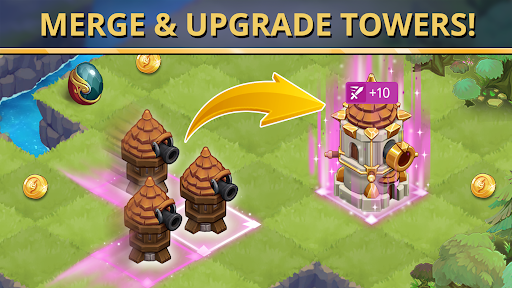
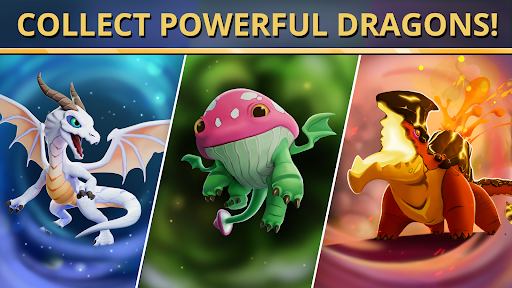
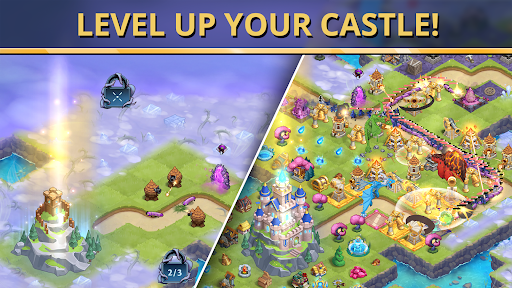
Fernhollow needs your help! A mysterious mist has corrupted the kingdom’s land and creatures, and your castle is under siege — only your merge mastery, tower defense strategy, and dragon defenders can defeat the corrupted beasts. Tower defense meets merge in this fantasy kingdom under attack: defend your castle, merge towers and resources, and unleash powerful dragons to reclaim Fernhollow and expand your kingdom.
Game Features
• Defend Your Castle – Strategically place and upgrade towers to protect your castle from waves of deadly enemies in the ultimate tower defense challenge.
• Merge & Upgrade Towers – Merge towers, villagers, gold, and mana to unlock stronger defenses and build your ultimate strategy.
• Collect Powerful Dragons – Train dragons with unique abilities and unleash them alongside your towers for explosive battles.
• Expand Your Kingdom – Defeat enemies to unlock new territories, expand your kingdom, and grow your persistent map.
• Outsmart Puzzle Campaigns – Conquer 100+ tactical campaign levels with clever merging, resource management, and positional strategy.
• Compete in TD Events – Join monthly tower defense events with new dragons, maps, and leaderboard rewards.
• Customize & Enhance – Augment towers with runes, mid-battle upgrades, and activatable dragon abilities to crush enemy waves.
• Build Your Realm – Organize your kingdom, upgrade your castle from a scrappy keep to an unbreakable fortress, and enjoy the satisfaction of merging.
Why Play Twilight Towers?
• Twilight Towers combines the addictive progression of merge games with the deep strategy of tower defense. Whether you’re defending your castle from endless waves, collecting dragons, or expanding your kingdom, every merge and upgrade brings you closer to victory.
• Are you ready to merge, defend, and reclaim your kingdom? Download Twilight Towers today and master the art of tower defense!
Twilight Towers is free to download and play, but some in-game items, including in-game purchases with random rewards, can be purchased with real money. You can disable in-app purchases in your device settings.
This game contains visual effects and animations which may trigger seizures for those with photosensitive epilepsy.
TERMS OF SERVICE:
https://www.fortisgames.com/en-us/legal/terms-of-use
PRIVACY POLICY:
https://www.fortisgames.com/en-us/legal/privacy-policy
FORTIS CODE:
https://www.fortisgames.com/en-us/community/the-fortis-code
Show more

1. Download MEmu installer and finish the setup

2. Start MEmu then open Google Play on the desktop

3. Search Twilight Towers: Merge Defense in Google Play
Install
4. Download and Install Twilight Towers: Merge Defense
5. On install completion click the icon to start

6. Enjoy playing Twilight Towers: Merge Defense on PC with MEmu
MEmu Play is the best Android emulator and 100 million people already enjoy its superb Android gaming experience. The MEmu virtualization technology empowers you to play thousands of Android games smoothly on your PC, even the most graphic-intensive ones.
Bigger screen with better graphics; Long duration, without limitation of battery or mobile data.
Full Keymapping support for precise control of keyboard and mouse or gamepad.
Multiple game accounts or tasks on single PC at one time with Multi-Instance manager.
Play Twilight Towers: Merge Defense on PC by following steps: