Where's My Water?
Updated
Current Version
1.18.9
Offered By

With your passion for Where's My Water?, you shouldn’t have to limit yourself to the small screen of a phone. Play like a pro and take full control of the game using a keyboard and mouse. MEmu gives you everything you’re looking for. Download and play Where's My Water? on PC. Play as long as you want — no more worries about battery life, mobile data, or unexpected calls. The all-new MEmu 9 is the best way to play Where's My Water? on PC. With our expertly designed keymapping system, Where's My Water? feels just like a real PC game. The MEmu multi-instance manager lets you run two or more accounts on the same device at the same time. Most importantly, our exclusive emulation engine unlocks your PC’s full potential, delivering smooth and seamless performance.
Show more
Download Where's My Water? on PC with MEmu Android Emulator. Enjoy playing on big screen. Get the GAME OF THE YEAR award-winning puzzler!
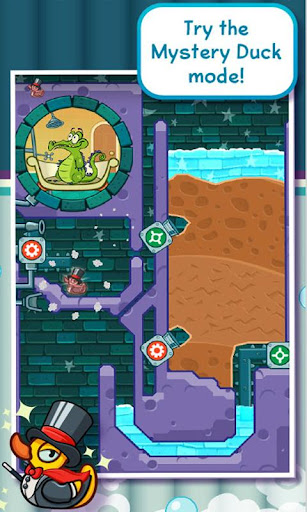
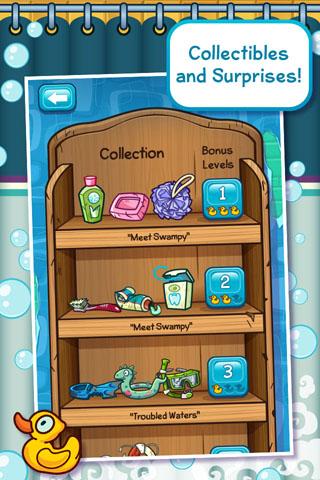
Get the GAME OF THE YEAR award-winning puzzler!
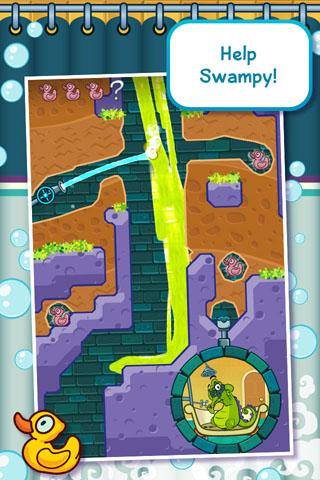
Help Swampy by guiding water to his broken shower. Each level is a challenging physics-based puzzle with amazing life-like mechanics. Cut through dirt to guide fresh water, dirty water, toxic water, steam, and ooze through increasingly challenging scenarios! Every drop counts!
• Original Stories & Characters – Play through 4 unique stories featuring Swampy, Allie, Cranky and Mystery Duck. That’s over 500 amazing puzzles!
• Innovative Mechanic – See water in various forms and use your creativity to solve the puzzles – totally stimulating!
• Collectibles, Challenges, and Bonus Levels – Collect special items uniquely designed for each character and complete cool challenges to unlock bonus levels! “Tri-Duck” each level for ultimate bragging rights!
SWAMPY’S STORY
Swampy the Alligator lives in the sewers under the city. He’s a little different from the other alligators – he’s curious, friendly, and loves taking a nice long shower after a hard day at work. But there’s trouble with the pipes and Swampy needs your help getting water to his shower!
ALLIE’S STORY
Allie is the sewer's most creative alligator. Her quirky spirit and artistic talents made her a star. Now, the gators have crafted a one-of-a-kind steam-powered musical instrument, and can't wait to hear her play it! Help Allie get the steam she needs and enjoy her take on classic Disney tunes.
CRANKY’S STORY
Cranky, a real gator’s gator, has a big appetite and will eat anything, from tires to old fish bones. But he refuses to eat his greens! Use the dirty purple water to clear the algae on Cranky’s plate so he can gobble up his “food”.
MYSTERY DUCK
Catch this fancy teleporting Mystery Duck in this special chapter and hint - timing is everything! Find all kinds of surprises including the biggest duck ever, MegaDuck and cute little Ducklings!
Some stories may require a small additional price but try the FREE levels today!
Before you download this experience, please consider that this app contains social media links to connect with others, in-app purchases that cost real money, as well as advertising for The Walt Disney Family of Companies and some third parties. In App Purchases from $0.99-$4.99
Visit the official Where's My Water? website – http://lol.disney.com/games/wheres-my-water-app
Privacy Policy - https://privacy.thewaltdisneycompany.com/
Terms of Use - https://disneytermsofuse.com/
Your California Privacy Rights - https://privacy.thewaltdisneycompany.com/en/current-privacy-policy/your-california-privacy-rights/
Do Not Sell My Info - https://privacy.thewaltdisneycompany.com/en/dnsmi/
Children’s Online Privacy Policy - https://privacy.thewaltdisneycompany.com/en/for-parents/childrens-online-privacy-policy/
Show more

1. Download MEmu installer and finish the setup

2. Start MEmu then open Google Play on the desktop

3. Search Where's My Water? in Google Play
Install
4. Download and Install Where's My Water?
5. On install completion click the icon to start

6. Enjoy playing Where's My Water? on PC with MEmu
MEmu Play is the best Android emulator and 100 million people already enjoy its superb Android gaming experience. The MEmu virtualization technology empowers you to play thousands of Android games smoothly on your PC, even the most graphic-intensive ones.
Bigger screen with better graphics; Long duration, without limitation of battery or mobile data.
Full Keymapping support for precise control of keyboard and mouse or gamepad.
Multiple game accounts or tasks on single PC at one time with Multi-Instance manager.
Play Where's My Water? on PC by following steps: