AOV Pro
Updated
Current Version
7.20.10
Offered By

Stop worrying about high battery drain when using AOV Pro on your phone. Free yourself from the tiny screen and enjoy the app on a much larger display. From now on, get a full-screen experience of your app with the convenience of a keyboard and mouse. MEmu offers you all the surprising features you’d expect: quick installation and easy setup, intuitive controls, and no more worries about battery life, mobile data, or unexpected calls. The all-new MEmu 9 is the choice for using AOV Pro on your computer. With the MEmu multi-instance manager, you can run two or more accounts at the same time. Most importantly, our exclusive emulation engine unlocks your PC’s full potential, delivering smooth and enjoyable performance.
Show more
Enjoy superb experience of using AOV Pro on PC with MEMU App Player. It's a powerful free Android emulator which provides you with thousands of android apps for their desktop version. Enjoy connecting with friends and polishing your work with higher efficiency! Video app for your in-house photographer, or Lot Management Company.
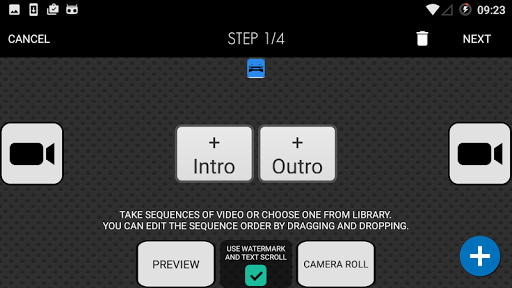
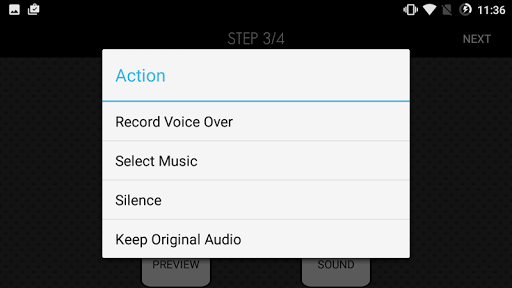
Video app for your in-house photographer, or Lot Management Company
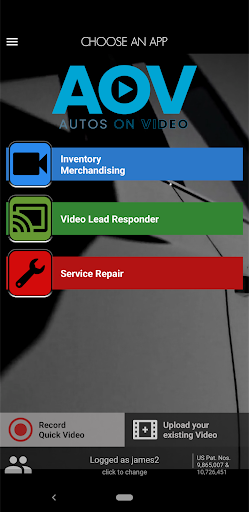
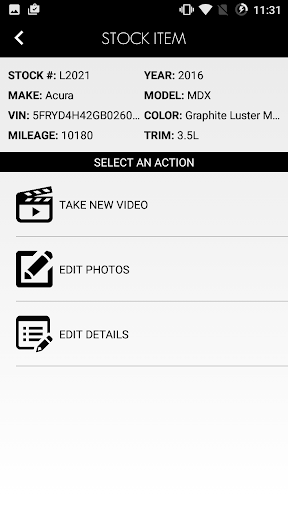
Autos On Video App® - REAL VIDEO - Inventory Merchandising incorporates New and Pre-owned inventory and the ability to do segmented video. Once video, and or video and photos are complete, the simple upload process allows easy syndication to your website and all third party sites, including cars.com, AutoTrader, etc…
Liberate yourself from the old, costly, and time consuming ways you get car videos to the web! A video ad gives shoppers the sense that they are standing beside your car, bringing your product into their home or office. Now you can do easy Walk Around Video. Video is the first media choice for prospective buyers on the web and mobile devices.
Sell more, and reduce fixed expenses with Autos On Video
Sales Opportunity Video app for your sales people and BDC department
Sales Opportunity Follow Up is an innovative video app that allows your Sales/BDC team to do segmented video of vehicles people are interested in buying. Social Videos: Lead Response, Testimonials, Pre-Delivery, etc…
“View 360” Interactive
Allows prospects to interact with “360 Walk Around” with interactive photo hotspots of vehicle they interested in buying. More time on your website and information you need to help your customer’s
engage.
Service Opportunities Video app for your ASM, Technician, or dedicated service videographer.
Service Opportunities helps you build trust with your service customers. Service Repair video helps your customers see and understanding the repair. Video increases hours and line items sold per RO.
Important:
HTML email through Android device is now available.
After you complete your update on Google Play, create a VLR video, and follow app steps until you get to send options. If you select “HTML Email” to deliver video with AOV Pro Android, this is where you can select your current Gmail, or Outlook account. If you are unsure, please send video via “Plain Text Email”.
Show more

1. Download MEmu installer and finish the setup

2. Start MEmu then open Google Play on the desktop

3. Search AOV Pro in Google Play
Install
4. Download and Install AOV Pro
5. On install completion click the icon to start

6. Enjoy using AOV Pro on PC with MEmu
MEmu Play is the best Android emulator, and 100 million users already enjoy its superb Android app experience. Powered by advanced virtualization technology, it lets you enjoy thousands of Android apps smoothly on your PC—including the most graphics-intensive ones.
Bigger screen with better graphics; Long duration, without limitation of battery or mobile data.
Full Keymapping support for precise control of keyboard and mouse or gamepad.
Multiple game accounts or tasks on single PC at one time with Multi-Instance manager.
Use AOV Pro on PC by following steps: