ASMR Camera With Audio Effects
Updated
Current Version
1.2-Vain
Offered By

Stop worrying about high battery drain when using ASMR Camera With Audio Effects on your phone. Free yourself from the tiny screen and enjoy the app on a much larger display. From now on, get a full-screen experience of your app with the convenience of a keyboard and mouse. MEmu offers you all the surprising features you’d expect: quick installation and easy setup, intuitive controls, and no more worries about battery life, mobile data, or unexpected calls. The all-new MEmu 9 is the choice for using ASMR Camera With Audio Effects on your computer. With the MEmu multi-instance manager, you can run two or more accounts at the same time. Most importantly, our exclusive emulation engine unlocks your PC’s full potential, delivering smooth and enjoyable performance.
Show more
Enjoy superb experience of using ASMR Camera With Audio Effects on PC with MEMU App Player. It's a powerful free Android emulator which provides you with thousands of android apps for their desktop version. Enjoy connecting with friends and polishing your work with higher efficiency! AX Video Recorder is a Video Recorder with High Quality Audio Effects, such as Reverb, Compressor, Echo, Flanger, Normalizer, and more.
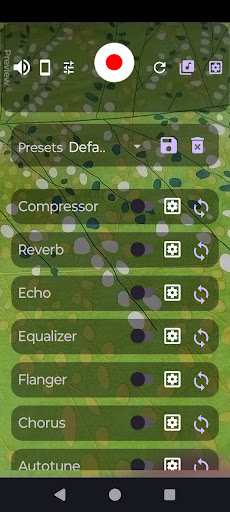
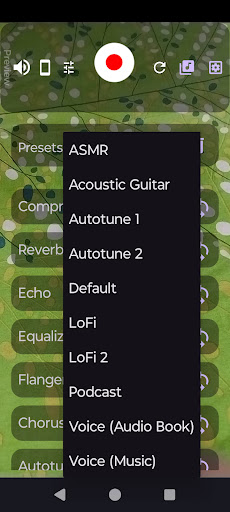
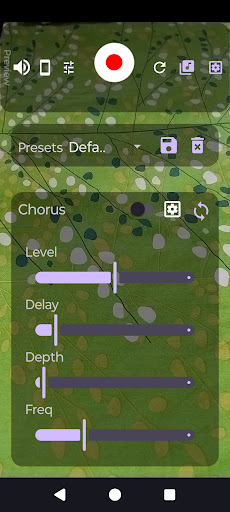
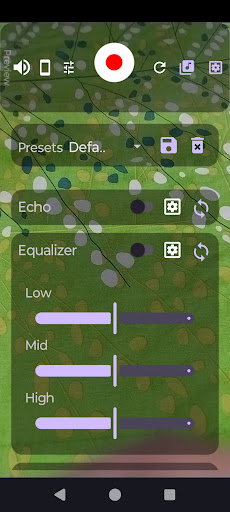
AX Video Recorder is a Video Recorder with High Quality Audio Effects, such as Reverb, Compressor, Echo, Flanger, Normalizer, and more. This is the only video reocrder app on the Play Store with audio effects. You can also record audio from USB OTG devices and microphones.
With this app, you can directly record high quality studio-like audio with post production on your phone. You can use multiple effects at the same time. No need to edit the recorded audio, just record anywhere on the go! With the Live Preview feature, with plugged in bluetooth or wired speakers or headphones, (or even the phone speaker, see below) you can listen to the audio being recorded, or prepare your presets for use during recording. You can use the built-in presets, or create your own settings and save them for later.
Supported effects:
• Audio Compressor: Adjust the dynamic range of the audio input
• Reverb: Create ambience in the audio signal. Configure the effect to suit your target sound. Create LoFi audio easily
• Echo: Create echo and delay sounds for spacy soundscapes or to add weight to your voice while singing
• Equalizer: Tune your audio to your taste with a three band graphic equalizer
• Flanger: Use the flanger to create interesting sounds
• Chorus: This effect can be used to create texture for your voice or a musical instrument
• Autotune: Play around with frequencies, change pitch, and adjust your voice to fixed musical notes
• Normalizer: Use the normalizer to boost the audio signal, for example to create ASMR
Key Features
• Live Preview: Listen to your voice while recording, or play back live audio without recording. You can use this feature to hear what is being recorded in real time, or hear live feedback from the microphone without recording to create presets. Note: Using the Live Preview feature directly on the device without connecting headphones will cause a feedback sound - much like the feedback on a public address system. Use of headphones - Bluetooth or wired - is recommended. The app will switch audio automatically to connected audio devices. You can also change the audio devices in app settings.
• USB OTG Audio Device support: Use USB audio interfaces or external soundcards to record audio.
• Floating point precision for high quality audio processing
• Ultra Low latency for lag free recording experience
• Low memory footprint provides great performance on even low end devices
• High performance efficient audio engine
• No ads
• No unnecessary permissions required
• Completely open source
Made with ❤️
See for yourself what the app actually does, or use this code to create something new!
Show more

1. Download MEmu installer and finish the setup

2. Start MEmu then open Google Play on the desktop

3. Search ASMR Camera With Audio Effects in Google Play
Install
4. Download and Install ASMR Camera With Audio Effects
5. On install completion click the icon to start

6. Enjoy using ASMR Camera With Audio Effects on PC with MEmu
MEmu Play is the best Android emulator, and 100 million users already enjoy its superb Android app experience. Powered by advanced virtualization technology, it lets you enjoy thousands of Android apps smoothly on your PC—including the most graphics-intensive ones.
Bigger screen with better graphics; Long duration, without limitation of battery or mobile data.
Full Keymapping support for precise control of keyboard and mouse or gamepad.
Multiple game accounts or tasks on single PC at one time with Multi-Instance manager.
Use ASMR Camera With Audio Effects on PC by following steps:































