Müller Deutschland
Updated
Current Version
1.17.1
Offered By

Stop worrying about high battery drain when using Müller Deutschland on your phone. Free yourself from the tiny screen and enjoy the app on a much larger display. From now on, get a full-screen experience of your app with the convenience of a keyboard and mouse. MEmu offers you all the surprising features you’d expect: quick installation and easy setup, intuitive controls, and no more worries about battery life, mobile data, or unexpected calls. The all-new MEmu 9 is the choice for using Müller Deutschland on your computer. With the MEmu multi-instance manager, you can run two or more accounts at the same time. Most importantly, our exclusive emulation engine unlocks your PC’s full potential, delivering smooth and enjoyable performance.
Show more
Enjoy superb experience of using Müller Deutschland on PC with MEMU App Player. It's a powerful free Android emulator which provides you with thousands of android apps for their desktop version. Enjoy connecting with friends and polishing your work with higher efficiency! Sammeln, shoppen, sparen & gewinnen!
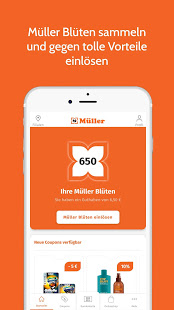
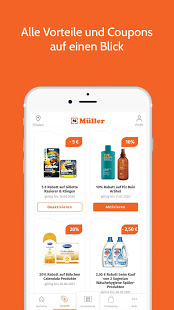
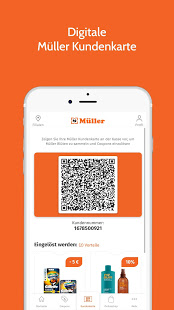
Sammeln, shoppen, sparen & gewinnen!
Die neue Müller App bietet Ihnen viele Vorteile, wie z.B. eine digitale Kundenkarte, Coupons, Gewinnspiele & vieles mehr. Diese Vorteile können Sie in ganz Deutschland nutzen.
So funktioniert es:
1. Müller App kostenlos herunterladen
2. Registrieren Sie sich für die Müller Kundenkarte: Sie entscheiden mit welchen Daten Sie sich anmelden: über Ihre E-Mail-Adresse, per SMS, über Facebook oder mit Ihren Google Daten.
3. Um von den vielen Vorteilen der App zu profitieren, ist die Angabe von wenigen persönlichen Daten notwendig. Sie entscheiden selbst welche Daten Sie angeben möchten und können Benachrichtigungen von uns selbständig aktivieren.
Die Vorteile und Funktionen der Müller App:
Digitale Kundenkarte
Ihre Treue wird belohnt! Durch Einkäufe und Weiterempfehlungen sammeln Sie Müller Blüten auf Ihrer Kundenkarte. Bereits für Ihren 1. Einkauf in Höhe von min. 20 Euro erhalten Sie einen Willkommensbonus von 500 Müller Blüten! Diese können Sie bei zukünftigen Einkäufen einlösen und bares Geld sparen. Die App ist als digitale Kundenkarte auf Ihrem Mobiltelefon immer mit dabei. In Ihrem Blütenkonto sehen Sie jederzeit den aktuellen Blüten Stand Ihrer Kundenkarte sowie eine Übersicht über Ihre vergangenen Einkäufe.
Coupons & Gewinnspiele
Als App Nutzer erhalten Sie einen Überblick über aktuelle Coupons aus unserer Drogerie und aus weiteren Sortimenten und können diese nach dem Aktivieren bei Ihren Einkäufen nutzen um zu sparen. Außerdem profitieren Sie von exklusiven Gewinnspielen.
Weitere Funktionen
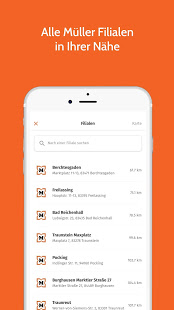
Filialfinder: In unserem Filialfinder finden Sie Ihre nächste Müller Filiale, Öffnungszeiten und weitere Informationen zu unseren Müller-Filialen.
Onlineshop: In der App können Sie wie gewohnt in unseren Produktkategorien stöbern, bestimmte Artikel aus unserem Sortiment suchen und direkt shoppen. Müller ist mehr als nur eine Drogerie – Sie finden im Onlineshop alle Sortimente: Drogerie, Parfümerie, Naturshop, Spielware, Schreibware, Multi-Media, Haushalt, Strümpfe und Bücher.
Prospekte & Magazine: In der Prospekt Übersicht finden Sie alle aktuellen Müller Prospekte, z.B. unsere regelmäßigen Drogerie Angebote und können diese durchblättern. Außerdem finden Sie hier unsere Kundenmagazine, lassen Sie sich inspirieren!
Digitaler Kassenbon: Nach dem Einkauf erhalten Sie Ihren Kassenbon in der App – nachhaltig und praktisch, denn so kann er nicht verloren gehen.
Ihre Meinung ist uns wichtig! Wir freuen uns über Ihr Feedback um unsere Müller App weiterzuentwickeln und zu verbessern: kundenkarte@mueller.de
Show more

1. Download MEmu installer and finish the setup

2. Start MEmu then open Google Play on the desktop

3. Search Müller Deutschland in Google Play
Install
4. Download and Install Müller Deutschland
5. On install completion click the icon to start

6. Enjoy using Müller Deutschland on PC with MEmu
MEmu Play is the best Android emulator, and 100 million users already enjoy its superb Android app experience. Powered by advanced virtualization technology, it lets you enjoy thousands of Android apps smoothly on your PC—including the most graphics-intensive ones.
Bigger screen with better graphics; Long duration, without limitation of battery or mobile data.
Full Keymapping support for precise control of keyboard and mouse or gamepad.
Multiple game accounts or tasks on single PC at one time with Multi-Instance manager.
Use Müller Deutschland on PC by following steps: