Avion Rewards
Updated
Current Version
4.70
Offered By

Stop worrying about high battery drain when using Avion Rewards on your phone. Free yourself from the tiny screen and enjoy the app on a much larger display. From now on, get a full-screen experience of your app with the convenience of a keyboard and mouse. MEmu offers you all the surprising features you’d expect: quick installation and easy setup, intuitive controls, and no more worries about battery life, mobile data, or unexpected calls. The all-new MEmu 9 is the choice for using Avion Rewards on your computer. With the MEmu multi-instance manager, you can run two or more accounts at the same time. Most importantly, our exclusive emulation engine unlocks your PC’s full potential, delivering smooth and enjoyable performance.
Show more
Enjoy superb experience of using Avion Rewards on PC with MEMU App Player. It's a powerful free Android emulator which provides you with thousands of android apps for their desktop version. Enjoy connecting with friends and polishing your work with higher efficiency! Get cash back offers, savings and rewards points all in one app.
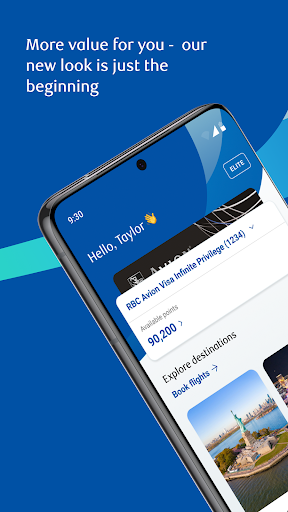
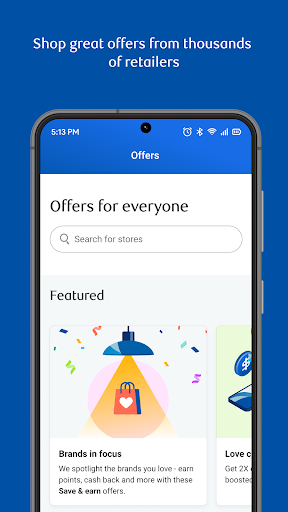
Get cash back offers, savings and rewards points all in one app.
Shop deals on the web
Easily shop for products you want and get cash back offers and discounts from thousands of merchants online.
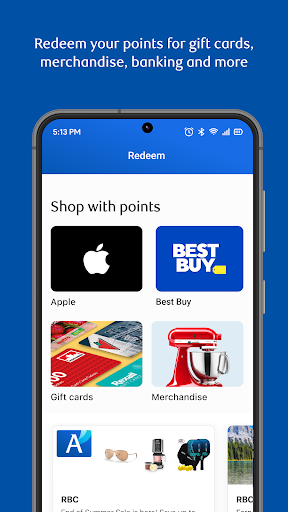
Redeem with Avion points
Redeem your points for all the things you love like gift cards and merchandise - even Apple and Best Buy.
Book travel with ease
Eligible members can redeem Avion points for flights, stays and car rentals – Elite members can enjoy any flight on any airline at any time!
Manage your points
Transfer your points across your Avion Rewards accounts to use them where you need them most. Find greater flexibility when you convert your Avion points to another loyalty program.
Pay bills
Use points to pay bills, pay a credit card, invest or make donations – it’s your choice!
Don’t have an RBC points-earning product?
No problem. Join without an RBC account to start earning cash back today. Or, if you have an RBC product, join with your RBC information and earn even greater rewards on every eligible transaction.
Here’s how we keep you safe:
SECURITY
Rest easy knowing that you’re protected from unauthorized transactions** in the Avion Rewards® app by the RBC Online Security Guarantee.
PRIVACY
The Avion Rewards app might need to access device services for certain features. For a full list of the features, check out https://www.rbcroyalbank.com/ways-to-bank/rbc-rewards-app/android-permissions.html
For help removing the Avion Rewards app from your device, there are instructions at https://www.rbcroyalbank.com/ways-to-bank/rbc-rewards-app/android-permissions.html
You can get more information about RBC digital channel privacy at https://www.rbc.com/privacysecurity/ca/online-privacy.html
Contact information for RBC Royal Bank is available at https://www.rbcroyalbank.com/customer-service/mailing-addresses/index.html
LEGAL
When you select to install the Avion Rewards app, you’re consenting to any future updates or upgrades. Depending on your device, operating system or user-initiated settings, these might be automatically installed. You’re able to withdraw your consent by uninstalling the Avion Rewards app from your device.
If you download the Avion Rewards app, you must review, and are subject to, the terms & conditions found under the Legal link on www.rbc.com, as well as the Electronic Access Agreement, as applicable.
* The Avion Rewards app is operated by Royal Bank of Canada.
** For a definition of an unauthorized transaction & for full details regarding the protections and limitations of the RBC Online Security Guarantee, please see your account &/or online agreements with the applicable entity. The guarantees are given by Royal Bank of Canada, in connection with its respective online services.
®/™ Trademarks of Royal Bank of Canada. RBC and Royal Bank are registered trademarks of Royal Bank of Canada.
‡ All other trademarks are the property of their respective owner(s).
Show more

1. Download MEmu installer and finish the setup

2. Start MEmu then open Google Play on the desktop

3. Search Avion Rewards in Google Play
Install
4. Download and Install Avion Rewards
5. On install completion click the icon to start

6. Enjoy using Avion Rewards on PC with MEmu
MEmu Play is the best Android emulator, and 100 million users already enjoy its superb Android app experience. Powered by advanced virtualization technology, it lets you enjoy thousands of Android apps smoothly on your PC—including the most graphics-intensive ones.
Bigger screen with better graphics; Long duration, without limitation of battery or mobile data.
Full Keymapping support for precise control of keyboard and mouse or gamepad.
Multiple game accounts or tasks on single PC at one time with Multi-Instance manager.
Use Avion Rewards on PC by following steps: