FreeBox
Updated
Current Version
1.0.5
Offered By

Stop worrying about high battery drain when using FreeBox on your phone. Free yourself from the tiny screen and enjoy the app on a much larger display. From now on, get a full-screen experience of your app with the convenience of a keyboard and mouse. MEmu offers you all the surprising features you’d expect: quick installation and easy setup, intuitive controls, and no more worries about battery life, mobile data, or unexpected calls. The all-new MEmu 9 is the choice for using FreeBox on your computer. With the MEmu multi-instance manager, you can run two or more accounts at the same time. Most importantly, our exclusive emulation engine unlocks your PC’s full potential, delivering smooth and enjoyable performance.
Show more
Enjoy superb experience of using FreeBox on PC with MEMU App Player. It's a powerful free Android emulator which provides you with thousands of android apps for their desktop version. Enjoy connecting with friends and polishing your work with higher efficiency! APA ITU FREEBOX.
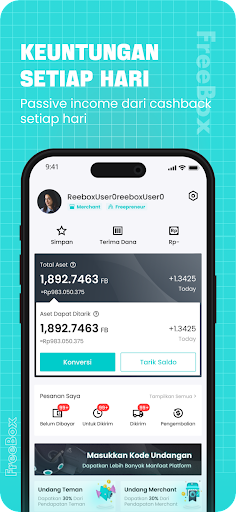
APA ITU FREEBOX
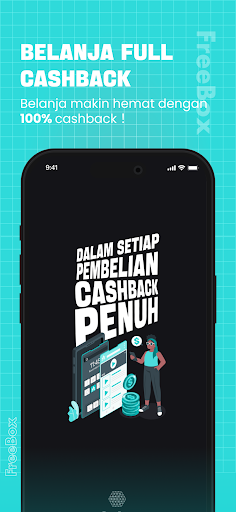
FreeBox adalah platform e-commerce yang membantu pengguna untuk berbelanja online dan melakukan sharing untuk mendapatkan keuntungan. Tujuan FreeBox adalah untuk memudahkan segala kebutuhan dasar masyarakat, sehingga apapun yang diinginkan dapat di temukan di FreeBox. Selain itu, FreeBox dapat menghubungkan merchant dan juga konsumen untuk menciptakan dan berbagi keuntungan bersama.
INTRODUKSI PLATFORM
Download dan bagikan video pendek hanya dengan satu-klik saja.
MEKANISME PENGGUNAAN
1. Download FreeBox di hape kamu
2. Daftar akun baru
3. Cari produk favorit kamu dan masukkan ke keranjang
4. Checkout pesanan kamu
5. Pesanan kamu akan segera di antarkan ke alamat yang terdaftar
6. Reward akan langsung masuk ke wallet kamu setelah menyelesaikan pesanan
KEUNGGULAN FREEBOX
Full Reward Transaksi – Belanja menjadi lebih hemat dengan adanya pemberian reward senilai total pembelanjaan Anda, tanpa minimal belanja, tanpa batasan maksimal reward. Belanja semakin banyak, untung semakin banyak.
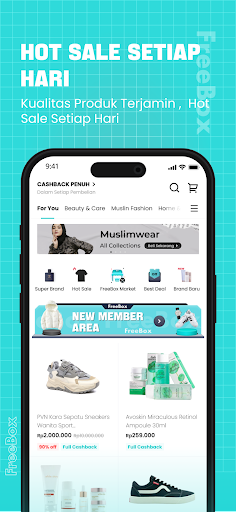
Kualitas Barang Terbaik - FreeBox berkomitmen untuk menjaga kualitas barang yang dijual di platform dengan melakukan seleksi ketat terhadap supplier yang akan berdagang di FreeBox, baik dari sisi kualitas, harga, dan juga penampilan. Pembeli dapat selalu berbelanja dengan aman dan tenang.
Hot Sale Produk Pilihan – FreeBox mengadakan Hot Sale produk pilihan setiap harinya. Jangan kelewatan kesempatan untuk mendapatkan produk kesayangan kamu dengan harga termurah hanya di Hot Sale FreeBox!
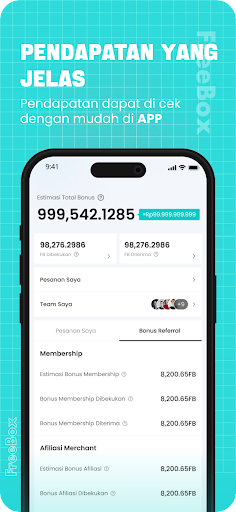
Loyality Program – Ajak temanmu untuk mendaftar dan berbelanja di FreeBox dan dapatkan keuntungan seumur hidup. Semakin banyak teman bergabung semakin besar keuntungannya.
Tim Trainer Profesional – Tim profesional FreeBox akan membimbing Anda, tidak perlu khawatir akan tersesat dijalan
After Sales Service – Tak perlu khawatir mengenai pelayanan after-sales karena adanya tim Customer Service yang kompeten dan selalu siap membantu Anda.
PILIHAN METODE PEMBAYARAN
1. Bank Transfer : BCA, Mandiri, BRI, BNI, Permata, BSI, Bank Lain
2. Credit Card : Mastercard, VISA, JCB
3. E-Wallet / QRIS : OVO, Dana, ShopeePay, Link Aja
Show more

1. Download MEmu installer and finish the setup

2. Start MEmu then open Google Play on the desktop

3. Search FreeBox in Google Play
Install
4. Download and Install FreeBox
5. On install completion click the icon to start

6. Enjoy using FreeBox on PC with MEmu
MEmu Play is the best Android emulator, and 100 million users already enjoy its superb Android app experience. Powered by advanced virtualization technology, it lets you enjoy thousands of Android apps smoothly on your PC—including the most graphics-intensive ones.
Bigger screen with better graphics; Long duration, without limitation of battery or mobile data.
Full Keymapping support for precise control of keyboard and mouse or gamepad.
Multiple game accounts or tasks on single PC at one time with Multi-Instance manager.
Use FreeBox on PC by following steps: