
Meu Social - Gás do Povo
Updated
Current Version
1.3.0
Offered By

Stop worrying about high battery drain when using Meu Social - Gás do Povo on your phone. Free yourself from the tiny screen and enjoy the app on a much larger display. From now on, get a full-screen experience of your app with the convenience of a keyboard and mouse. MEmu offers you all the surprising features you’d expect: quick installation and easy setup, intuitive controls, and no more worries about battery life, mobile data, or unexpected calls. The all-new MEmu 9 is the choice for using Meu Social - Gás do Povo on your computer. With the MEmu multi-instance manager, you can run two or more accounts at the same time. Most importantly, our exclusive emulation engine unlocks your PC’s full potential, delivering smooth and enjoyable performance.
Show more
Enjoy superb experience of using Meu Social - Gás do Povo on PC with MEMU App Player. It's a powerful free Android emulator which provides you with thousands of android apps for their desktop version. Enjoy connecting with friends and polishing your work with higher efficiency! My Social - People's Gas is the official app of the Federal Government for the People's Gas Program, developed to facilitate access to information and benefits related to gas refills for low-income families.
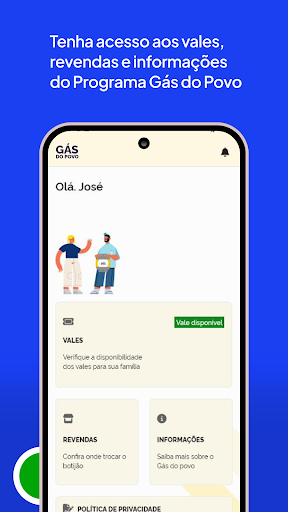
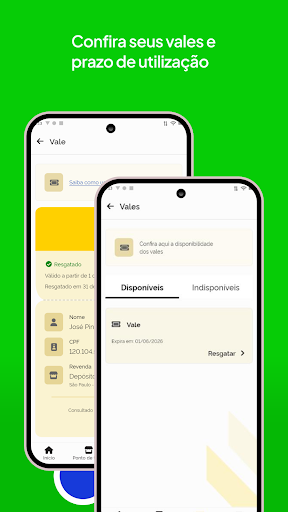
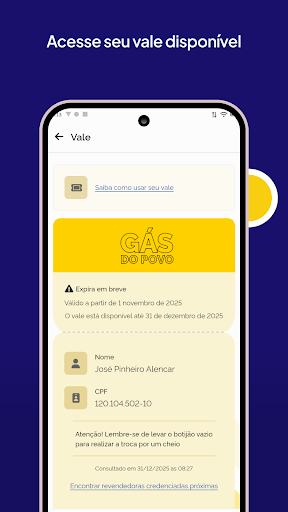
My Social - People's Gas is the official app of the Federal Government for the People's Gas Program, developed to facilitate access to information and benefits related to gas refills for low-income families.
With My Social - People's Gas, you can:
- Check your status in the People's Gas Program.
- Receive notifications about the release and use of new vouchers, as well as guidance on pending issues and updated rules.
- Track the history and receipt of each available refill voucher.
- Locate the nearest accredited gas retailers in any region of the country.
- Generate voucher codes directly through the app to pick up gas cylinder refills (available from February 2026).
- Understand the validity periods of the vouchers so you don't miss any free refills.
For those who want to know if they are entitled to the benefit or better understand how the Program works, Meu Social - Gás do Povo also allows you to:
- Check the main access criteria: be registered in the Cadastro Único (CadÚnico) with updated data, be a beneficiary of Bolsa Família with two or more people in the family group, have a monthly per capita income equal to or less than half the minimum wage, and keep the CPF of the Family Head regularized.
- Understand the importance of keeping your data always updated to avoid pending issues or cancellation of the benefit.
Download Meu Social - Gás do Povo and track your Gás do Povo Program benefits quickly, securely, and transparently — directly on your cell phone.
Important note on security:
Always remember to check if the application you are downloading is an official Federal Government app.
To do this, follow these tips:
In app stores, check if the app has the "Government" seal, displayed next to the ratings — it indicates that the app has been verified by Google Play as belonging to a government entity. Verify that the developer is “Serviços e Informações do Brasil”, the official account that brings together the applications of the Federal Public Administration on Gov.br.
These measures help you avoid fake apps and ensure that you are using a secure and legitimate app from the Federal Government.
Show more

1. Download MEmu installer and finish the setup

2. Start MEmu then open Google Play on the desktop

3. Search Meu Social - Gás do Povo in Google Play
Install
4. Download and Install Meu Social - Gás do Povo
5. On install completion click the icon to start

6. Enjoy using Meu Social - Gás do Povo on PC with MEmu
MEmu Play is the best Android emulator, and 100 million users already enjoy its superb Android app experience. Powered by advanced virtualization technology, it lets you enjoy thousands of Android apps smoothly on your PC—including the most graphics-intensive ones.
Bigger screen with better graphics; Long duration, without limitation of battery or mobile data.
Full Keymapping support for precise control of keyboard and mouse or gamepad.
Multiple game accounts or tasks on single PC at one time with Multi-Instance manager.
Use Meu Social - Gás do Povo on PC by following steps: