BuildCutPro
Updated
Current Version
1.1.9
Offered By

Stop worrying about high battery drain when using BuildCutPro on your phone. Free yourself from the tiny screen and enjoy the app on a much larger display. From now on, get a full-screen experience of your app with the convenience of a keyboard and mouse. MEmu offers you all the surprising features you’d expect: quick installation and easy setup, intuitive controls, and no more worries about battery life, mobile data, or unexpected calls. The all-new MEmu 9 is the choice for using BuildCutPro on your computer. With the MEmu multi-instance manager, you can run two or more accounts at the same time. Most importantly, our exclusive emulation engine unlocks your PC’s full potential, delivering smooth and enjoyable performance.
Show more
Enjoy superb experience of using BuildCutPro on PC with MEMU App Player. It's a powerful free Android emulator which provides you with thousands of android apps for their desktop version. Enjoy connecting with friends and polishing your work with higher efficiency! Multi-dimensional space and time editor, combined with free layer layout and regional screen recording, drag videos, pictures, text, cameras, characters, and web pages like cartography for spatial layout, the timeline controls playback, and the foreground area screen recording exports videos and animations Figure etc.
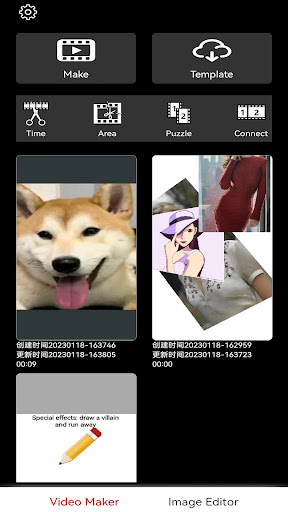
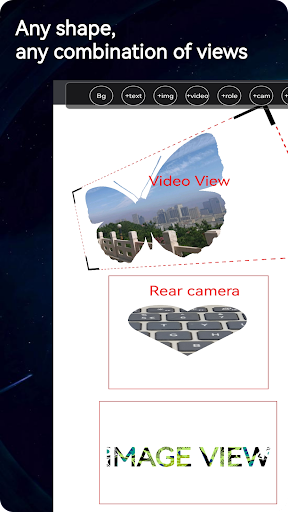
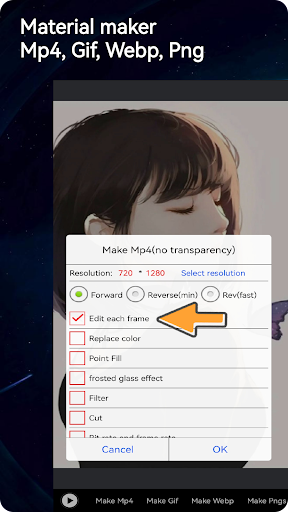
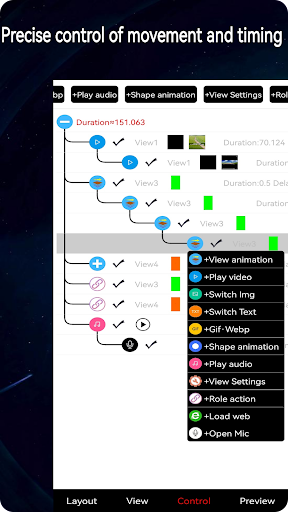
Multi-dimensional space and time editor, combined with free layer layout and regional screen recording, drag videos, pictures, text, cameras, characters, and web pages like cartography for spatial layout, the timeline controls playback, and the foreground area screen recording exports videos and animations Figure etc.
Screen Recording Animation Clip Pro is a free video editor that is widely used and easy to use. It can create all kinds of video, text and image display methods you can think of into videos. For example, to make a video: drag an image and press Fixed route movement or zooming in and out. It's very easy to do, just drag or zoom with your finger and export the video.
Screen Recording Animation Editing Pro uses the method of adding layers to create videos. It edits the interface layout by adding layers such as videos, images, text, cameras, web pages, characters, etc., and then completes video production by controlling layer actions. You can create all kinds of complex animated videos, as well as simple Gifs.
In addition to supporting editing and exporting MP4 videos, it also supports exporting Gif and webp animation files. The production and export process can also perform single-frame processing.
Use Screen Recording Animation Clip Pro to create animated videos and materials that can become popular on Douyin, Kuaishou, Jianying, Xiaohongshu, Bilibili, TikTok, YouTube, Instagram, WhatsApp, CapCut and Facebook! , you can also use the created gif extensively in various comments to add comment effects.
feature
video production
• Editing of any type of layer combination, including video, image (including animation), text, WEB, camera, and character
• Multiple videos can be combined in multiple dimensions by adding multiple video layers.
• Drag the video layer by zooming to crop part of the video and export it.
• Add text, images, or other layers to embellish video layers.
• Control video layer rotation, flip, zoom, etc.
•In the process of exporting the video, you can choose single frame processing and directly improve and modify it through image editing tools, such as adding or removing watermarks from a single frame.
• Supports editing new video animations by referencing other animation videos as characters.
• Supports exporting animations to mp4, gif, webp, png sequences, etc.
special function
• Export mp4 video through regional screen recording, which is very fast.
• Supports gif and webp playback and export.
• Region crop video.
• Supports exporting reverse video or animation.
• Supports text-to-speech and voice changing functions
Screen Recorder Animation Pro is a free, professional video animation app that has everything you need to create stunning, high-quality videos. Beginners can start using Screen Recorder Animation Clip in seconds, while advanced users can enjoy all the features they need to edit videos. Express your personality with exclusive video editor and image editor features. You can create popular special effects videos, simple gifs, and promotional videos.
Have any questions about Screen Recording Animation Editor Pro? Please contact us at 2840058600@qq.com.
Show more

1. Download MEmu installer and finish the setup

2. Start MEmu then open Google Play on the desktop

3. Search BuildCutPro in Google Play
Install
4. Download and Install BuildCutPro
5. On install completion click the icon to start

6. Enjoy using BuildCutPro on PC with MEmu
MEmu Play is the best Android emulator, and 100 million users already enjoy its superb Android app experience. Powered by advanced virtualization technology, it lets you enjoy thousands of Android apps smoothly on your PC—including the most graphics-intensive ones.
Bigger screen with better graphics; Long duration, without limitation of battery or mobile data.
Full Keymapping support for precise control of keyboard and mouse or gamepad.
Multiple game accounts or tasks on single PC at one time with Multi-Instance manager.
Use BuildCutPro on PC by following steps: