
Calorie Counter by fatsecret
Updated
Current Version
9.40.0.9
Offered By

Stop worrying about high battery drain when using Calorie Counter by fatsecret on your phone. Free yourself from the tiny screen and enjoy the app on a much larger display. From now on, get a full-screen experience of your app with the convenience of a keyboard and mouse. MEmu offers you all the surprising features you’d expect: quick installation and easy setup, intuitive controls, and no more worries about battery life, mobile data, or unexpected calls. The all-new MEmu 9 is the choice for using Calorie Counter by fatsecret on your computer. With the MEmu multi-instance manager, you can run two or more accounts at the same time. Most importantly, our exclusive emulation engine unlocks your PC’s full potential, delivering smooth and enjoyable performance.
Show more
Enjoy superb experience of using Calorie Counter by fatsecret on PC with MEMU App Player. It's a powerful free Android emulator which provides you with thousands of android apps for their desktop version. Enjoy connecting with friends and polishing your work with higher efficiency! Welcome to fatsecret, the easiest to use calorie counter and most effective weight loss and dieting app on the market.
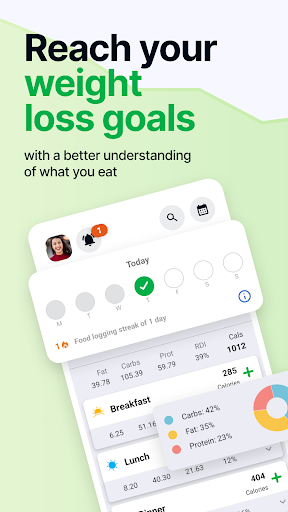

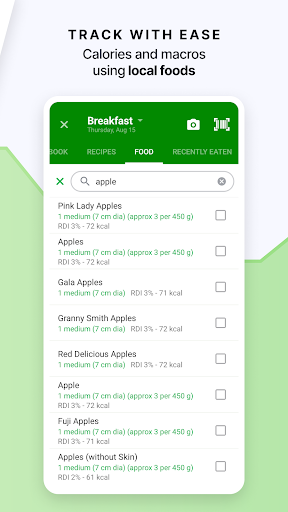
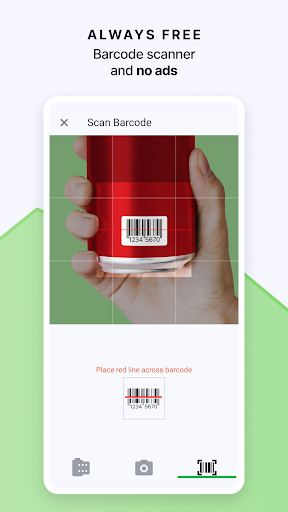
Welcome to fatsecret, the easiest to use calorie counter and most effective weight loss and dieting app on the market. Best of all, fatsecret is free.
Keep track of your food, exercise and weight, using the world's highest quality food and nutrition database and connect with a global community of people looking to make a change for the better and start losing weight and achieve your goals the healthy way.
fatsecret is fast, simple to use and includes integration with external tools and services to help you succeed with your diet:
- An easy to use food diary to plan and keep track of what you're eating.
- A wonderful community that's ready to provide support and turbo charge your weight loss.
- Image recognition of foods, meals and products so you can take photos with the camera and track nutrition with pictures.
- A barcode scanner and auto-complete functions.
- Google Fit, Samsung Health and Fitbit exercise tracking integration.
- An exercise diary to record all the calories you burn.
- A diet calendar to see your calories consumed and burned.
- A weight tracker.
- Detailed reporting and goals for all your calories and macros.
- Photo album to keep a photodiet of your foodsnaps and instacalories.
- A journal to record your progress.
- Reminders for meals, weigh-ins and journals.
- Notifications for support, comments and followers.
- Fantastic recipes and meal ideas.
- Sharing and interacting with your professional of choice.
- Facebook and Google login.
- Widget.
The app syncs with fatsecret Professional, the most convenient way to share your food, exercise and weight with your preferred health professional. Your health professional will get free access to simple and powerful tools to monitor your performance and provide you with feedback, advice and support.
You can also sync your account online to access your info anywhere, any time.
Premium subscriptions are available for enhanced features and capabilities for those who need some extra help to achieve their diet and weight management goals. Premium users get:
- Nutritional meal plans created by our dietitian specifically for different diet preferences and calorie goals (Keto Style, Balanced, Mediterranean, Intermittent Fasting, High Protein Low Carb)
- Advanced Meal Planning: plan ahead and know in advance how many calories each meal contains
- Custom Meal Headings: Six additional meal types that allow you to spread your food intake across multiple points in the day
- Water Tracking: so you can make sure you reach a daily water intake goal
We hope you'll love Calorie Counter by fatsecret. We are constantly working to improve the app and welcome user feedback.
Show more

1. Download MEmu installer and finish the setup

2. Start MEmu then open Google Play on the desktop

3. Search Calorie Counter by fatsecret in Google Play
Install
4. Download and Install Calorie Counter by fatsecret
5. On install completion click the icon to start

6. Enjoy using Calorie Counter by fatsecret on PC with MEmu
MEmu Play is the best Android emulator, and 100 million users already enjoy its superb Android app experience. Powered by advanced virtualization technology, it lets you enjoy thousands of Android apps smoothly on your PC—including the most graphics-intensive ones.
Bigger screen with better graphics; Long duration, without limitation of battery or mobile data.
Full Keymapping support for precise control of keyboard and mouse or gamepad.
Multiple game accounts or tasks on single PC at one time with Multi-Instance manager.
Use Calorie Counter by fatsecret on PC by following steps: