
Chase
Updated
Current Version
2.79.0
Offered By

Stop worrying about high battery drain when using Chase on your phone. Free yourself from the tiny screen and enjoy the app on a much larger display. From now on, get a full-screen experience of your app with the convenience of a keyboard and mouse. MEmu offers you all the surprising features you’d expect: quick installation and easy setup, intuitive controls, and no more worries about battery life, mobile data, or unexpected calls. The all-new MEmu 9 is the choice for using Chase on your computer. With the MEmu multi-instance manager, you can run two or more accounts at the same time. Most importantly, our exclusive emulation engine unlocks your PC’s full potential, delivering smooth and enjoyable performance.
Show more
Enjoy superb experience of using Chase on PC with MEMU App Player. It's a powerful free Android emulator which provides you with thousands of android apps for their desktop version. Enjoy connecting with friends and polishing your work with higher efficiency! Eröffne dein Tagesgeldkonto in wenigen Minuten und sichere dir 4 % Zinsen p.
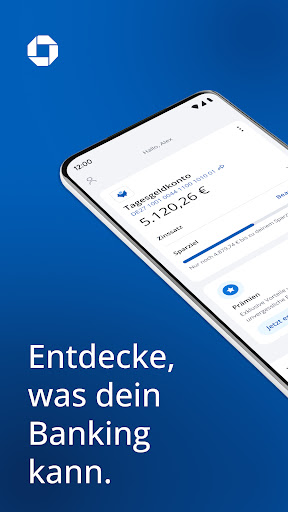
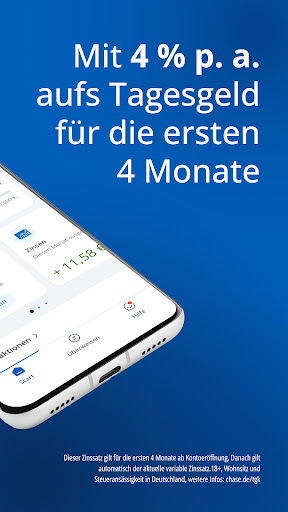

Eröffne dein Tagesgeldkonto in wenigen Minuten und sichere dir 4 % Zinsen p. a.(1) auf deine Ersparnisse – ganz ohne Mindesteinzahlungen und komplett kostenlos. Die Eröffnung erfolgt direkt über die Chase App mit deinem Ausweisdokument – entweder via eID oder über Video-Ident. Werde eine:r von 80 Millionen Chase Kund:innen weltweit(2) und entdecke, was dein Banking kann.
Bei uns erhältst du starke Zinsen auf dein Tagesgeld:
- Deine Zinsen werden täglich berechnet und monatlich ausgezahlt – so kannst du schneller vom Zinseszins profitieren
- Du hast jederzeit Zugang zu deinen Ersparnissen
- Auch langfristig bekommst du attraktive variable Zinsen auf dein Tagesgeld
Du hast volle Transparenz über dein Geld:
- Es gibt keine versteckten Gebühren
- Die Kontoeröffnung und -führung ist komplett kostenlos
- Bleib flexibel: Zahle große oder kleine Beträge ein – du entscheidest
Manage alles in der App – einfach, intuitiv und smart:
- Verfolge immer und überall, wie sich deine Ersparnisse entwickeln
- Behalte jederzeit den Überblick über deinen geltenden Zinssatz, deine Ein- und Auszahlungen sowie deine Zinserträge
- Erstelle in nur wenigen Schritten deinen Freistellungsauftrag, um jährlich steuerfreie Zinsen zu erhalten
- Setze dein individuelles Sparziel und sieh, wie du ihm Schritt für Schritt näher kommst
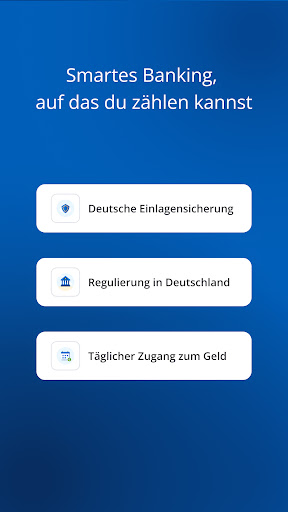
Smartes Banking, auf das du zählen kannst
- Bank mit deutscher Vollbanklizenz: Chase wird von J.P. Morgan SE betrieben, die durch die Bundesanstalt für Finanzdienstleistungsaufsicht (BaFin) zugelassen und gemeinsam beaufsichtigt durch die BaFin, die Europäische Zentralbank (EZB) und die Deutsche Bundesbank (Bundesbank) ist.
- Deutsche Einlagensicherung: Deine Ersparnisse sind durch die gesetzliche Einlagensicherung bis zu 100.000 Euro und durch die freiwillige Einlagensicherung sogar bis zu 3 Millionen Euro abgesichert.
- Persönlicher Support: Wir kümmern uns um dein Anliegen – du erreichst uns sicher und direkt über die App per Chat oder Anruf. Wir sind Mo–Sa von 8–20 Uhr für dich da, außer an Feiertagen.
- Das Referenzkonto bietet zusätzlich Sicherheit: Auszahlungen erfolgen ausschließlich über ein von dir gewähltes und in deinem Namen lautendes Referenzkonto.
Gut zu wissen:
Um ein Tagesgeldkonto bei uns zu eröffnen, brauchst du die Chase App. Außerdem musst du über 18 sein, deinen Wohnsitz und deine Steueransässigkeit in Deutschland haben sowie ein Smartphone mit deutscher Handynummer besitzen.
Rechtliches
(1) Du erhältst 4 % Zinsen p. a. für die ersten 4 Monate ab Kontoeröffnung. Danach gilt automatisch der aktuelle variable Zinssatz auf dein Tagesgeld.
(2) Chase ist in den USA, dem UK und Deutschland als Teil von JPMorganChase verfügbar. In Deutschland wird Chase von J.P. Morgan SE betrieben. Hier gehts zu den Bedingungen: chase.de/tgk
Name und Sitz der Gesellschaft:
J.P. Morgan SE
Taunustor 1
60310 Frankfurt am Main
Deutschland
E-Mail: support.deutschland@chase.de
Telefon (Inland): 0 800 712 4200 (kostenlos)
Telefon (Ausland): +49 69 712 42000 (es können Gebühren anfallen)
Show more

1. Download MEmu installer and finish the setup

2. Start MEmu then open Google Play on the desktop

3. Search Chase in Google Play
Install
4. Download and Install Chase
5. On install completion click the icon to start

6. Enjoy using Chase on PC with MEmu
MEmu Play is the best Android emulator, and 100 million users already enjoy its superb Android app experience. Powered by advanced virtualization technology, it lets you enjoy thousands of Android apps smoothly on your PC—including the most graphics-intensive ones.
Bigger screen with better graphics; Long duration, without limitation of battery or mobile data.
Full Keymapping support for precise control of keyboard and mouse or gamepad.
Multiple game accounts or tasks on single PC at one time with Multi-Instance manager.
Use Chase on PC by following steps:
































