
百度输入法
Updated
Current Version
12.0.10.204
Offered By

Stop worrying about high battery drain when using 百度输入法 on your phone. Free yourself from the tiny screen and enjoy the app on a much larger display. From now on, get a full-screen experience of your app with the convenience of a keyboard and mouse. MEmu offers you all the surprising features you’d expect: quick installation and easy setup, intuitive controls, and no more worries about battery life, mobile data, or unexpected calls. The all-new MEmu 9 is the choice for using 百度输入法 on your computer. With the MEmu multi-instance manager, you can run two or more accounts at the same time. Most importantly, our exclusive emulation engine unlocks your PC’s full potential, delivering smooth and enjoyable performance.
Show more
Enjoy superb experience of using 百度输入法 on PC with MEMU App Player. It's a powerful free Android emulator which provides you with thousands of android apps for their desktop version. Enjoy connecting with friends and polishing your work with higher efficiency! AI full sensory input, 900 million junior partner of choice【The main function】 【YAN Keyboard】Yan/Yan/Yan's new skin is online, multi-picture carousel, copywriting is ever-changing, and there is a small surprise every time you type;[Customized skin] Super multi-material, support for multi-picture DIY and ever-changing copywriting DIY;[Intelligent prediction] Guess what you want to say according to the scene, and intelligently complete the whole sentence;[AI Intelligent Input] Adaptive input scene, more intelligent words;【AI Voice Input】Supports Chinese-English mixing without switching, dialect without switching, faster and more accurate;[Offline Voice] The voice input is as accurate as when the network is disconnected and the weak network is weak;[AR Emoticons] Make a variety of funny emoticons through face recognition technology;[Super Large System Thesaurus] 500,000 system thesaurus, smooth input and accurate word selection;[Artificial Intelligence Engine] Intelligent sentence input algorithm plus error correction algorithm to improve accuracy;【Quick search】Search while chatting, one step direct;[Game keyboard] The three major artifacts of game phrases, floating voice, and harmonious conversion are essential for boosting scores and super gods;[Lazy Phrases] Built-in multiple phrase categories, and supports adding personal common words;【Automatic synchronization】Automatic synchronization of cloud backup of user network words, setting items, and personalized phrases;[Super strong Chinese and English mixed input] Free mixed input of Chinese, English, numbers and symbols;【Smart handwriting】Support stacking; writing while writing, fast recognition speed; brush writing effect;【Multiple input methods】Support multiple input methods such as Pinyin, English, strokes, Wubi, and voice;【Voice shorthand】Voiceprint distinguishing role technology landed in the input method for the first time;【Accessibility Service】If you want to use the one-click sending function of emoticons, please enable the accessibility service of the input method.
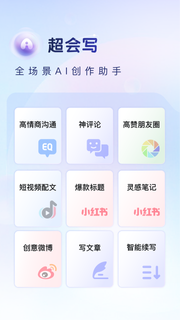
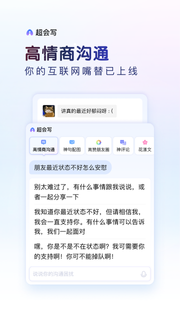
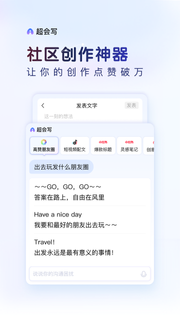
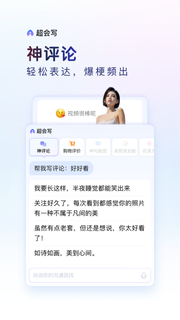
AI full sensory input, 900 million junior partner of choice【The main function】 【YAN Keyboard】Yan/Yan/Yan's new skin is online, multi-picture carousel, copywriting is ever-changing, and there is a small surprise every time you type;[Customized skin] Super multi-material, support for multi-picture DIY and ever-changing copywriting DIY;[Intelligent prediction] Guess what you want to say according to the scene, and intelligently complete the whole sentence;[AI Intelligent Input] Adaptive input scene, more intelligent words;【AI Voice Input】Supports Chinese-English mixing without switching, dialect without switching, faster and more accurate;[Offline Voice] The voice input is as accurate as when the network is disconnected and the weak network is weak;[AR Emoticons] Make a variety of funny emoticons through face recognition technology;[Super Large System Thesaurus] 500,000 system thesaurus, smooth input and accurate word selection;[Artificial Intelligence Engine] Intelligent sentence input algorithm plus error correction algorithm to improve accuracy;【Quick search】Search while chatting, one step direct;[Game keyboard] The three major artifacts of game phrases, floating voice, and harmonious conversion are essential for boosting scores and super gods;[Lazy Phrases] Built-in multiple phrase categories, and supports adding personal common words;【Automatic synchronization】Automatic synchronization of cloud backup of user network words, setting items, and personalized phrases;[Super strong Chinese and English mixed input] Free mixed input of Chinese, English, numbers and symbols;【Smart handwriting】Support stacking; writing while writing, fast recognition speed; brush writing effect;【Multiple input methods】Support multiple input methods such as Pinyin, English, strokes, Wubi, and voice;【Voice shorthand】Voiceprint distinguishing role technology landed in the input method for the first time;【Accessibility Service】If you want to use the one-click sending function of emoticons, please enable the accessibility service of the input method. This service is only used to achieve the above functions, and the input method will not collect user privacy information, please feel free to use it. Opening method: "Settings" > "Accessibility" > "Installed Services" > "Check Baidu Input Method"
Show more

1. Download MEmu installer and finish the setup

2. Start MEmu then open Google Play on the desktop

3. Search 百度输入法 in Google Play
Install
4. Download and Install 百度输入法
5. On install completion click the icon to start

6. Enjoy using 百度输入法 on PC with MEmu
MEmu Play is the best Android emulator, and 100 million users already enjoy its superb Android app experience. Powered by advanced virtualization technology, it lets you enjoy thousands of Android apps smoothly on your PC—including the most graphics-intensive ones.
Bigger screen with better graphics; Long duration, without limitation of battery or mobile data.
Full Keymapping support for precise control of keyboard and mouse or gamepad.
Multiple game accounts or tasks on single PC at one time with Multi-Instance manager.
Use 百度输入法 on PC by following steps: