
Bioskop Online
Updated
Current Version
1.3.18
Offered By

Stop worrying about high battery drain when using Bioskop Online on your phone. Free yourself from the tiny screen and enjoy the app on a much larger display. From now on, get a full-screen experience of your app with the convenience of a keyboard and mouse. MEmu offers you all the surprising features you’d expect: quick installation and easy setup, intuitive controls, and no more worries about battery life, mobile data, or unexpected calls. The all-new MEmu 9 is the choice for using Bioskop Online on your computer. With the MEmu multi-instance manager, you can run two or more accounts at the same time. Most importantly, our exclusive emulation engine unlocks your PC’s full potential, delivering smooth and enjoyable performance.
Show more
Enjoy superb experience of using Bioskop Online on PC with MEMU App Player. It's a powerful free Android emulator which provides you with thousands of android apps for their desktop version. Enjoy connecting with friends and polishing your work with higher efficiency! Selamat datang di Rumah Sinema Indonesia, BIOSKOP ONLINE adalah platform lokal yang mengerti & menjawab kebutuhan penonton Indonesia.

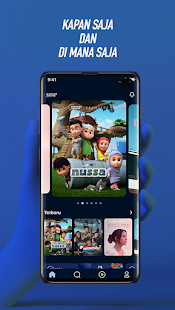


Selamat datang di Rumah Sinema Indonesia, BIOSKOP ONLINE adalah platform lokal yang mengerti & menjawab kebutuhan penonton Indonesia. Pengguna tidak diharuskan berlangganan untuk bisa nonton film atau series favorit, melainkan hanya membayar sesuai harga tiket melalui berbagai pilihan metode pembayaran seperti OVO, GoPay, LinkAja, dan e-wallet lainnya.
Semua konten yang ada di platform BIOSKOP ONLINE merupakan konten-konten Indonesia berkualitas yang sudah terkurasi. Sebagai RUMAH SINEMA INDONESIA, BIOSKOP ONLINE memiliki beragam pilihan untuk streaming film, yaitu konten original seperti 'Filosofi Kopi: Aroma Gayo', serial 'Awal & Akhir', dan 'Quarantine Tales'.
Selain itu, pengguna juga bisa nonton virtual event seperti festival musik 'Wave of Cinema' dan koleksi film-film berkualitas lain seperti 'Kucumbu Tubuh Indahku' yang mendapatkan penghargaan sebagai Film Panjang Terbaik dari Festival Film Indonesia tahun 2019, film Istirahatlah Kata-kata yang mendapatkan penghargaan JAFF di tahun 2016 sebagai film terbaik, dan film legendaris 'Tiga Dara' yang sudah direstorasi.
Aplikasi ini tidak hanya memanjakan pengguna dalam memilih tontonan favorit, tapi juga dilengkapi dengan fitur-fitur tambahan seperti 'Bagikan' yang memungkinkan kita untuk merekomendasikan konten favorit lewat Instagram, Facebook, Twitter, atau WhatsApp.
BIOSKOP ONLINE juga adalah rumah bagi para pembuat film di Indonesia, ruang di mana mereka dapat berbagi ragam cerita, pengalaman, dan format. Memperlihatkan bakat dan karyanya kepada lebih banyak orang.
Untuk para pencinta konten-konten Indonesia berkualitas, mari bergabung di Rumah Sinema Indonesia!
Show more

1. Download MEmu installer and finish the setup

2. Start MEmu then open Google Play on the desktop

3. Search Bioskop Online in Google Play
Install
4. Download and Install Bioskop Online
5. On install completion click the icon to start

6. Enjoy using Bioskop Online on PC with MEmu
MEmu Play is the best Android emulator, and 100 million users already enjoy its superb Android app experience. Powered by advanced virtualization technology, it lets you enjoy thousands of Android apps smoothly on your PC—including the most graphics-intensive ones.
Bigger screen with better graphics; Long duration, without limitation of battery or mobile data.
Full Keymapping support for precise control of keyboard and mouse or gamepad.
Multiple game accounts or tasks on single PC at one time with Multi-Instance manager.
Use Bioskop Online on PC by following steps: