Triangle
Updated
Current Version
4.3.1
Offered By

Stop worrying about high battery drain when using Triangle on your phone. Free yourself from the tiny screen and enjoy the app on a much larger display. From now on, get a full-screen experience of your app with the convenience of a keyboard and mouse. MEmu offers you all the surprising features you’d expect: quick installation and easy setup, intuitive controls, and no more worries about battery life, mobile data, or unexpected calls. The all-new MEmu 9 is the choice for using Triangle on your computer. With the MEmu multi-instance manager, you can run two or more accounts at the same time. Most importantly, our exclusive emulation engine unlocks your PC’s full potential, delivering smooth and enjoyable performance.
Show more
Enjoy superb experience of using Triangle on PC with MEMU App Player. It's a powerful free Android emulator which provides you with thousands of android apps for their desktop version. Enjoy connecting with friends and polishing your work with higher efficiency! Triangle Rewards is a loyalty program that rewards real life.
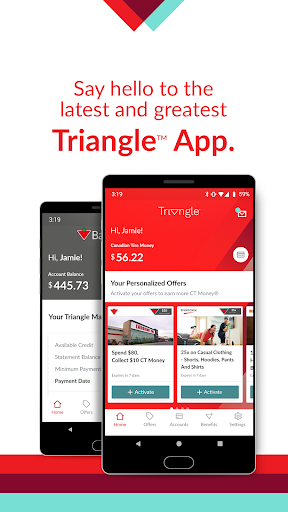
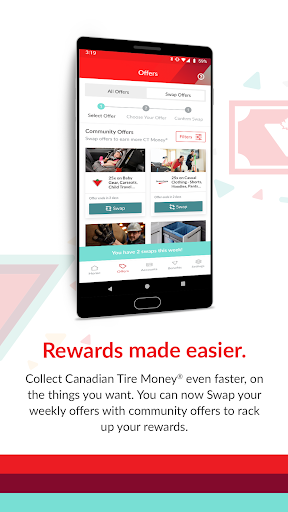
Triangle Rewards is a loyalty program that rewards real life.
The Triangle App for Android makes collecting and redeeming Canadian Tire Money® even more rewarding.
Designed for New & Existing Customers
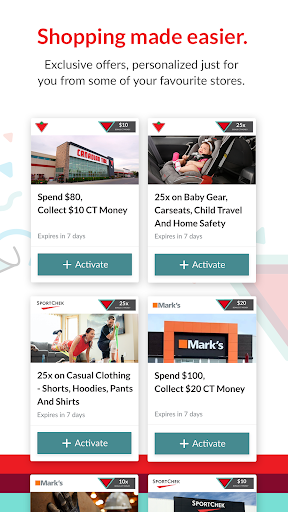
Triangle Rewards lets you earn and redeem Canadian Tire Money on just about everything across all of your favourite stores including Canadian Tire, Sport Chek, Mark’s, L’Équipeur, Party City, Atmosphere, Pro Hockey Life, Sports Rousseau, L’Entrepôt du Hockey, Hockey Experts and participating Sports Experts stores.
Personalized offers in your pocket
Get weekly personalized offers based on the things you need & love. Activate all your offers with just one tap and watch your CT Money roll in.
Swap your offers for the things you want
Got a great offer this week but it’s just not right for you? Offer Swap let’s you trade it in for a Community Offer from another member. Now you can rack up the rewards even faster!
Save for something special with Goal Tracking
Whether its those stylish new runners or a new bed for your furry friend, this feature will help you stay on track. Pick something fun to save for, set an amount and watch your CT Money add up as you reach your goal.
Managing your Credit Card
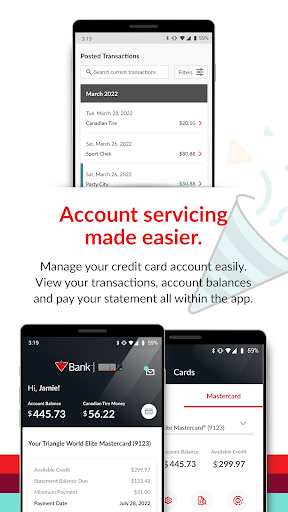
Manage your credit card accounts easily. Enrol in e-statements, view your transactions CT Money balance, account balances and statements directly in the app. Plus, you can schedule one-time or recurring bill payments to make things a little bit easier.
By clicking "Install", you consent to the installation of the Triangle App that is provided by Canadian Tire Corporation and its future updates and upgrades. You may withdraw your consent at any time by deleting or uninstalling this app. You are also acknowledging that you understand that the Triangle App includes the functions as described below. The Triangle App is free to download; however standard wireless carrier message and data rates may apply. Requirements For use with Triangle Rewards™ Card, My Canadian Tire Money® Card, Triangle™ World Elite Mastercard®, Triangle™ World Mastercard®, Triangle™ Mastercard®, Canadian Tire Options® World Mastercard®, Canadian Tire Options® Mastercard®, Gas Advantage® Mastercard® and Cash Advantage® Mastercard®. Available Languages • English • French Contact Us Call: 1-800-226-8473 Mail: PO Box 2000, Station Main, Welland, ON, L3B 5S3 Visit: Triangle.com †The Triangle Rewards Program is owned and operated by Canadian Tire Corporation, Limited. Triangle Mastercard, Triangle World Mastercard and Triangle World Elite Mastercard are issued by Canadian Tire Bank. Rewards are in the form of electronic Canadian Tire Money® (CT Money®). Terms and Conditions apply to collecting and redeeming. ®/™ Unless otherwise noted, all trademarks are owned by Canadian Tire Corporation, Limited and are used under licence. ®FGL Sports Ltd. ®/™ Mark’s and L’Equipeur are registered trademarks of Mark’s Work Wearhouse Ltd. ®/™ Mastercard, World Mastercard, World Elite Mastercard and the Mastercard Brand are registered trademarks of Mastercard International Incorporated.
Show more

1. Download MEmu installer and finish the setup

2. Start MEmu then open Google Play on the desktop

3. Search Triangle in Google Play
Install
4. Download and Install Triangle
5. On install completion click the icon to start

6. Enjoy using Triangle on PC with MEmu
MEmu Play is the best Android emulator, and 100 million users already enjoy its superb Android app experience. Powered by advanced virtualization technology, it lets you enjoy thousands of Android apps smoothly on your PC—including the most graphics-intensive ones.
Bigger screen with better graphics; Long duration, without limitation of battery or mobile data.
Full Keymapping support for precise control of keyboard and mouse or gamepad.
Multiple game accounts or tasks on single PC at one time with Multi-Instance manager.
Use Triangle on PC by following steps: