RMVgo
Updated
Current Version
1.7.0
Offered By

Stop worrying about high battery drain when using RMVgo on your phone. Free yourself from the tiny screen and enjoy the app on a much larger display. From now on, get a full-screen experience of your app with the convenience of a keyboard and mouse. MEmu offers you all the surprising features you’d expect: quick installation and easy setup, intuitive controls, and no more worries about battery life, mobile data, or unexpected calls. The all-new MEmu 9 is the choice for using RMVgo on your computer. With the MEmu multi-instance manager, you can run two or more accounts at the same time. Most importantly, our exclusive emulation engine unlocks your PC’s full potential, delivering smooth and enjoyable performance.
Show more
Enjoy superb experience of using RMVgo on PC with MEMU App Player. It's a powerful free Android emulator which provides you with thousands of android apps for their desktop version. Enjoy connecting with friends and polishing your work with higher efficiency! RMVgo – Die App für Ihre einfache Mobilität.
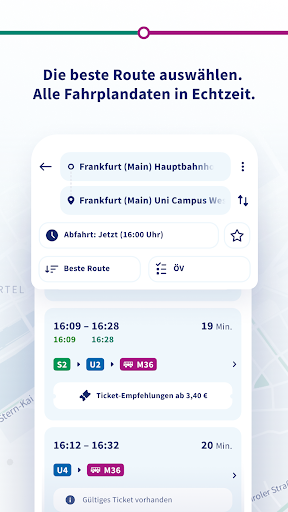
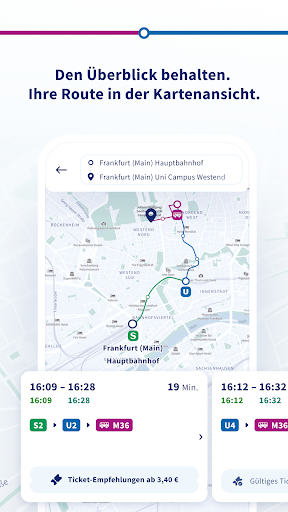
RMVgo – Die App für Ihre einfache Mobilität.
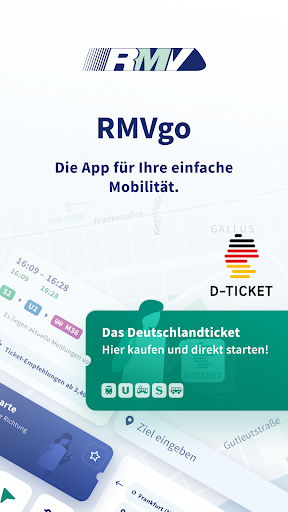
Auf die Plätze, fertig, go! Mit RMVgo planen Sie Ihre einfache Mobilität im Rhein-Main-Gebiet.
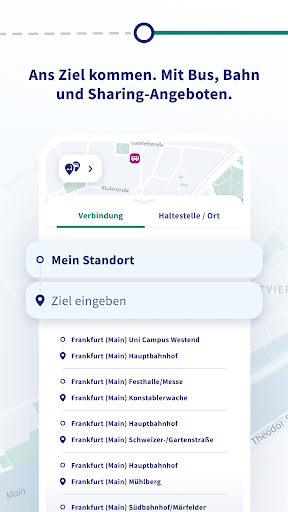
So sind Sie einfach, schnell und bargeldlos unterwegs. Geben Sie Ihr gewünschtes Ziel ein und lassen Sie sich direkt von Ihrem Standort aus eine aktuelle Verbindungsauskunft für Bus und Bahn anzeigen. Mit nur einem Klick orientieren Sie sich auf der Kartenansicht. Bei Bedarf kombinieren Sie Ihre Verbindung mit Sharing-Angeboten oder lassen sich einen Fußweg anzeigen. Echtzeitdaten mit aktuellen Verkehrsmeldungen und Auslastungsprognosen helfen Ihnen beim Planen der besten Route.
Das passende RMV-Ticket wird Ihnen direkt mit angezeigt. Einzelfahrkarten, Tageskarten, Wochen-, Monats- und Jahreskarten für Erwachsene und Kinder sowie Gruppentageskarten, das Hessenticket, der RMV-SparPass sowie das Deutschlandticket können in RMVgo erworben werden.
Und so geht’s:
• RMVgo auf Ihrem Smartphone installieren, Mitteilungen und Zugriff auf Ihren Standort erlauben.
• Start und Ziel eingeben, Verbindungsauskunft anzeigen lassen und die gewünschte Reiseroute auswählen.
• Passendes RMV-Ticket direkt über die Ticket-Empfehlungen buchen.
• Bezahlung jederzeit, einfach und bargeldlos: über PayPal auch ohne Anmeldung.
• Push-Nachrichten für Verspätungsalarm oder Fahrplanänderung einstellen.
• Favoriten für häufig genutzte Verbindungen aktivieren.
Klicken Sie auf „Mehr“ und finden Sie u.a. weitere Funktionalitäten:
• Anmeldung mit Ihrem meinRMV-Benutzerkonto.
• Verwaltung Ihres RMV-PrepaidRabatts.
• RMV-Liniennetzpläne und lokale Liniennetzpläne einsehen und downloaden.
Wir wünschen Ihnen eine gute Fahrt!
Weitere Infos unter: www.rmv.de/app
Gefällt Ihnen die App? Dann freuen wir uns über Ihre Bewertung. Senden Sie uns gerne Ihre Meinung und Vorschläge über https://www.rmv.de/c/de/service/kontakt/service-fuer-anfragen-und-kritik
Show more

1. Download MEmu installer and finish the setup

2. Start MEmu then open Google Play on the desktop

3. Search RMVgo in Google Play
Install
4. Download and Install RMVgo
5. On install completion click the icon to start

6. Enjoy using RMVgo on PC with MEmu
MEmu Play is the best Android emulator, and 100 million users already enjoy its superb Android app experience. Powered by advanced virtualization technology, it lets you enjoy thousands of Android apps smoothly on your PC—including the most graphics-intensive ones.
Bigger screen with better graphics; Long duration, without limitation of battery or mobile data.
Full Keymapping support for precise control of keyboard and mouse or gamepad.
Multiple game accounts or tasks on single PC at one time with Multi-Instance manager.
Use RMVgo on PC by following steps: