
Douglas – Parfüm & Kosmetik
Updated
Current Version
10.18.0
Offered By

Stop worrying about high battery drain when using Douglas – Parfüm & Kosmetik on your phone. Free yourself from the tiny screen and enjoy the app on a much larger display. From now on, get a full-screen experience of your app with the convenience of a keyboard and mouse. MEmu offers you all the surprising features you’d expect: quick installation and easy setup, intuitive controls, and no more worries about battery life, mobile data, or unexpected calls. The all-new MEmu 9 is the choice for using Douglas – Parfüm & Kosmetik on your computer. With the MEmu multi-instance manager, you can run two or more accounts at the same time. Most importantly, our exclusive emulation engine unlocks your PC’s full potential, delivering smooth and enjoyable performance.
Show more
Enjoy superb experience of using Douglas – Parfüm & Kosmetik on PC with MEMU App Player. It's a powerful free Android emulator which provides you with thousands of android apps for their desktop version. Enjoy connecting with friends and polishing your work with higher efficiency! Die Douglas-App – das Must-have auf deinem Smartphone oder Tablet!

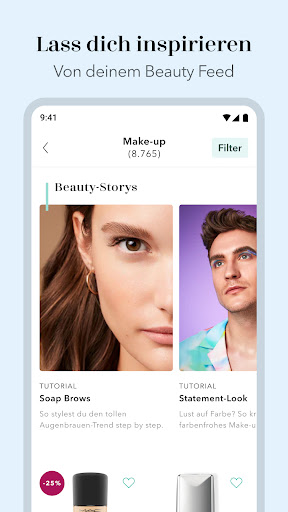
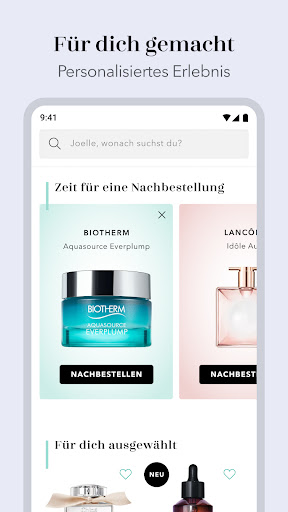
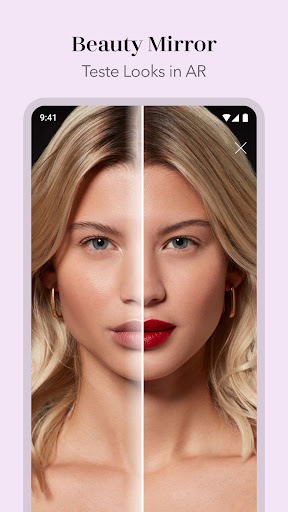
Die Douglas-App – das Must-have auf deinem Smartphone oder Tablet! Entdecke die ganze Douglas Welt und finde deine neuen Lieblingsprodukte in unseren Kategorien von Make-up über Parfum bis hin zu Home & Lifestyle. Shoppe beliebte Kosmetik-Brands wie benefit oder Mac Cosmetics und scroll dich in unserer Online-Parfümerie durch Düfte für jeden Anlass.
Verlieb dich mit der Douglas-App rund um die Uhr in neue Produkte, Trends und Styles – das kleinste Beauty-Case der Welt wartet auf dich!
Genieße exklusive Vorteile & App-Features:
• DOUGLAS BEAUTY CARD: Sammle mit jedem Einkauf in der App oder in unseren Filialen wertvolle Douglas Beauty Points (derzeit nur in Deutschland verfügbar).
• DOUGLAS BEAUTY MIRROR: Teste frische Make-up Looks mit dem Schminkspiegel der besonderen Art! Entdecke Lippenstifte, Foundation, Mascara & Co., die dich perfekt in Szene setzen. Unser Augmented Reality Tool legt sich wie ein Filter über dein Gesicht und stellt dir Highlight Produkte sowie verschiedene Styles vor. Wedding Look, Nude Make-up oder doch lieber French Chic? Du entscheidest!
• BEAUTY-TIPPS & NEWS: Lass dich von unserem Online-Magazin inspirieren und entdecke die angesagtesten, saisonalen Beauty Trends!
• Finde alle Neuheiten auf einen Blick und erhalte neue Angebote aus dem Douglas Sale.
• Aktiviere unsere Push Notifications und werde als Erstes über die neuesten Angebote und Aktionen informiert. So bleibst du stets up to date und verpasst keine Rabattaktion.
•FAVORITE BRANDS: Personalisiere die Douglas-App mit deinen Lieblingsmarken und erhalte speziell angepasste Inhalte, bei denen deine Favoriten immer an erster Stelle stehen!
•NACHKAUF-FUNKTION: Bestell deine Beauty- und Parfumlieblinge ganz bequem mit nur wenigen Klicks nach. Alle deine Favoriten sind schon aufgefüllt? Dann pausiere die gewünschten Produkte in der Nachkauf-Funktion oder entferne sie. Mach die Douglas-App zu deiner individuellen Einkaufsliste!
Show more

1. Download MEmu installer and finish the setup

2. Start MEmu then open Google Play on the desktop

3. Search Douglas – Parfüm & Kosmetik in Google Play
Install
4. Download and Install Douglas – Parfüm & Kosmetik
5. On install completion click the icon to start

6. Enjoy using Douglas – Parfüm & Kosmetik on PC with MEmu
MEmu Play is the best Android emulator, and 100 million users already enjoy its superb Android app experience. Powered by advanced virtualization technology, it lets you enjoy thousands of Android apps smoothly on your PC—including the most graphics-intensive ones.
Bigger screen with better graphics; Long duration, without limitation of battery or mobile data.
Full Keymapping support for precise control of keyboard and mouse or gamepad.
Multiple game accounts or tasks on single PC at one time with Multi-Instance manager.
Use Douglas – Parfüm & Kosmetik on PC by following steps: