Whosfan
Updated
Current Version
1.0.29
Offered By

Stop worrying about high battery drain when using Whosfan on your phone. Free yourself from the tiny screen and enjoy the app on a much larger display. From now on, get a full-screen experience of your app with the convenience of a keyboard and mouse. MEmu offers you all the surprising features you’d expect: quick installation and easy setup, intuitive controls, and no more worries about battery life, mobile data, or unexpected calls. The all-new MEmu 9 is the choice for using Whosfan on your computer. With the MEmu multi-instance manager, you can run two or more accounts at the same time. Most importantly, our exclusive emulation engine unlocks your PC’s full potential, delivering smooth and enjoyable performance.
Show more
Enjoy superb experience of using Whosfan on PC with MEMU App Player. It's a powerful free Android emulator which provides you with thousands of android apps for their desktop version. Enjoy connecting with friends and polishing your work with higher efficiency! ▶What is the global K-pop fandom platform "Whosfan"?


▶What is the global K-pop fandom platform "Whosfan"?
Whosfan reflects the 'activities' of the K-POP fans into the artists' 'value' based on 'Hanteo Chart.'
Whosfan's goal is to collect the voices of the global fans in the changing fandom world and to create the culture where both the artists and the fans are satisfied.
[ "Hanteo Chart," the standard of the fandom's power ]
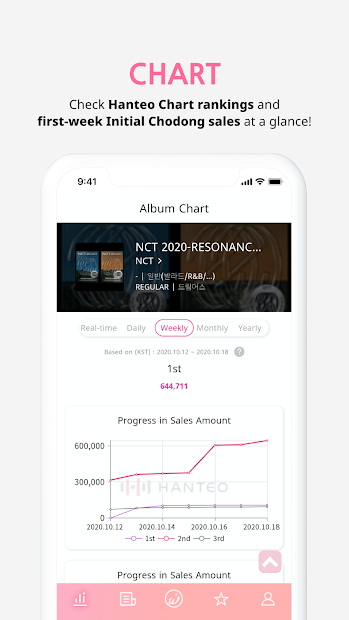
- Check the Initial Chodong (first week of release) sales in real-time!
- Easily check Hanteo Chart's Real-time/Daily/Weekly sales chart!
[ "Album Authentication," a shortcut to become a true fan ]
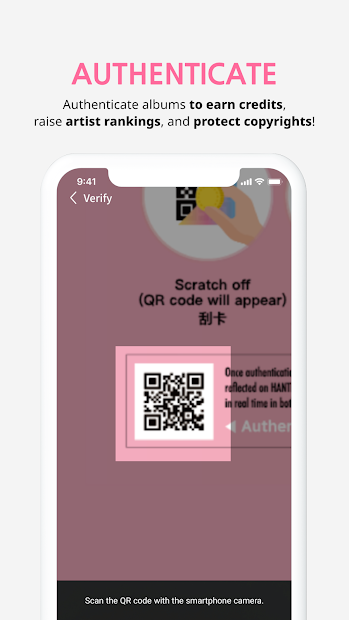
- Earn points and count towards chart when authenticating with the HATS card that comes with the K-POP album purchase
- Help protect the copyrights of your favorite artist!
[ "VOTE & EVENT" for both the artists and the fans ]
- Stability and security guaranteed with the Blockchain voting technology!
- A number of events that both the artists and the fans can be satisfied are also available! Participate now!
[ "Hanteo News," the fastest way to meet K-POP news ]
- You can find the chart news of K-POP idols faster than anywhere else.
- Read news articles on Whosfan and raise the Star Chart rankings of the artist!
[ "Star Chart," where fans activities count ]
- The fans can earn credit through a number of ways and contribute to the Star Chart.
- Actively communicate and participate to raise your favorite artist to the '1st place!'
[ "Star Channel" provided by Whosfan ]
- Whosfan offers a total of 107 channels including the those of BTS, EXO, SEVENTEEN, BLACKPINK, TWICE, IZ*ONE, GOT7, Super Junior, Kang Daniel, Taeyeon, MONSTA X, ATEEZ, iKON, TXT, WINNER, Red Velvet, NCT, NCT 127, NCT DREAM, NCT U, BTOB, Stray Kids, VICTON, ASTRO, PENTAGON, ITZY, SF9, GFRIEND, Oh My Girl, THE BOYZ, EVERGLOW, Dreamcatcher, TOO, CRAVITY, and more. Communicate with the global fans and check all the Star's contents on the Star Channel.
[Information on Purchase]
You can purchase Whosfan Gold Coin on the app.
Price: The pricing can differ by the product, and you can check it from the purchase page (Store).
[Information on Required Access]
- Device ID (Required) : It is used for device differentiation and identification, checking login information, account and profile data checking for push notification.
- In-app Purchase (Optional): It is used for product purchase on the Whosfan app.
- Camera (Optional): It is used when authenticating albums, changing the profile picture or adding an image on the board or comments.
- Storage space (Optional): It is used for using the file stored in the device or saving the photo.
- Location (Optional): It is used when authenticating the album.
Show more

1. Download MEmu installer and finish the setup

2. Start MEmu then open Google Play on the desktop

3. Search Whosfan in Google Play
Install
4. Download and Install Whosfan
5. On install completion click the icon to start

6. Enjoy using Whosfan on PC with MEmu
MEmu Play is the best Android emulator, and 100 million users already enjoy its superb Android app experience. Powered by advanced virtualization technology, it lets you enjoy thousands of Android apps smoothly on your PC—including the most graphics-intensive ones.
Bigger screen with better graphics; Long duration, without limitation of battery or mobile data.
Full Keymapping support for precise control of keyboard and mouse or gamepad.
Multiple game accounts or tasks on single PC at one time with Multi-Instance manager.
Use Whosfan on PC by following steps: