클로바노트 - 음성 그 이상의 기록
Updated
Current Version
D
Offered By

Stop worrying about high battery drain when using 클로바노트 - 음성 그 이상의 기록 on your phone. Free yourself from the tiny screen and enjoy the app on a much larger display. From now on, get a full-screen experience of your app with the convenience of a keyboard and mouse. MEmu offers you all the surprising features you’d expect: quick installation and easy setup, intuitive controls, and no more worries about battery life, mobile data, or unexpected calls. The all-new MEmu 9 is the choice for using 클로바노트 - 음성 그 이상의 기록 on your computer. With the MEmu multi-instance manager, you can run two or more accounts at the same time. Most importantly, our exclusive emulation engine unlocks your PC’s full potential, delivering smooth and enjoyable performance.
Show more
Enjoy superb experience of using 클로바노트 - 음성 그 이상의 기록 on PC with MEMU App Player. It's a powerful free Android emulator which provides you with thousands of android apps for their desktop version. Enjoy connecting with friends and polishing your work with higher efficiency! Clobanote for business has been newly released.
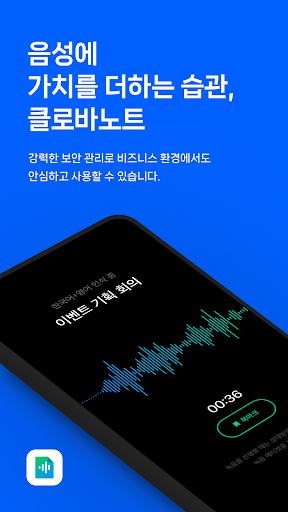
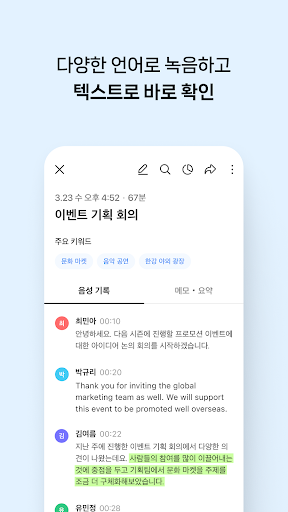
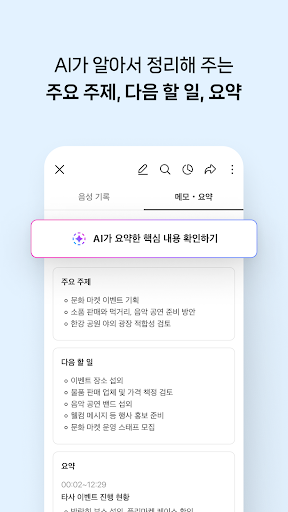
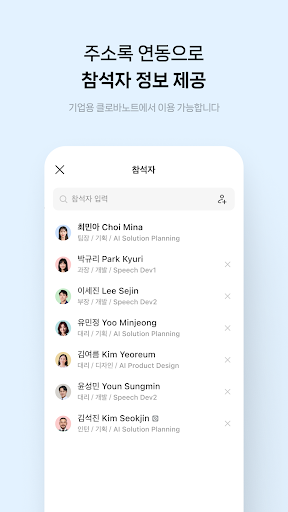
Clobanote for business has been newly released.
Now record and summarize all of your company's meetings with ClovaNote.
- Product application: https://naver.worksmobile.com/pricing/clovanote/
1. Conveniently record anywhere on mobile or PC
You can start recording right away from anywhere on your mobile or PC.
Easily create notes according to the recording situation or environment.
2. Record in different languages
You can select the language to be used for voice recognition.
Check the text for conversations in Korean, English, Japanese, and Chinese.
3. Take real-time notes while recording
If there is anything you want to remember while recording, write it down right away.
The writing time is also recorded, making it easy to understand the context of the conversation.
4. Bookmark important moments
Add bookmarks while recording to help you find important conversations.
You can collect just one bookmark or play it right away.
5. Summary/main topics/next tasks organized by AI
Just check the key contents automatically organized by AI.
You can also edit the automatically extracted summary/main topic/next task.
6. Check call recordings via text
When you turn on automatic call recording, voice files are automatically classified.
You can preview the text and convert only the currency you want.
7. Emphasize with highlights
Emphasize important information with highlights.
You can also see just one highlight at a glance.
8. Quickly search only what you want to find
You can search for only the information you need and find it quickly.
If you want to edit the word you found, you can change it all at once.
9. Share notes as links
Easily share your notes with conversation participants as a link.
If security is required, you can share after setting a password.
10. Download only the data you need as a file
You can download recorded music, voice records, and memos as files.
Download and use it in the file format you want.
11. Use on various devices
The mobile app and PC can be automatically linked and used.
You can also load separately recorded voice files, such as call records.
※ Precautions when using the app
- When recording, please follow the recording etiquette of seeking consent from the other party in advance.
- The accuracy of voice recognition varies depending on the recording device, sound quality, and network conditions.
- We recommend using the voice record converted to text and the participant's voice as a draft to organize the recording record.
- This app can use device administrator privileges according to each company's policy.
※ Required access rights
- Microphone: You can use the recording function to recognize your voice and create notes.
- Files and Media (Music and Audio): You can download text and audio files created in notes to your device, or upload audio files saved on your device.
- Phone: By detecting incoming/outgoing phone calls, you can pause and re-record notes while recording them.
- Notifications: You can receive notifications of note creation and sharing instructions, announcements, and event information. (Only used on terminals with OS version 13.0 or higher)
Inquiry about Clobanote for business
- Frequently Asked Questions (Help Center): https://help.worksmobile.com/ko/
Show more

1. Download MEmu installer and finish the setup

2. Start MEmu then open Google Play on the desktop

3. Search 클로바노트 - 음성 그 이상의 기록 in Google Play
Install
4. Download and Install 클로바노트 - 음성 그 이상의 기록
5. On install completion click the icon to start

6. Enjoy using 클로바노트 - 음성 그 이상의 기록 on PC with MEmu
MEmu Play is the best Android emulator, and 100 million users already enjoy its superb Android app experience. Powered by advanced virtualization technology, it lets you enjoy thousands of Android apps smoothly on your PC—including the most graphics-intensive ones.
Bigger screen with better graphics; Long duration, without limitation of battery or mobile data.
Full Keymapping support for precise control of keyboard and mouse or gamepad.
Multiple game accounts or tasks on single PC at one time with Multi-Instance manager.
Use 클로바노트 - 음성 그 이상의 기록 on PC by following steps: